cfchris.com

Loading

introduction to java programming

An Introduction to Java Programming: Building a Strong Foundation in Software Development

Introduction to Java Programming

Introduction to Java Programming

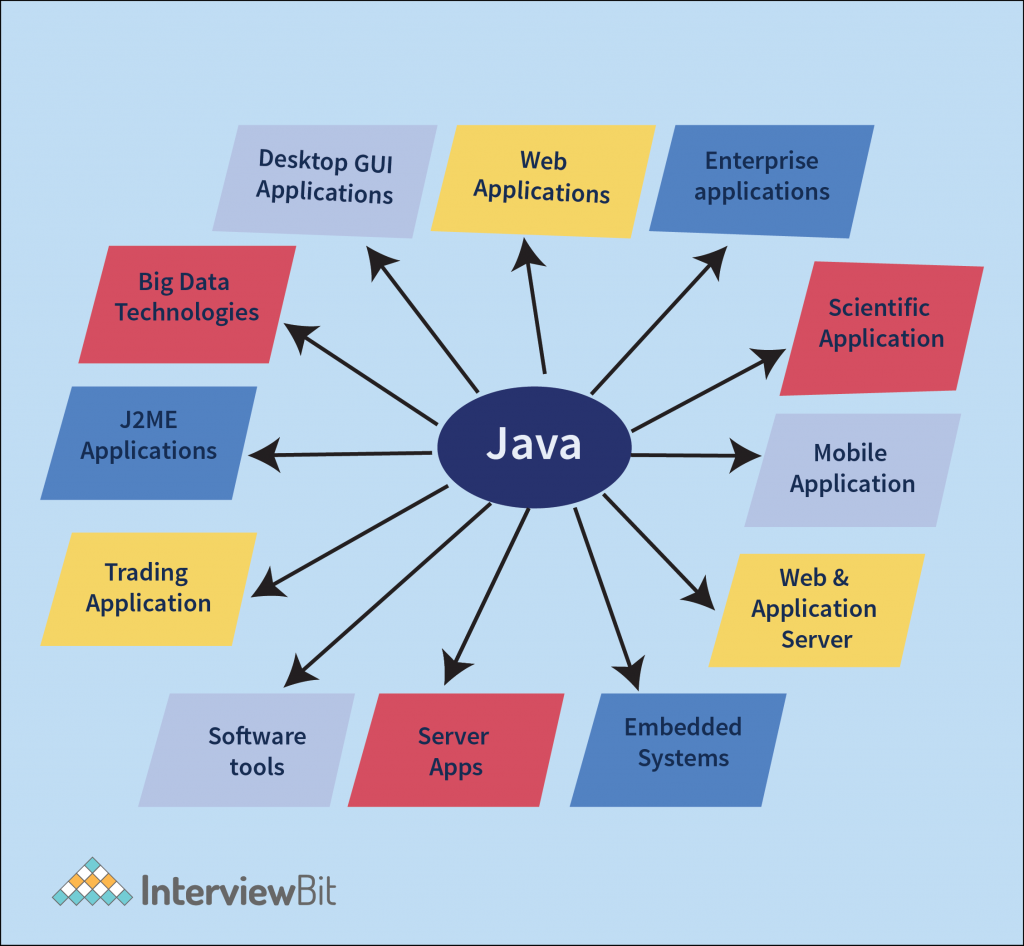
Java is a widely-used programming language known for its versatility, portability, and robustness. Developed by Sun Microsystems (now owned by Oracle Corporation), Java has become one of the most popular languages in the world, used in a wide range of applications from web development to mobile apps and enterprise systems.

Key Features of Java

One of the key features that sets Java apart is its platform independence. Java programs are compiled into bytecode that can run on any device with a Java Virtual Machine (JVM). This “write once, run anywhere” capability has made Java a favorite among developers.

Java is also known for its object-oriented programming (OOP) approach. Everything in Java is an object, allowing developers to create modular and scalable applications. In addition, Java provides built-in libraries and tools that simplify development tasks and promote code reusability.

Getting Started with Java

To start programming in Java, you need to install the Java Development Kit (JDK) on your computer. The JDK includes the tools necessary for compiling and running Java programs. Once you have set up your development environment, you can write your first “Hello, World!” program in Java:

public class HelloWorld {

public static void main(String[] args) {

System.out.println("Hello, World!");

}

}

This simple program demonstrates the basic structure of a Java program. You define a class with a main method where the execution starts. The System.out.println() statement prints the message “Hello, World!” to the console.

Learning More

If you are new to programming or transitioning to Java from another language, there are many resources available to help you learn. Online tutorials, books, and courses can guide you through the fundamentals of Java programming and introduce you to advanced topics such as multi-threading, networking, and GUI development.

By mastering Java programming, you open doors to endless possibilities in software development. Whether you aspire to build web applications, mobile games, or enterprise solutions, Java provides a solid foundation for turning your ideas into reality.


7 Essential Tips for Beginners in Java Programming

  1. Understand the basic syntax of Java, such as data types, variables, and loops.
  2. Learn about object-oriented programming concepts like classes and objects.
  3. Practice writing simple programs to get familiar with Java’s structure.
  4. Explore the Java standard library for ready-to-use functions and classes.
  5. Understand the importance of error handling and debugging in Java programming.
  6. Get comfortable using Integrated Development Environments (IDEs) like Eclipse or IntelliJ IDEA.
  7. Join online communities or forums to seek help and learn from experienced Java programmers.

Understand the basic syntax of Java, such as data types, variables, and loops.

To excel in Java programming, it is crucial to grasp the fundamental syntax elements, including data types, variables, and loops. Data types define the kind of values a variable can hold, such as integers, strings, or booleans. Variables serve as containers for storing data that can be manipulated throughout the program. Loops are essential for executing repetitive tasks efficiently by iterating over a block of code until a certain condition is met. Mastering these basic concepts lays a strong foundation for writing clear and concise Java code that performs effectively.

Learn about object-oriented programming concepts like classes and objects.

To excel in Java programming, it is essential to understand key object-oriented programming concepts such as classes and objects. In Java, classes act as blueprints for creating objects, which are instances of those classes. By grasping the relationship between classes and objects, developers can design modular, reusable code that enhances the efficiency and scalability of their Java applications. Mastering these fundamental concepts lays a strong foundation for building sophisticated software solutions using Java.

Practice writing simple programs to get familiar with Java’s structure.

To master the basics of Java programming, it is crucial to practice writing simple programs to become familiar with Java’s structure. By consistently working on coding exercises that involve creating basic applications or solving small problems, you can gain a better understanding of Java syntax, classes, methods, and overall program flow. This hands-on approach not only helps solidify your knowledge but also boosts your confidence in tackling more complex programming challenges as you progress in your Java learning journey.

Explore the Java standard library for ready-to-use functions and classes.

When delving into Java programming, it is highly beneficial to explore the Java standard library, which offers a plethora of ready-to-use functions and classes. By leveraging the resources available in the standard library, developers can streamline their coding process, enhance efficiency, and reduce the need to reinvent the wheel. Whether you are looking for solutions related to data structures, input/output operations, networking, or other common tasks, the Java standard library provides a rich set of tools that can simplify your development workflow and help you build robust applications more effectively.

Understand the importance of error handling and debugging in Java programming.

Understanding the importance of error handling and debugging in Java programming is crucial for developing reliable and robust applications. Error handling allows developers to anticipate and address potential issues that may arise during program execution, ensuring smooth operation and preventing crashes. Debugging, on the other hand, is a systematic process of identifying and resolving errors in the code, helping programmers trace the root cause of problems and improve code quality. By mastering error handling and debugging techniques in Java, developers can create more stable software that meets user expectations and delivers a seamless user experience.

Get comfortable using Integrated Development Environments (IDEs) like Eclipse or IntelliJ IDEA.

To excel in Java programming, it is essential to become proficient in using Integrated Development Environments (IDEs) such as Eclipse or IntelliJ IDEA. These powerful tools streamline the development process by providing features like code completion, debugging tools, and project management capabilities. By mastering an IDE, developers can enhance their productivity, write code more efficiently, and easily navigate through complex projects. Embracing IDEs not only simplifies Java programming tasks but also fosters a more organized and effective coding workflow.

Join online communities or forums to seek help and learn from experienced Java programmers.

Joining online communities or forums is a valuable tip for anyone diving into Java programming. These platforms offer a wealth of knowledge and support from experienced Java programmers who are eager to share their expertise. By actively participating in these communities, you can seek help with coding challenges, troubleshoot issues, and learn best practices that can enhance your Java programming skills. Engaging with a community of like-minded individuals not only accelerates your learning but also fosters connections that can lead to collaboration and mentorship opportunities in the exciting world of Java development.

introduction to java

An Introduction to Java Programming: Exploring the Basics of Java Development

Introduction to Java

Introduction to Java

Java is a high-level, object-oriented programming language developed by Sun Microsystems in the mid-1990s. It is known for its portability, versatility, and robustness, making it one of the most popular programming languages in the world.

Key Features of Java:

  • Platform Independence: Java programs can run on any platform that has a Java Virtual Machine (JVM) installed, making it highly portable.
  • Object-Oriented: Java follows an object-oriented programming paradigm, allowing developers to create modular and reusable code.
  • Syntax Simplicity: Java syntax is easy to read and understand, making it a beginner-friendly language.
  • Automatic Memory Management: Java handles memory management automatically through its built-in garbage collector, reducing the risk of memory leaks.
  • Rich Standard Library: Java comes with a vast standard library that provides pre-built functionality for common tasks, saving developers time and effort.

Main Components of Java:

  1. JVM (Java Virtual Machine): The JVM is an essential component of the Java platform that executes compiled Java code.
  2. JRE (Java Runtime Environment): The JRE includes the JVM and other libraries necessary for running Java applications.
  3. JDK (Java Development Kit): The JDK is a software development kit that includes tools for developing, debugging, and monitoring Java applications.

Hello World Example in Java:

“`java

public class HelloWorld {

public static void main(String[] args) {

System.out.println(“Hello, World!”);

}

}

“`

The above code snippet demonstrates a simple “Hello World” program in Java. It defines a class named `HelloWorld` with a `main` method that prints “Hello, World!” to the console.

In conclusion, Java’s versatility and ease of use make it an ideal choice for developing various types of applications, from web applications to mobile apps. Whether you are a beginner or an experienced developer, learning Java can open up numerous opportunities in the world of programming.


5 Key Advantages of Learning Java: Platform Independence, Object-Oriented Design, Simplicity, Memory Management, and a Robust Standard Library

  1. Java is platform-independent, allowing programs to run on different operating systems with a Java Virtual Machine (JVM).
  2. Java is object-oriented, promoting code reusability and modular development.
  3. Java has a simple syntax that is easy to read and understand, making it beginner-friendly.
  4. Java features automatic memory management through garbage collection, reducing the risk of memory leaks.
  5. Java offers a rich standard library with pre-built functionality for common tasks, saving developers time and effort.


6 Drawbacks to Consider When Learning Java for Beginners

  1. Java can be verbose, requiring more lines of code compared to other languages.
  2. Learning Java syntax and concepts may be challenging for beginners with no prior programming experience.
  3. Java’s performance may not be as fast as some lower-level languages like C or C++.
  4. Managing memory in Java can be complex, especially when dealing with large-scale applications.
  5. Java’s strict typing system can lead to longer development times due to the need for explicit type declarations.
  6. Java updates and versions may introduce compatibility issues with existing codebases.

Java is platform-independent, allowing programs to run on different operating systems with a Java Virtual Machine (JVM).

Java’s platform independence is a significant advantage that sets it apart from many other programming languages. By utilizing the Java Virtual Machine (JVM), Java programs can be executed on various operating systems without the need for recompilation. This cross-platform compatibility simplifies software development and deployment, making Java an ideal choice for creating applications that can run seamlessly across different environments.

Java is object-oriented, promoting code reusability and modular development.

Java’s object-oriented nature is a significant advantage, as it fosters code reusability and modular development. By structuring programs around objects and classes, Java enables developers to create reusable components that can be easily integrated into different parts of a project. This approach not only streamlines the development process but also enhances the maintainability and scalability of Java applications, making them more efficient and adaptable to changing requirements.

Java has a simple syntax that is easy to read and understand, making it beginner-friendly.

Java’s simple syntax sets it apart as a beginner-friendly programming language, as it is designed to be easy to read and understand. This feature of Java allows new programmers to grasp the fundamentals quickly and start writing code with confidence. The straightforward syntax of Java contributes to its popularity among beginners and experienced developers alike, making it an excellent choice for those looking to enter the world of programming.

Java features automatic memory management through garbage collection, reducing the risk of memory leaks.

Java’s automatic memory management through garbage collection is a significant advantage that sets it apart from many other programming languages. By handling memory allocation and deallocation automatically, Java reduces the risk of memory leaks, a common issue in manual memory management languages. This feature not only simplifies the development process but also enhances the reliability and stability of Java applications by ensuring efficient memory usage.

Java offers a rich standard library with pre-built functionality for common tasks, saving developers time and effort.

Java’s rich standard library is a standout feature that significantly benefits developers by providing pre-built functionality for common tasks. This extensive library not only saves developers valuable time but also reduces the effort required to implement basic functionalities in their applications. By leveraging the ready-to-use components within the standard library, Java developers can focus more on solving complex problems and building innovative solutions rather than reinventing the wheel for routine tasks.

Java can be verbose, requiring more lines of code compared to other languages.

Java’s verbosity is often cited as a drawback, as it typically requires more lines of code compared to some other programming languages. This can lead to increased development time and potentially make the codebase harder to maintain. While Java’s explicit syntax can enhance readability and maintainability in some cases, developers may find themselves writing more boilerplate code than desired, which can be seen as a downside, especially when working on projects with tight deadlines.

Learning Java syntax and concepts may be challenging for beginners with no prior programming experience.

Learning Java syntax and concepts may pose a challenge for beginners with no prior programming experience. Java, being an object-oriented language, introduces new concepts such as classes, objects, inheritance, and polymorphism that may require a steep learning curve for those unfamiliar with programming principles. Additionally, Java syntax can be strict and verbose compared to some other languages, demanding attention to detail and precision in coding practices. However, with dedication, practice, and the right resources, beginners can overcome these initial hurdles and gradually build a solid foundation in Java programming.

Java’s performance may not be as fast as some lower-level languages like C or C++.

Java’s performance may not always match the speed of lower-level languages such as C or C++. Due to its design as a high-level language with automatic memory management and platform independence, Java may introduce some overhead that can impact its execution speed compared to more optimized, lower-level languages. While Java offers advantages in terms of portability and ease of development, developers working on performance-critical applications may need to carefully consider the trade-offs between these benefits and the potential performance limitations of the language.

Managing memory in Java can be complex, especially when dealing with large-scale applications.

Managing memory in Java can be complex, especially when dealing with large-scale applications. One of the challenges developers face is ensuring efficient memory usage to prevent issues like memory leaks or excessive garbage collection pauses. In large-scale applications, the sheer volume of objects created and the complexity of their interactions can make it challenging to optimize memory allocation and deallocation effectively. This complexity requires careful planning and implementation of memory management strategies to maintain application performance and stability.

Java’s strict typing system can lead to longer development times due to the need for explicit type declarations.

Java’s strict typing system, while beneficial for ensuring code integrity and reducing errors at runtime, can sometimes result in longer development times. The requirement for explicit type declarations in Java means that developers need to specify the data types of variables, parameters, and return values throughout their code. This level of detail can add complexity to the development process, especially when compared to dynamically typed languages where type inference is more flexible. Despite this potential drawback, the strict typing system in Java ultimately contributes to code reliability and maintainability in the long run.

Java updates and versions may introduce compatibility issues with existing codebases.

Java updates and new versions can sometimes pose a challenge for developers due to potential compatibility issues with existing codebases. When Java introduces changes or deprecates certain features, it may require modifications to the code to ensure that it functions correctly with the latest version. This can be a time-consuming process, especially for large projects with extensive codebases, as developers need to carefully assess and update their code to maintain compatibility and take advantage of new Java features. Despite this con, staying up-to-date with Java versions is essential for security patches, performance improvements, and access to new functionalities in the language.

javascript examples

Exploring Creative JavaScript Examples for Interactive Web Experiences

Exploring JavaScript Examples

JavaScript is a versatile programming language that is commonly used to enhance the interactivity of websites. With its wide range of functionalities, JavaScript can be applied in various ways to create dynamic and engaging web experiences. Let’s explore some examples of how JavaScript can be used:

Form Validation

JavaScript can be used to validate user input in forms, ensuring that the data submitted is correct and meets specified criteria. For example, you can create a script that checks if an email address entered by a user is in the correct format before allowing the form to be submitted.

Image Slideshow

JavaScript can also be used to create interactive image slideshows on websites. By writing a script that cycles through a set of images and displays them one after another with transition effects, you can enhance the visual appeal of your website.

Interactive Maps

With JavaScript libraries like Google Maps API, you can integrate interactive maps into your website. Users can interact with the map by zooming in, panning around, and even adding custom markers for locations of interest.

Dynamic Content Loading

JavaScript enables dynamic content loading without having to reload the entire webpage. For instance, you can use AJAX (Asynchronous JavaScript and XML) to fetch data from a server and update specific parts of a webpage without disrupting the user experience.

Form Submission Handling

You can use JavaScript to handle form submissions asynchronously, providing instant feedback to users without reloading the page. This technique enhances user experience by giving immediate responses upon form submission.

In conclusion, JavaScript offers endless possibilities for creating interactive and engaging web experiences. By leveraging its capabilities through various examples like form validation, image slideshows, interactive maps, dynamic content loading, and form submission handling, you can take your website to the next level of interactivity and functionality.


Top 9 JavaScript Example FAQs: Form Validation, Image Slideshows, Interactive Maps, and More

  1. 1. How can I create a simple form validation using JavaScript?
  2. 2. What are some popular libraries or frameworks for creating image slideshows with JavaScript?
  3. 3. How do I integrate interactive maps into my website using JavaScript?
  4. 4. Can you provide an example of dynamic content loading using AJAX in JavaScript?
  5. 5. What is the best practice for handling form submissions asynchronously with JavaScript?
  6. 6. How can I implement client-side input validation in JavaScript to improve user experience?
  7. 7. Are there any specific security considerations when using JavaScript examples on a website?
  8. 8. How do I optimize performance when incorporating multiple JavaScript examples on a webpage?
  9. 9. What are some creative ways to use JavaScript to enhance user engagement on a website?

1. How can I create a simple form validation using JavaScript?

To create a simple form validation using JavaScript, you can write a script that checks the input fields of a form before it is submitted. For instance, you can verify if a required field is empty or validate the format of an email address. By attaching event listeners to the form elements, you can trigger validation functions when the user interacts with the form. Providing informative error messages and preventing form submission until all criteria are met enhances user experience and ensures data integrity. JavaScript empowers developers to customize form validation logic according to their specific requirements, making it a powerful tool for enhancing user interaction on websites.

There are several popular libraries and frameworks commonly used for creating image slideshows with JavaScript. One of the most well-known libraries is Slick Carousel, which offers a wide range of customizable options for creating responsive and feature-rich slideshows. Another popular choice is Swiper, known for its smooth touch interactions and support for various types of content beyond images. Additionally, libraries like Flickity and Glide.js provide easy-to-use solutions with unique features such as draggable sliders and carousel layouts. These libraries offer developers a convenient way to implement dynamic and visually appealing image slideshows on websites efficiently.

3. How do I integrate interactive maps into my website using JavaScript?

To integrate interactive maps into your website using JavaScript, you can utilize libraries like Google Maps API. By incorporating the API into your code, you gain access to a wide range of functionalities that allow you to create dynamic and interactive maps for your website visitors. With JavaScript, you can customize the map’s appearance, add markers for specific locations, enable zooming and panning features, and even integrate additional layers for enhanced user experience. By following the documentation provided by the mapping library and implementing the necessary scripts in your web pages, you can seamlessly integrate interactive maps that engage and inform your audience effectively.

4. Can you provide an example of dynamic content loading using AJAX in JavaScript?

Certainly! Dynamic content loading using AJAX in JavaScript is a common technique used to fetch data from a server asynchronously and update specific parts of a webpage without requiring a full page reload. For example, you can create a button on a webpage that, when clicked, triggers an AJAX request to retrieve new content from the server and seamlessly updates the existing content on the page. This approach enhances user experience by providing real-time updates without disrupting the overall layout or functionality of the webpage.

5. What is the best practice for handling form submissions asynchronously with JavaScript?

When it comes to handling form submissions asynchronously with JavaScript, the best practice is to utilize AJAX (Asynchronous JavaScript and XML) technology. By using AJAX, you can send form data to the server in the background without refreshing the entire webpage. This allows for a seamless user experience where feedback can be provided instantly without disrupting the user’s interaction on the page. Additionally, incorporating error handling mechanisms and validation checks on both the client and server sides ensures data integrity and enhances the overall reliability of form submissions.

6. How can I implement client-side input validation in JavaScript to improve user experience?

Implementing client-side input validation in JavaScript is a crucial step to enhance the user experience on a website. By writing scripts that validate user input directly in the browser, you can provide instant feedback to users, guiding them to correct any errors before submitting a form. This proactive approach not only improves data accuracy but also saves time by preventing unnecessary server requests for invalid data. Through client-side input validation, users can enjoy a smoother and more intuitive interaction with web forms, leading to a more satisfying browsing experience overall.

7. Are there any specific security considerations when using JavaScript examples on a website?

When using JavaScript examples on a website, it is crucial to consider security implications to protect both the website and its users. One key consideration is the risk of Cross-Site Scripting (XSS) attacks, where malicious scripts are injected into web pages to steal sensitive information or manipulate content. To mitigate this risk, it is important to sanitize user input, validate data before processing it, and avoid executing code from untrusted sources. Additionally, implementing Content Security Policy (CSP) headers can help prevent unauthorized script execution and enhance the overall security posture of the website. By following best practices and staying vigilant about potential security threats, developers can ensure that their JavaScript examples do not compromise the integrity and safety of the website.

8. How do I optimize performance when incorporating multiple JavaScript examples on a webpage?

When incorporating multiple JavaScript examples on a webpage, optimizing performance is crucial to ensure a smooth user experience. One effective way to enhance performance is by minimizing the number of external script files and combining them into a single file to reduce HTTP requests. Additionally, utilizing asynchronous loading for non-essential scripts can prevent blocking the rendering of critical content. Implementing lazy loading techniques for JavaScript components that are not immediately visible on the page can also improve load times. Moreover, regularly reviewing and optimizing code for efficiency and removing unnecessary scripts can further boost the overall performance of a webpage with multiple JavaScript examples.

9. What are some creative ways to use JavaScript to enhance user engagement on a website?

There are numerous creative ways to utilize JavaScript to enhance user engagement on a website. One popular method is creating interactive quizzes or surveys that dynamically update based on user responses, providing a personalized experience. Another effective approach is implementing live chat functionality using JavaScript to allow real-time communication between users and customer support. Additionally, incorporating animated elements such as interactive infographics or scrolling effects can capture users’ attention and make the website more visually appealing. By leveraging JavaScript for features like gamification, dynamic content updates, and immersive visual effects, websites can offer a more engaging and interactive user experience that keeps visitors coming back for more.

java square

Exploring Java Square: Fundamental Geometric Concepts

The Java Square: Exploring the Fundamentals

The Java Square: Exploring the Fundamentals

Java, a versatile and powerful programming language, offers numerous features and functionalities that make it a popular choice among developers. One fundamental concept in Java programming is the notion of a square.

What is a Square in Java?

In Java, a square is a geometric shape with four equal sides and four right angles. It is often represented by its side length or diagonal length. The calculation of the area and perimeter of a square are common operations in Java programming.

Calculating the Area of a Square in Java

To calculate the area of a square in Java, you can use the formula:

area = sideLength * sideLength;

Where “sideLength” represents the length of one side of the square. By multiplying the side length by itself, you can determine the total area enclosed by the square.

Calculating the Perimeter of a Square in Java

The perimeter of a square can be calculated using the formula:

perimeter = 4 * sideLength;

Here, “sideLength” denotes the length of one side of the square. By multiplying this value by 4, you obtain the total perimeter encompassing all four sides of the square.

Implementing Square Operations in Java

In Java programming, you can create classes and methods to encapsulate square-related operations. By defining appropriate functions for calculating area and perimeter, you can efficiently work with squares in your programs.

Utilizing object-oriented principles such as inheritance and polymorphism, you can extend your square implementation to incorporate more complex geometric shapes and hierarchies.

Conclusion

The concept of squares in Java exemplifies fundamental principles in programming, including mathematical computations and object-oriented design. By mastering these concepts, developers can enhance their skills and create robust applications that leverage geometric calculations effectively.


Understanding Squares in Java: FAQs on Calculations, Formulas, and Best Practices

  1. What is a square in Java?
  2. How do you calculate the area of a square in Java?
  3. How do you calculate the perimeter of a square in Java?
  4. Can you explain the formula for calculating the area of a square in Java?
  5. What is the formula for finding the perimeter of a square in Java?
  6. Are there specific methods or functions to implement square operations in Java?
  7. How can object-oriented principles be applied to work with squares in Java programming?
  8. What are some common mistakes or challenges when dealing with squares in Java?

What is a square in Java?

In Java programming, a square is defined as a geometric shape characterized by four equal sides and four right angles. It is a fundamental concept in geometry and serves as a common example for understanding basic mathematical calculations within the language. In Java, a square can be represented by its side length or diagonal length, with formulas readily available for calculating its area and perimeter. Understanding the properties and operations associated with squares in Java is essential for performing geometric computations and implementing related functionalities in software development projects.

How do you calculate the area of a square in Java?

Calculating the area of a square in Java involves a straightforward process. To determine the area of a square, you can simply multiply the length of one side by itself. This computation is achieved by using the formula “area = sideLength * sideLength”. By squaring the side length value, you obtain the total area enclosed within the square. This fundamental operation is essential in Java programming and serves as a basic example of mathematical calculations applied within software development contexts.

How do you calculate the perimeter of a square in Java?

Calculating the perimeter of a square in Java involves a straightforward process. In Java programming, you can determine the perimeter of a square by multiplying the length of one side by 4. This simple formula, “perimeter = 4 * sideLength,” where “sideLength” represents the length of one side of the square, allows developers to efficiently compute the total distance around the square. By implementing this calculation in Java code, programmers can easily incorporate perimeter calculations into their applications, showcasing the elegance and simplicity of working with geometric shapes in Java.

Can you explain the formula for calculating the area of a square in Java?

When it comes to calculating the area of a square in Java, the formula is quite straightforward. By multiplying the length of one side of the square by itself, you can easily determine the total area enclosed by the square. The formula for calculating the area of a square in Java is simply: area = sideLength * sideLength. This simple calculation allows developers to efficiently compute the area of a square within their Java programs, making it a fundamental and essential operation when working with geometric shapes in Java programming.

What is the formula for finding the perimeter of a square in Java?

When it comes to calculating the perimeter of a square in Java, the formula is straightforward and easy to implement. The perimeter of a square can be determined by multiplying the length of one side by 4. In Java programming, you can express this formula as “perimeter = 4 * sideLength,” where “sideLength” represents the length of a single side of the square. By applying this formula, developers can efficiently compute the total distance around the square, encompassing all four equal sides.

Are there specific methods or functions to implement square operations in Java?

When it comes to implementing square operations in Java, developers often wonder if there are specific methods or functions tailored for this purpose. While Java does not have built-in functions specifically dedicated to squares, programmers can create custom methods within their classes to handle square-related calculations efficiently. By defining functions for calculating the area, perimeter, and other properties of a square, developers can encapsulate these operations and leverage them across their applications. Additionally, object-oriented principles in Java enable the creation of classes that represent squares and provide reusable functionalities for working with geometric shapes effectively.

How can object-oriented principles be applied to work with squares in Java programming?

When working with squares in Java programming, object-oriented principles can be effectively applied to enhance the design and functionality of the square-related operations. By creating a Square class that encapsulates attributes such as side length and methods for calculating area and perimeter, developers can leverage concepts like encapsulation, inheritance, and polymorphism. Encapsulation allows for data hiding and abstraction, ensuring that the internal details of the Square class are hidden from external entities. Inheritance enables the creation of specialized square subclasses with additional features or behaviors, while polymorphism allows for flexibility in handling different types of squares within a unified interface. By applying these object-oriented principles thoughtfully, developers can create modular, reusable, and extensible solutions for working with squares in Java programming.

What are some common mistakes or challenges when dealing with squares in Java?

When working with squares in Java, some common mistakes or challenges that developers may encounter include incorrect calculations of the square’s area or perimeter due to improper handling of side lengths, overlooking the validation of input values to ensure they represent valid square dimensions, and potential issues with precision when dealing with floating-point arithmetic. Additionally, ensuring proper encapsulation and organization of square-related operations within classes and methods can be challenging for beginners, leading to code that is difficult to maintain and debug. By paying attention to these potential pitfalls and adopting best practices in Java programming, developers can effectively address these challenges and work more efficiently with squares in their applications.

effective java

Unlocking the Secrets of Effective Java Programming

The Power of Effective Java Programming

The Power of Effective Java Programming

Java is a versatile and powerful programming language that is widely used in various applications and industries. To truly harness the full potential of Java, it is essential to understand and implement effective programming practices. This is where “Effective Java” comes into play.

What is Effective Java?

“Effective Java” is a renowned book written by Joshua Bloch, a distinguished software engineer who was formerly a chief architect at Google and a key contributor to the Java platform. The book offers invaluable insights and best practices for writing efficient, readable, and maintainable Java code.

Key Principles of Effective Java

Some key principles highlighted in “Effective Java” include:

  • Use of Design Patterns: The book emphasizes the importance of leveraging design patterns to solve common programming challenges effectively.
  • Effective Use of Generics: Understanding how to use generics in Java can lead to more type-safe and reusable code.
  • Error Handling: Proper error handling techniques are crucial for writing robust and reliable code.
  • Concurrency: Guidelines on writing concurrent programs that are efficient and free from race conditions are discussed in detail.
  • Performance Optimization: Tips on optimizing performance without sacrificing code clarity are provided to help developers create efficient applications.

The Impact of Effective Java

By following the recommendations outlined in “Effective Java,” developers can significantly enhance the quality of their codebase. Adopting these best practices not only results in cleaner and more maintainable code but also helps prevent common pitfalls that can lead to bugs and performance issues.

In Conclusion

“Effective Java” serves as a comprehensive guide for both novice and experienced Java developers looking to elevate their programming skills. By adhering to the principles laid out in this book, developers can write better code, improve productivity, and ultimately deliver high-quality software solutions.


6 Essential Tips for Writing Effective Java Code

  1. Follow naming conventions for classes, methods, and variables.
  2. Use meaningful and descriptive names for better code readability.
  3. Write small and focused methods to promote reusability and maintainability.
  4. Avoid using magic numbers in your code; define constants instead.
  5. Always handle exceptions properly to prevent unexpected program behavior.
  6. Regularly refactor your code to improve its design and performance.

Follow naming conventions for classes, methods, and variables.

Adhering to naming conventions for classes, methods, and variables is a fundamental aspect of writing effective Java code. Consistent and meaningful naming not only enhances code readability but also makes it easier for developers to understand the purpose and functionality of different components within the codebase. By following established naming conventions, such as using camelCase for method names and PascalCase for class names, developers can create code that is more intuitive, maintainable, and accessible to others working on the project.

Use meaningful and descriptive names for better code readability.

Using meaningful and descriptive names for variables, methods, and classes is a fundamental principle in effective Java programming. By choosing clear and expressive names that accurately reflect the purpose and functionality of each component, developers can greatly enhance code readability. Well-chosen names not only make the code easier to understand for others but also for the original developer when revisiting the code in the future. This practice promotes maintainability, reduces the risk of errors, and contributes to overall code quality.

Write small and focused methods to promote reusability and maintainability.

To enhance the reusability and maintainability of Java code, it is advisable to follow the tip of writing small and focused methods. By breaking down complex functionalities into smaller, more manageable units, developers can promote code reusability across different parts of the application. Additionally, having concise and focused methods makes it easier to understand, debug, and maintain the codebase in the long run. This practice not only improves the overall structure of the code but also contributes to better collaboration among team members working on the project.

Avoid using magic numbers in your code; define constants instead.

In effective Java programming, it is recommended to avoid using magic numbers in your code and instead define constants. Magic numbers are hard-coded numerical values scattered throughout the code, making it difficult to understand their significance. By defining constants with meaningful names, developers can improve code readability, maintainability, and reduce the risk of errors caused by unclear or arbitrary values. This practice enhances code quality and promotes better software design principles in Java development.

Always handle exceptions properly to prevent unexpected program behavior.

Properly handling exceptions in Java is a fundamental practice that can prevent unexpected program behavior and enhance the reliability of your code. By implementing exception handling mechanisms, developers can gracefully manage errors and failures, ensuring that their programs continue to function correctly even when unexpected issues arise. This proactive approach not only improves the robustness of the software but also facilitates troubleshooting and debugging processes, leading to more stable and predictable applications.

Regularly refactor your code to improve its design and performance.

Regularly refactoring your code is a crucial practice in effective Java programming. By continuously improving the design and performance of your code through refactoring, you ensure that it remains clean, maintainable, and efficient. Refactoring allows you to identify and eliminate redundant or poorly structured code, leading to enhanced readability and scalability. Embracing this tip not only results in a more robust codebase but also facilitates easier troubleshooting and future enhancements in your Java projects.

java app

Mastering Java App Development: Building Powerful Applications with Java

The Power of Java Applications

The Power of Java Applications

Java is a versatile programming language that has gained immense popularity for its ability to create robust and scalable applications. Java applications are used in a wide range of industries, from web development to mobile apps and enterprise software solutions.

One of the key strengths of Java applications is their platform independence. This means that a Java application can run on any device or operating system that has a Java Virtual Machine (JVM) installed. This portability makes Java an ideal choice for developing cross-platform applications that reach a larger audience.

Java’s rich set of libraries and frameworks provide developers with the tools they need to build complex and feature-rich applications efficiently. Whether you are developing a simple desktop application or a sophisticated web-based system, Java offers the flexibility and scalability required to meet your project’s demands.

Furthermore, Java’s strong emphasis on security makes it a popular choice for developing secure applications. With built-in features like automatic memory management and strong type checking, Java helps developers write code that is less prone to common vulnerabilities such as buffer overflows or memory leaks.

Java’s community support is another factor that contributes to its popularity. The vast community of Java developers worldwide ensures that there are plenty of resources, tutorials, and forums available for developers looking to enhance their skills or troubleshoot issues they encounter during development.

In conclusion, Java applications offer unparalleled versatility, portability, security, and community support. Whether you are a seasoned developer or just starting your programming journey, exploring the world of Java applications can open up a world of possibilities for creating innovative and powerful software solutions.


9 Essential Tips for Building Robust and Maintainable Java Applications

  1. 1. Write clean and readable code to improve maintainability.
  2. 2. Follow naming conventions to enhance code consistency.
  3. 3. Use meaningful comments to explain complex logic or algorithms.
  4. 4. Break down large functions into smaller, reusable methods for better organization.
  5. 5. Implement error handling to gracefully manage exceptions and prevent crashes.
  6. 6. Optimize performance by avoiding unnecessary loops or operations.
  7. 7. Utilize design patterns to solve common problems effectively.
  8. 8. Test your application thoroughly with unit tests and integration tests.
  9. 9. Keep learning and stay updated with the latest Java features and best practices.

1. Write clean and readable code to improve maintainability.

Writing clean and readable code is crucial when developing Java applications to enhance maintainability. By following best practices and adhering to coding standards, developers can ensure that their code is easy to understand and modify in the future. Clean code not only makes it simpler for other team members to collaborate on the project but also reduces the chances of introducing bugs during maintenance. Prioritizing readability in code can lead to more efficient debugging, faster updates, and overall smoother development processes for Java applications.

2. Follow naming conventions to enhance code consistency.

Following naming conventions is a crucial practice in Java application development as it enhances code consistency and readability. By adhering to established naming conventions, developers can create code that is easier to understand and maintain. Consistent naming of classes, methods, variables, and other elements not only improves the overall quality of the codebase but also promotes collaboration among team members. When everyone follows the same naming conventions, it becomes simpler to navigate through the code, identify functionalities, and make modifications without confusion. This simple tip can have a significant impact on the efficiency and effectiveness of Java application development projects.

3. Use meaningful comments to explain complex logic or algorithms.

When developing a Java application, it is crucial to utilize meaningful comments to elucidate intricate logic or algorithms. By incorporating clear and concise comments within the codebase, developers can enhance the readability and maintainability of the application. These comments serve as valuable documentation for understanding the purpose behind complex logic, facilitating collaboration among team members, and aiding in future troubleshooting and modifications. Embracing this practice not only promotes code clarity but also contributes to the overall efficiency and effectiveness of the Java application development process.

4. Break down large functions into smaller, reusable methods for better organization.

Breaking down large functions into smaller, reusable methods is a valuable tip in Java application development. By dividing complex tasks into smaller, more manageable chunks, developers can improve the organization and maintainability of their code. This practice not only enhances readability but also promotes code reusability, making it easier to maintain and update the application in the future. Additionally, breaking down functions into smaller methods allows for better testing and debugging, as issues can be isolated and addressed more effectively. Overall, adopting this approach leads to more efficient and structured Java applications.

5. Implement error handling to gracefully manage exceptions and prevent crashes.

Implementing error handling is a crucial aspect of developing Java applications to ensure smooth operation and prevent unexpected crashes. By gracefully managing exceptions, developers can anticipate potential errors and handle them appropriately, maintaining the application’s stability and enhancing the user experience. Proper error handling not only helps in identifying issues promptly but also allows for effective troubleshooting and debugging, leading to more robust and reliable Java applications.

6. Optimize performance by avoiding unnecessary loops or operations.

To optimize the performance of a Java application, it is crucial to avoid unnecessary loops or operations. By minimizing the number of loops and streamlining operations within the code, developers can significantly improve the efficiency and speed of their application. Unnecessary loops can lead to increased processing time and resource consumption, impacting the overall performance of the software. Therefore, by carefully assessing and optimizing the logic within loops and operations, developers can enhance the performance of their Java application and deliver a more responsive user experience.

7. Utilize design patterns to solve common problems effectively.

Utilizing design patterns in Java applications is a valuable strategy to solve common problems effectively. By leveraging established design patterns such as Singleton, Factory, or Observer, developers can streamline their code structure, improve maintainability, and enhance scalability. Design patterns provide proven solutions to recurring design challenges, allowing developers to write cleaner and more efficient code while promoting best practices in software development. Incorporating design patterns in Java applications not only enhances code quality but also fosters a deeper understanding of software architecture principles among developers.

8. Test your application thoroughly with unit tests and integration tests.

Testing your Java application thoroughly with unit tests and integration tests is crucial for ensuring its reliability and functionality. Unit tests allow you to test individual components of your code in isolation, verifying that each part works as intended. On the other hand, integration tests help you assess how different parts of your application work together as a whole. By conducting both types of tests diligently, you can identify and address any issues early in the development process, leading to a more robust and stable Java application in the end.

9. Keep learning and stay updated with the latest Java features and best practices.

To ensure the success of your Java applications, it is crucial to continuously expand your knowledge and stay informed about the latest Java features and best practices. By keeping up with advancements in the Java ecosystem, you can leverage new tools, techniques, and optimizations to enhance the performance, security, and scalability of your applications. Embracing a mindset of lifelong learning in Java development not only sharpens your skills but also empowers you to adapt to industry trends and deliver cutting-edge solutions that meet evolving user needs.

java language basics

Mastering Java Language Basics: A Comprehensive Guide

Java Language Basics

The Basics of Java Programming Language

Java is a widely-used programming language known for its versatility and platform independence. It was developed by Sun Microsystems in the mid-1990s and has since become one of the most popular languages in the world.

Key Features of Java:

  • Simplicity: Java was designed to be easy to learn and use, making it a great choice for beginners.
  • Object-Oriented: Java is an object-oriented language, which means it focuses on creating objects that interact with each other to perform tasks.
  • Platform-Independent: Java programs can run on any device that has a Java Virtual Machine (JVM), making it highly portable.
  • Security: Java has built-in security features to protect against viruses and other malicious attacks.
  • Multithreading: Java supports multithreading, allowing programs to execute multiple tasks simultaneously.

Hello World Program in Java:

To get started with Java, let’s look at a simple “Hello World” program:

“`java

public class HelloWorld {

public static void main(String[] args) {

System.out.println(“Hello, World!”);

}

}

“`

In this program, we define a class called `HelloWorld` with a `main` method that prints “Hello, World!” to the console. This is often the first program beginners write when learning a new language.

Data Types in Java:

Java supports various data types, including:

  • int: for integer values
  • double: for floating-point numbers
  • boolean: for true/false values
  • String: for text strings


Java Basics: Answers to 8 Frequently Asked Questions

  1. What is Java?
  2. Why is Java popular?
  3. What are the key features of Java?
  4. How do I write a simple ‘Hello World’ program in Java?
  5. What are data types in Java?
  6. How does Java handle memory management?
  7. What is object-oriented programming in Java?
  8. Can you explain the concept of inheritance in Java?

What is Java?

Java is a versatile and widely-used programming language that was developed by Sun Microsystems in the mid-1990s. Known for its simplicity, object-oriented approach, and platform independence, Java allows developers to create applications that can run on any device with a Java Virtual Machine (JVM). With built-in security features, support for multithreading, and a rich set of libraries, Java has become a popular choice for building a wide range of software applications across different industries.

Java is popular for several reasons. One key factor is its platform independence, allowing Java programs to run on any device with a Java Virtual Machine (JVM). This portability makes it an attractive choice for developers looking to reach a wide audience. Additionally, Java’s robust security features help protect against vulnerabilities and ensure safer programming practices. Its object-oriented nature promotes code reusability and maintainability, making it easier for developers to create scalable and efficient applications. Overall, Java’s simplicity, versatility, and strong community support contribute to its enduring popularity in the programming world.

What are the key features of Java?

Java, a widely-used programming language, boasts several key features that contribute to its popularity and versatility. One of its standout characteristics is its simplicity, designed to be beginner-friendly and easy to learn. Java’s object-oriented nature emphasizes the creation of objects that interact to perform tasks efficiently. Additionally, Java’s platform independence allows programs to run on any device with a Java Virtual Machine (JVM), ensuring high portability. Security is another crucial feature of Java, with built-in measures to safeguard against malicious attacks. Furthermore, Java supports multithreading, enabling programs to execute multiple tasks concurrently for enhanced performance. These key features collectively make Java a robust and reliable choice for developers across various domains.

How do I write a simple ‘Hello World’ program in Java?

To write a simple “Hello World” program in Java, you can start by creating a class named HelloWorld. Inside this class, include a main method with the following code: System.out.println(“Hello, World!”); This line of code will print “Hello, World!” to the console when the program is executed. It is a common first program for beginners learning Java as it introduces the basic structure of a Java program and how to output text to the screen.

What are data types in Java?

In Java, data types define the type of data that a variable can hold. There are several built-in data types in Java, including integer (int), floating-point (double), character (char), boolean, and more. Each data type has specific rules for storing and manipulating data. Understanding data types in Java is essential for writing efficient and error-free programs, as it helps ensure that variables are used appropriately and consistently throughout the code.

How does Java handle memory management?

Java utilizes an automatic memory management system known as garbage collection to handle memory management efficiently. When a Java program runs, the Java Virtual Machine (JVM) automatically allocates and deallocates memory for objects. The garbage collector periodically identifies and removes objects that are no longer needed, freeing up memory space for new objects. This process helps developers avoid memory leaks and manual memory management errors, making Java a reliable and robust programming language for handling memory allocation and deallocation seamlessly.

What is object-oriented programming in Java?

Object-oriented programming in Java is a fundamental concept that revolves around creating objects that interact with each other to accomplish tasks. In Java, everything is treated as an object, which allows for the organization of code into reusable components. This approach emphasizes concepts such as encapsulation, inheritance, and polymorphism. Encapsulation ensures data security by hiding implementation details, while inheritance enables the creation of new classes based on existing ones. Polymorphism allows objects to take on multiple forms, enhancing flexibility and code reusability in Java programming. Overall, object-oriented programming in Java provides a structured and efficient way to design and develop software applications.

Can you explain the concept of inheritance in Java?

In Java programming, inheritance is a fundamental concept that allows a class to inherit attributes and methods from another class. This promotes code reusability and helps in creating a hierarchical relationship between classes. Inheritance in Java is implemented using the “extends” keyword, where a subclass (child class) can inherit properties and behaviors from a superclass (parent class). The subclass can then add its own unique features or override existing methods from the superclass. This concept enables developers to build upon existing code structures, making their programs more efficient and easier to maintain.

java language

Exploring the Versatility of the Java Programming Language

The Power of Java Programming Language

The Power of Java Programming Language

Java is a versatile and widely-used programming language that has been shaping the digital world for decades. Developed by Sun Microsystems in the mid-1990s, Java has evolved into one of the most popular languages for building a variety of applications, from web and mobile apps to enterprise software and more.

Key Features of Java:

  • Platform-Independent: One of the key strengths of Java is its “write once, run anywhere” philosophy. Java programs can run on any device that has a Java Virtual Machine (JVM), making it platform-independent.
  • Object-Oriented: Java is an object-oriented language, which means it focuses on creating reusable code through objects and classes. This approach promotes code modularity, reusability, and maintainability.
  • Robust Standard Library: Java comes with a rich standard library that provides ready-to-use components for various tasks like networking, I/O operations, data structures, and more. This extensive library saves developers time and effort in building applications.
  • Security: Security is a top priority in Java development. The language includes features like bytecode verification and automatic memory management (garbage collection) to prevent common security vulnerabilities.
  • Multithreading Support: Java supports multithreading, allowing developers to create applications that can perform multiple tasks simultaneously. This feature enhances performance and responsiveness in complex applications.
  • Scalability: Java’s scalability makes it an ideal choice for developing large-scale enterprise applications. Its ability to handle heavy workloads efficiently makes it suitable for mission-critical systems.
  • Community Support: The vibrant Java community provides developers with access to resources, forums, libraries, and tools that facilitate learning and collaboration within the ecosystem.

In conclusion, Java’s versatility, reliability, performance, and extensive ecosystem make it a preferred choice for developers across industries. Whether you are a beginner learning programming or an experienced developer working on enterprise solutions, mastering Java opens up a world of opportunities in the ever-evolving tech landscape.


Understanding Java: Key Features, Differences, and Concepts Explained

  1. What is Java and why is it popular?
  2. How is Java different from other programming languages?
  3. What are the key features of Java?
  4. Is Java platform-independent? How does it achieve this?
  5. Can you explain the concept of object-oriented programming in Java?
  6. How does Java handle memory management and garbage collection?

Java is a versatile and widely-used programming language known for its platform independence, object-oriented approach, robust standard library, security features, multithreading support, scalability, and vibrant community. Its popularity stems from its ability to run on any device with a Java Virtual Machine (JVM), making it accessible across different platforms. Java’s emphasis on code reusability, modularity, and maintainability through objects and classes attracts developers seeking efficient and reliable solutions. Additionally, Java’s strong security measures, scalability for large-scale applications, and extensive community support contribute to its widespread adoption in various industries.

How is Java different from other programming languages?

Java stands out from other programming languages in several key aspects. One notable difference is Java’s platform independence, allowing code to be written once and run on any device with a Java Virtual Machine (JVM). Its robust standard library simplifies development by providing a wide range of pre-built components for various tasks. Additionally, Java’s focus on security features like bytecode verification and automatic memory management enhances application safety. The language’s support for multithreading enables concurrent task execution, improving performance in complex applications. With its scalability, community support, and object-oriented approach, Java continues to be a versatile and popular choice for developers seeking reliability and efficiency in their projects.

What are the key features of Java?

Java, a widely-used programming language, boasts several key features that make it a popular choice among developers. Some of the standout features of Java include its platform independence, object-oriented nature, robust standard library, emphasis on security, support for multithreading, scalability for enterprise applications, and the strong community support it offers. These features collectively contribute to Java’s versatility, reliability, performance, and suitability for a wide range of applications across different industries.

Is Java platform-independent? How does it achieve this?

Java is renowned for its platform independence, a feature that sets it apart from many other programming languages. The key to Java’s platform independence lies in its unique approach of compiling code into an intermediate representation known as bytecode. This bytecode is then executed by the Java Virtual Machine (JVM), which is specific to each platform. By abstracting the hardware dependencies and providing a consistent runtime environment through the JVM, Java ensures that a program written once can run on any device or operating system that has a compatible JVM installed. This “write once, run anywhere” capability has made Java a popular choice for developing cross-platform applications and has contributed to its widespread adoption in various domains.

Can you explain the concept of object-oriented programming in Java?

In Java, object-oriented programming (OOP) is a fundamental concept that revolves around the idea of organizing code into objects that interact with each other to accomplish tasks. In OOP, everything is treated as an object, which has attributes (data) and behaviors (methods). Classes serve as blueprints for creating objects, defining their structure and behavior. Encapsulation allows data hiding within objects, ensuring data integrity and security. Inheritance enables the creation of new classes based on existing ones, promoting code reuse and hierarchy. Polymorphism allows objects to take multiple forms based on their context, enhancing flexibility and extensibility in Java programming. Overall, object-oriented programming in Java provides a structured approach to software development, promoting modularity, reusability, and maintainability in applications.

How does Java handle memory management and garbage collection?

In Java, memory management and garbage collection are handled automatically by the Java Virtual Machine (JVM). Java uses a mechanism called garbage collection to automatically reclaim memory occupied by objects that are no longer in use. The JVM keeps track of object references and periodically identifies and removes unreferenced objects to free up memory. This automated process helps prevent memory leaks and simplifies memory management for developers, allowing them to focus on writing code without worrying about manual memory allocation and deallocation.

js code

Unleashing the Power of JS Code: Transforming the Web Experience

The Power of JavaScript Code: Transforming the Web

JavaScript, often abbreviated as JS, is a powerful programming language that has revolutionized the way websites and web applications are developed. Originally created to add interactivity to web pages, JavaScript has evolved into a versatile language that can handle complex tasks and create dynamic user experiences.

One of the key strengths of JavaScript is its ability to manipulate HTML elements and CSS styles on a webpage. With just a few lines of code, developers can change the content of a webpage, animate elements, validate forms, and much more. This dynamic nature of JavaScript makes websites more engaging and interactive for users.

Another important feature of JavaScript is its support for asynchronous programming through AJAX (Asynchronous JavaScript and XML). This allows web pages to fetch data from servers in the background without reloading the entire page. As a result, users experience faster and more responsive websites.

JavaScript is also widely used in building web applications. Frameworks like React, Angular, and Vue.js leverage the power of JavaScript to create single-page applications that provide a seamless user experience similar to desktop applications. These frameworks simplify complex tasks like state management, routing, and data binding, enabling developers to build robust applications efficiently.

Furthermore, JavaScript has expanded beyond the web browser with the introduction of Node.js. Node.js allows developers to run JavaScript on the server-side, opening up new possibilities for building scalable and high-performance web applications. With Node.js, developers can use JavaScript throughout the entire web development stack.

In conclusion, JavaScript code plays a crucial role in transforming the web by enabling dynamic interactions, asynchronous communication, and sophisticated web applications. Its versatility and widespread adoption make it an essential tool for modern web development.


7 Essential Tips for Writing Clean and Efficient JavaScript Code

  1. Use meaningful variable and function names for better code readability.
  2. Follow consistent coding style and indentation to improve code maintainability.
  3. Comment your code to explain complex logic or functionality.
  4. Avoid global variables to prevent variable conflicts and unexpected behavior.
  5. Use built-in methods and libraries whenever possible to write efficient code.
  6. Regularly test your code for bugs and errors using debugging tools or testing frameworks.
  7. Keep your code modular by breaking it into smaller functions or modules for easier troubleshooting.

Use meaningful variable and function names for better code readability.

When writing JavaScript code, it is essential to use meaningful variable and function names to enhance code readability. By choosing descriptive names that accurately reflect the purpose of each variable or function, developers can easily understand the logic of the code without needing to decipher cryptic abbreviations or unclear identifiers. This practice not only improves the readability of the code but also makes it more maintainable and easier for other developers to collaborate on the project effectively.

Follow consistent coding style and indentation to improve code maintainability.

Following a consistent coding style and indentation practices in JavaScript code is essential for improving code maintainability. By adhering to a set of guidelines for formatting and structuring code, developers can enhance readability, facilitate collaboration, and reduce the likelihood of errors. Consistent coding style ensures that all team members follow the same conventions, making it easier to understand and modify code in the future. Proper indentation also helps in visually organizing the code, making it more accessible and manageable. Overall, maintaining a uniform coding style and indentation standard leads to more maintainable and sustainable JavaScript codebases.

Comment your code to explain complex logic or functionality.

Commenting your JavaScript code is essential, especially when dealing with complex logic or functionality. By adding comments to your code, you provide valuable insights into the purpose of each section, making it easier for other developers (or even your future self) to understand how the code works. Clear and concise comments can clarify the reasoning behind specific decisions, outline the expected behavior of functions, and highlight any potential pitfalls. In addition, well-documented code fosters collaboration among team members and ensures that the codebase remains maintainable and scalable over time. Remember, commenting your code is not just a good practice—it’s a necessity for effective communication and efficient development.

Avoid global variables to prevent variable conflicts and unexpected behavior.

To ensure smooth functioning and prevent unexpected behavior in JavaScript code, it is advisable to avoid using global variables. Global variables can lead to variable conflicts and unintended consequences, especially in larger codebases or when collaborating with other developers. By encapsulating variables within functions or modules, developers can limit the scope of variables and reduce the risk of conflicts, ultimately improving code maintainability and reliability.

Use built-in methods and libraries whenever possible to write efficient code.

When writing JavaScript code, it is advisable to utilize built-in methods and libraries whenever feasible to ensure the efficiency of your code. By leveraging the existing functionality provided by JavaScript’s built-in methods and popular libraries, developers can streamline their coding process, improve performance, and reduce the likelihood of errors. These resources are often optimized for speed and reliability, allowing developers to focus on implementing solutions rather than reinventing the wheel. Embracing built-in methods and libraries in JavaScript coding not only enhances productivity but also promotes best practices in software development.

Regularly test your code for bugs and errors using debugging tools or testing frameworks.

Regularly testing your JavaScript code for bugs and errors using debugging tools or testing frameworks is essential to ensure the reliability and performance of your applications. By identifying and fixing issues early in the development process, you can prevent potential problems from impacting the user experience. Debugging tools like Chrome DevTools provide valuable insights into code execution, variable values, and network activity, helping you pinpoint and resolve issues efficiently. Testing frameworks such as Jest or Mocha enable you to automate the testing process, ensuring that your code functions as intended across different scenarios. Prioritizing thorough testing practices not only improves the quality of your code but also enhances overall software stability and user satisfaction.

Keep your code modular by breaking it into smaller functions or modules for easier troubleshooting.

To improve the maintainability and troubleshooting of your JavaScript code, it is essential to keep it modular by breaking it into smaller functions or modules. By dividing your code into smaller, self-contained units, you can isolate specific functionalities and make it easier to identify and fix issues when they arise. Modular code also promotes reusability, as individual functions or modules can be used in different parts of your application without duplicating code. This approach not only enhances the readability of your code but also streamlines the debugging process, ultimately leading to more efficient development and better-performing applications.

java development kit

Mastering Java Development Kit: Essential Tools for Java Programmers

The Java Development Kit (JDK): Everything You Need to Know

The Java Development Kit (JDK): Everything You Need to Know

Java is a popular programming language used for developing a wide range of applications, from simple desktop tools to complex enterprise systems. At the core of Java development is the Java Development Kit (JDK), a crucial set of tools that every Java developer needs to have.

What is the JDK?

The JDK is a software development kit that provides all the necessary tools and libraries for developing Java applications. It includes the Java Runtime Environment (JRE), which is required for running Java programs, as well as development tools such as the Java compiler, debugger, and other utilities.

Key Components of the JDK

Some of the key components of the JDK include:

  • Java Compiler: The javac compiler converts Java source code into bytecode that can be executed by the JVM.
  • Java Virtual Machine (JVM): The JVM is responsible for executing Java bytecode on different platforms.
  • Java Class Library: A collection of pre-written classes and interfaces that provide core functionality for Java applications.
  • Development Tools: Tools like Javadoc for generating API documentation, JAR for packaging applications, and more.

Why Use the JDK?

The JDK is essential for Java developers because it provides everything needed to write, compile, debug, and run Java applications. By using the JDK, developers can ensure that their code is compatible with different platforms and environments thanks to the JVM’s portability.

Getting Started with the JDK

To start using the JDK, developers can download it from Oracle’s website or other authorized sources. Installation instructions are typically provided with the download package, making it easy to set up and start developing in Java.

Conclusion

The JDK plays a vital role in Java development by providing developers with all the necessary tools and libraries to create powerful and scalable applications. Whether you are a beginner or an experienced developer, having a solid understanding of the JDK is essential for success in Java programming.


8 Key Advantages of the Java Development Kit for Developers

  1. Comprehensive set of tools for Java development
  2. Includes the Java compiler for converting source code to bytecode
  3. Provides a rich collection of libraries for building robust applications
  4. Cross-platform compatibility with the Java Virtual Machine (JVM)
  5. Supports object-oriented programming principles
  6. Integrated development environment (IDE) support for coding convenience
  7. Regular updates and improvements from Oracle and the Java community
  8. Extensive documentation and resources available online for learning and troubleshooting


Challenges of the Java Development Kit: Size, Complexity, Resource Demands, and Compatibility Issues

  1. Large Size
  2. Complexity
  3. Resource Intensive
  4. Updates and Compatibility

Comprehensive set of tools for Java development

The Java Development Kit (JDK) stands out for its comprehensive set of tools tailored for Java development. From the Java compiler to debugging utilities and class libraries, the JDK equips developers with everything they need to efficiently write, compile, and debug Java applications. This extensive toolkit not only streamlines the development process but also ensures that developers have access to a wide array of resources to tackle various aspects of Java programming effectively.

Includes the Java compiler for converting source code to bytecode

The Java Development Kit (JDK) offers a significant advantage by including the Java compiler, a crucial tool for converting source code into bytecode. This feature simplifies the development process for Java programmers, allowing them to write code in a human-readable format and then compile it into bytecode that can be executed by the Java Virtual Machine (JVM). By bundling the compiler with the JDK, developers can seamlessly transition from writing code to testing and running their applications without the need for additional tools or configurations.

Provides a rich collection of libraries for building robust applications

The Java Development Kit (JDK) stands out for its ability to provide a rich collection of libraries that empower developers to build robust applications with ease. These libraries offer a wide range of pre-written classes and interfaces that cover various functionalities, saving developers time and effort in coding from scratch. By leveraging the extensive library support within the JDK, developers can enhance the functionality and performance of their applications while ensuring scalability and reliability in their software projects.

Cross-platform compatibility with the Java Virtual Machine (JVM)

The Java Development Kit (JDK) offers a significant advantage with its cross-platform compatibility through the Java Virtual Machine (JVM). This feature allows Java applications to run on various operating systems without the need for recompilation, ensuring seamless deployment across different platforms. By leveraging the JVM, developers can write code once and have it executed on Windows, macOS, Linux, and other supported environments, making Java a versatile choice for creating applications that reach a wide audience.

Supports object-oriented programming principles

Java Development Kit (JDK) offers a significant advantage by supporting object-oriented programming principles. Object-oriented programming allows developers to organize code into reusable and modular components, enhancing code readability, maintainability, and scalability. With the JDK’s support for object-oriented programming, developers can easily create complex applications by leveraging concepts such as classes, objects, inheritance, and polymorphism, leading to more efficient and robust software development processes.

Integrated development environment (IDE) support for coding convenience

The Java Development Kit (JDK) offers integrated development environment (IDE) support, providing developers with a user-friendly platform for coding convenience. With IDE tools tailored for Java development, programmers can benefit from features like code completion, syntax highlighting, debugging capabilities, and project management tools. This support streamlines the coding process, enhances productivity, and helps developers write high-quality Java applications efficiently.

Regular updates and improvements from Oracle and the Java community

Regular updates and improvements from Oracle and the Java community ensure that the Java Development Kit (JDK) remains a cutting-edge tool for developers. By staying current with the latest advancements, developers can benefit from enhanced performance, security patches, and new features that help streamline their development process and keep their applications up-to-date with industry standards. This commitment to continuous improvement demonstrates the dedication of both Oracle and the Java community to support developers in creating robust and innovative Java applications.

Extensive documentation and resources available online for learning and troubleshooting

Java Development Kit (JDK) offers a significant advantage with its extensive documentation and abundant online resources available for learning and troubleshooting. Whether you are a novice Java developer looking to grasp the basics or an experienced programmer seeking solutions to complex issues, the wealth of online materials ensures that you have the support and guidance needed to enhance your Java development skills effectively. The comprehensive documentation and resources associated with JDK empower developers to overcome challenges, explore new features, and continuously improve their proficiency in Java programming.

Large Size

The Java Development Kit (JDK) has a notable downside in its large size, which can demand a considerable amount of storage space on your system. Due to its extensive collection of tools, libraries, and resources, the JDK’s size may pose a challenge for users with limited storage capacity, potentially impacting the availability of space for other applications or files on the system. This aspect of the JDK’s size underscores the importance of considering storage requirements when installing and using this development kit for Java programming projects.

Complexity

Java development using the JDK can present a significant challenge in terms of complexity, particularly for beginners. The extensive toolset provided by the JDK can be overwhelming for those new to Java programming, making it difficult to grasp all the functionalities and how they interact. Navigating through the various tools and libraries within the JDK may require a steep learning curve, potentially slowing down the development process and causing frustration for inexperienced developers.

Resource Intensive

One significant drawback of using the Java Development Kit (JDK) is its resource-intensive nature. Running Java applications developed with the JDK may demand higher system resources compared to applications built with other programming languages. This increased resource requirement can lead to higher memory consumption and slower performance on devices with limited capabilities, potentially affecting the overall efficiency and responsiveness of the application.

Updates and Compatibility

Keeping up with JDK updates and ensuring compatibility with different versions can be challenging for Java developers. As new updates are released regularly to enhance performance, security, and features, developers need to stay vigilant in updating their development environments and ensuring that their code remains compatible with the latest JDK versions. This process can be time-consuming and may require adjustments to existing codebases to avoid potential compatibility issues. Additionally, managing dependencies and third-party libraries to align with JDK updates adds another layer of complexity to the development process.