Mastering Java Development Kit: Your Guide to Java Programming Excellence
The Java Development Kit (JDK): A Comprehensive Guide
Java is a widely-used programming language that is known for its versatility and platform independence. To develop Java applications, one of the essential tools you need is the Java Development Kit (JDK).
What is the JDK?
The JDK is a software development kit used by Java developers to create applications. It includes tools such as the Java compiler, debugger, and other utilities needed for Java programming.
Components of the JDK
The JDK consists of several key components:
- Java Compiler: The javac compiler converts Java source code into bytecode that can be executed by the Java Virtual Machine (JVM).
- Java Virtual Machine (JVM): The JVM is responsible for running Java applications by interpreting bytecode and executing it on different platforms.
- Java Runtime Environment (JRE): The JRE provides the libraries and components necessary to run Java applications.
- Development Tools: The JDK includes various development tools like javadoc, jconsole, and jvisualvm that aid in application development and debugging.
Installing the JDK
To start developing Java applications with the JDK, you need to download and install it on your system. The installation process varies depending on your operating system, but most commonly involves setting up environment variables to point to the JDK installation directory.
Using the JDK
Once installed, you can use the JDK to compile and run your Java programs. By writing code in a text editor or an Integrated Development Environment (IDE) like Eclipse or IntelliJ IDEA, you can leverage the tools provided by the JDK to build robust and efficient applications.
Conclusion
The Java Development Kit (JDK) is an indispensable tool for Java developers looking to create powerful applications. With its comprehensive set of tools and libraries, the JDK simplifies the development process and enables programmers to harness the full potential of the Java language.
If you are venturing into Java development, make sure to familiarize yourself with the JDK and explore its capabilities to unlock endless possibilities in software development.
Essential FAQs About the Java Development Kit (JDK) for Developers
- What is the Java Development Kit (JDK)?
- Why do I need the JDK to develop Java applications?
- What are the key components of the JDK?
- How do I install the JDK on my system?
- Can I use the JDK on different operating systems?
- What tools are included in the JDK for Java development?
- How do I compile and run Java programs using the JDK?
- Are there any alternative development kits to the JDK for Java programming?
- Where can I find resources and documentation for using the JDK?
What is the Java Development Kit (JDK)?
The Java Development Kit (JDK) is a crucial software development kit utilized by Java developers to create applications. It encompasses essential tools such as the Java compiler, debugger, and various utilities required for Java programming. In essence, the JDK provides developers with the necessary resources to write, compile, and run Java code efficiently. By understanding the role of the JDK in the Java development process, programmers can leverage its capabilities to build robust and platform-independent applications effectively.
Why do I need the JDK to develop Java applications?
The Java Development Kit (JDK) is essential for developing Java applications due to its comprehensive set of tools and utilities that facilitate the entire development process. The JDK includes the Java compiler, debugger, and other necessary components that are crucial for compiling, running, and debugging Java code. Additionally, the JDK provides access to the Java Runtime Environment (JRE), which is required to execute Java applications. By utilizing the JDK, developers can write, test, and deploy Java programs efficiently while leveraging the rich features and libraries offered by this development kit.
What are the key components of the JDK?
The key components of the Java Development Kit (JDK) include essential tools that are fundamental to Java programming. These components consist of the Java compiler, which translates source code into bytecode for execution by the Java Virtual Machine (JVM). Additionally, the JDK comprises the JVM itself, responsible for running Java applications across different platforms. Furthermore, the JDK includes the Java Runtime Environment (JRE), providing libraries necessary for executing Java programs. Alongside these core components, developers benefit from various development tools like javadoc and jconsole that aid in coding, debugging, and optimizing Java applications effectively.
How do I install the JDK on my system?
To install the Java Development Kit (JDK) on your system, you can follow a few simple steps. First, download the JDK installer from the official Oracle website or another trusted source. Run the installer and follow the on-screen instructions to set up the JDK on your machine. During the installation process, you may need to specify the installation directory and configure any additional settings required for your development environment. Once the installation is complete, make sure to set up the necessary environment variables to point to the JDK installation directory. By successfully installing the JDK, you will have access to all the tools and libraries needed to start developing Java applications on your system.
Can I use the JDK on different operating systems?
The Java Development Kit (JDK) is designed to be platform-independent, allowing developers to use it on different operating systems seamlessly. Whether you are working on Windows, macOS, or Linux, the JDK provides a consistent set of tools and libraries for Java development. This cross-platform compatibility ensures that developers can write and compile Java code on any operating system without encountering major compatibility issues. As a result, programmers have the flexibility to switch between different environments while leveraging the full capabilities of the JDK to create robust and efficient Java applications.
What tools are included in the JDK for Java development?
The Java Development Kit (JDK) is equipped with a range of essential tools to facilitate Java development. Some of the key tools included in the JDK are the Java compiler (javac) for converting source code into bytecode, the Java Virtual Machine (JVM) for executing Java applications, the Java Archive Tool (jar) for creating and managing JAR files, and various debugging and profiling tools such as jdb and jvisualvm. Additionally, the JDK provides utilities like javadoc for generating API documentation and jconsole for monitoring and managing Java applications. These tools play a crucial role in simplifying the development process and ensuring efficient creation of robust Java applications.
How do I compile and run Java programs using the JDK?
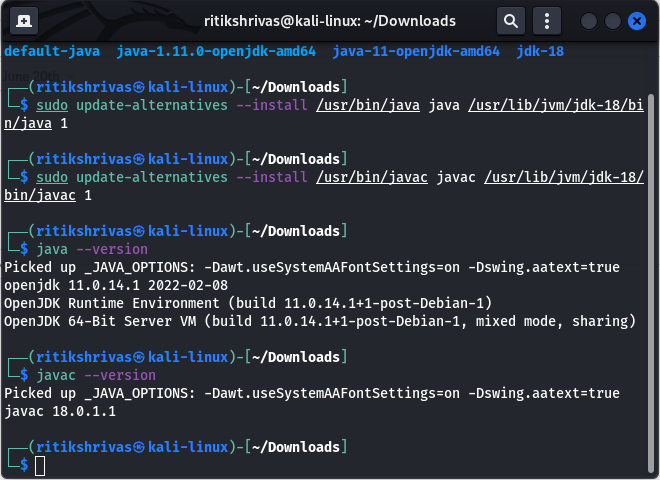
To compile and run Java programs using the Java Development Kit (JDK), you first need to ensure that the JDK is properly installed on your system. Once installed, you can open a command prompt or terminal window and navigate to the directory where your Java source code file is located. To compile the program, use the “javac” command followed by the name of your Java file (e.g., javac MyProgram.java). If there are no syntax errors, this will generate a bytecode file (.class) that can be executed by the Java Virtual Machine (JVM). To run the compiled program, use the “java” command followed by the name of the main class (e.g., java MyProgram). This will execute your Java program and produce the output based on your code logic. By following these steps, you can effectively compile and run Java programs using the JDK.
Are there any alternative development kits to the JDK for Java programming?
When it comes to Java programming, while the Java Development Kit (JDK) is the most commonly used toolset for Java development, there are alternative development kits available as well. One notable alternative is OpenJDK, which is an open-source implementation of the JDK. OpenJDK provides a free and community-driven option for Java developers looking to build applications using Java technology. Additionally, some vendors offer their own JDK distributions with added features and tools tailored to specific needs. Developers have the flexibility to choose from different development kits based on their preferences and requirements in Java programming.
Where can I find resources and documentation for using the JDK?
For those seeking resources and documentation on using the Java Development Kit (JDK), a wealth of information is readily available online. The official Oracle website offers comprehensive documentation, tutorials, and guides that cover various aspects of JDK usage, from installation instructions to advanced programming concepts. Additionally, online forums, developer communities, and educational platforms like Stack Overflow, GitHub, and Java-specific websites provide valuable insights, troubleshooting tips, and code examples to assist developers in harnessing the full potential of the JDK for their Java development projects.