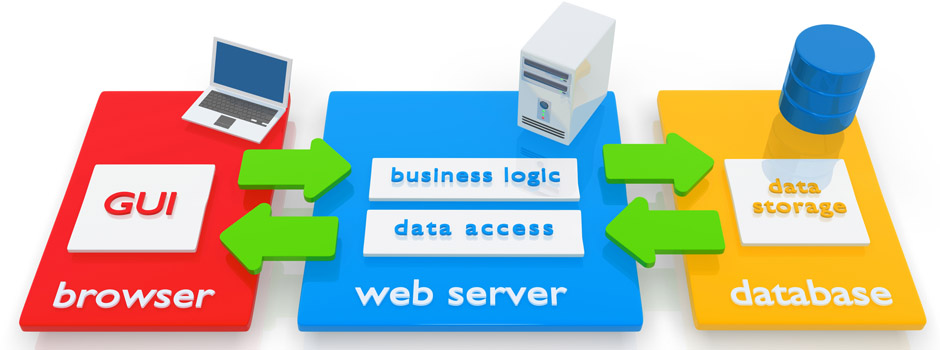
Unlocking Innovation: The Power of Application Development Software
The Importance of Application Development Software in the Digital Age
In today’s digital age, the demand for innovative and efficient software solutions is higher than ever. Businesses and individuals alike rely on applications to streamline processes, enhance productivity, and improve user experiences. This is where application development software plays a crucial role.
What is Application Development Software?
Application development software, also known as a development environment or integrated development environment (IDE), is a suite of tools that developers use to create, test, and deploy software applications. These tools provide a comprehensive platform for coding, debugging, and collaborating on projects.
The Benefits of Using Application Development Software
Using application development software offers several benefits:
- Efficiency: Developers can write code more quickly and accurately with features like auto-completion and syntax highlighting.
- Collaboration: Teams can work together seamlessly on projects by sharing code repositories and tracking changes.
- Testing: Built-in testing tools help ensure the quality and reliability of applications before deployment.
- Integration: Developers can easily integrate third-party libraries and APIs to enhance the functionality of their applications.
- Scalability: Applications developed using these tools are often easier to scale as business needs evolve.
Popular Application Development Software
There are many application development software options available in the market today. Some popular choices include:
- Visual Studio: A powerful IDE developed by Microsoft for building various types of applications.
- Eclipse: An open-source IDE that supports multiple programming languages and frameworks.
- Xcode: Apple’s IDE for developing apps for iOS, macOS, watchOS, and tvOS platforms.
In Conclusion
Application development software plays a vital role in empowering developers to create cutting-edge solutions that drive innovation across industries. By leveraging these tools effectively, businesses can stay ahead of the competition and meet the evolving needs of their customers in today’s fast-paced digital landscape.
Essential FAQs About Application Development Software: Understanding Its Role, Features, and Benefits
- What is application development software?
- Why is application development software important in the digital age?
- How does application development software help streamline the development process?
- What are the key features to look for in application development software?
- Which programming languages are commonly supported by application development software?
- How can teams collaborate effectively using application development software?
- What are the best practices for testing applications developed with this software?
- How does application development software support scalability and future growth of applications?
What is application development software?
Application development software, also known as a development environment or integrated development environment (IDE), is a comprehensive suite of tools that developers use to create, test, and deploy software applications. This software provides a centralized platform for coding, debugging, and collaborating on projects, enabling developers to efficiently write code, test applications, and manage the entire development process. By using application development software, developers can streamline their workflow, enhance productivity, and deliver high-quality applications that meet the evolving needs of users in today’s digital landscape.
Why is application development software important in the digital age?
In the digital age, application development software holds significant importance due to its role in driving innovation and efficiency across industries. As businesses and individuals increasingly rely on software applications to streamline processes, enhance user experiences, and stay competitive in the market, the need for robust development tools becomes paramount. Application development software enables developers to create customized solutions that address specific needs, improve productivity, and adapt to rapidly changing technological landscapes. By leveraging these tools effectively, organizations can accelerate their digital transformation efforts, deliver high-quality applications faster, and meet the evolving demands of today’s tech-savvy consumers.
How does application development software help streamline the development process?
Application development software helps streamline the development process by providing developers with a comprehensive set of tools and features that enhance efficiency and productivity. These software solutions offer functionalities such as code auto-completion, syntax highlighting, debugging tools, and version control systems, which enable developers to write, test, and deploy applications more effectively. By centralizing all development tasks within a single integrated environment, application development software promotes collaboration among team members, facilitates faster iteration cycles, ensures code consistency, and simplifies the overall development workflow. Ultimately, this streamlined process leads to faster time-to-market for applications and higher-quality end products.
What are the key features to look for in application development software?
When considering application development software, it is essential to look for key features that can enhance the development process and ensure the success of your projects. Some crucial features to consider include a user-friendly interface for efficient coding, robust debugging tools for identifying and fixing errors, seamless integration with version control systems for collaboration, built-in testing capabilities to ensure application quality, support for multiple programming languages and frameworks to cater to diverse project requirements, and scalability options to accommodate future growth. By selecting software that offers these key features, developers can streamline their workflow, improve productivity, and deliver high-quality applications efficiently.
Which programming languages are commonly supported by application development software?
When it comes to application development software, a wide range of programming languages are commonly supported to cater to the diverse needs of developers. Some of the most frequently supported programming languages include Java, C/C++, C#, Python, JavaScript, Ruby, PHP, and Swift. These languages are widely used in various types of applications and platforms, making them essential choices for developers working with application development software. The flexibility and compatibility of these programming languages enable developers to create robust and innovative applications efficiently.
How can teams collaborate effectively using application development software?
Effective collaboration among teams using application development software is essential for the success of any project. By leveraging features such as shared code repositories, version control, and real-time collaboration tools, teams can work seamlessly together on coding tasks, track changes efficiently, and communicate effectively. Additionally, integrated communication channels within the software enable team members to discuss ideas, resolve issues, and provide feedback in a centralized platform. This collaborative approach not only enhances productivity but also fosters creativity and innovation as team members can leverage each other’s expertise to deliver high-quality software solutions.
What are the best practices for testing applications developed with this software?
When it comes to testing applications developed with application development software, following best practices is essential to ensure the quality and reliability of the final product. Some key best practices for testing applications include implementing a comprehensive testing strategy that covers unit testing, integration testing, system testing, and user acceptance testing. It is crucial to automate testing processes where possible to increase efficiency and detect bugs early in the development cycle. Additionally, conducting thorough regression testing after each code change can help prevent the introduction of new issues. Collaborating closely with developers, testers, and stakeholders throughout the testing process is also vital to align expectations and deliver a successful application that meets user requirements.
How does application development software support scalability and future growth of applications?
Application development software plays a crucial role in supporting the scalability and future growth of applications by providing developers with tools and features that enable them to design applications in a modular and flexible manner. By using these software tools, developers can create code that is easily adaptable and expandable, allowing applications to scale efficiently as user demands increase or new features need to be added. Additionally, application development software often includes built-in support for version control, automated testing, and deployment pipelines, which help ensure the stability and reliability of applications as they grow over time. Overall, the use of application development software facilitates the seamless evolution of applications to meet the changing needs of users and businesses in a dynamic technological landscape.