cfchris.com

Loading

visual studio code java

Unlocking Java Development Potential with Visual Studio Code

Exploring Visual Studio Code for Java Development

Exploring Visual Studio Code for Java Development

Visual Studio Code (VS Code) has gained popularity among developers for its versatility and ease of use. While it is commonly associated with web development, VS Code also offers robust support for Java development, making it a compelling choice for Java programmers.

Key Features:

IntelliSense: VS Code provides IntelliSense capabilities for Java, offering intelligent code completion, parameter info, and code navigation features that enhance productivity.

Debugging: Developers can easily debug their Java applications within VS Code using breakpoints, variable inspection, and other debugging tools integrated seamlessly into the editor.

Extensions: The vast array of extensions available for VS Code allows developers to customize their Java development environment to suit their preferences and workflow.

Setting Up Java in Visual Studio Code:

To start coding in Java with Visual Studio Code, follow these steps:

  1. Install Java Development Kit (JDK): Ensure that you have the JDK installed on your system.
  2. Install Visual Studio Code: Download and install Visual Studio Code from the official website.
  3. Install Java Extension Pack: Install the “Java Extension Pack” from the VS Code marketplace to access essential tools and features for Java development.
  4. Create a New Project: Create a new Java project in VS Code and start coding!

The Future of Java Development with Visual Studio Code

The integration of Visual Studio Code with the robust capabilities of the Java ecosystem opens up exciting possibilities for developers. With its intuitive interface, powerful features, and extensive customization options, Visual Studio Code is poised to become a go-to choice for Java developers looking to streamline their workflow and boost productivity.

If you are a Java developer looking for a modern and efficient IDE, consider exploring Visual Studio Code – it might just be the tool you need to take your coding experience to the next level!


Top 7 FAQs About Using Visual Studio Code for Java Development

  1. How do I set up Java in Visual Studio Code?
  2. What are the key features of Visual Studio Code for Java development?
  3. Can I debug Java applications in Visual Studio Code?
  4. Which extensions are recommended for Java development in Visual Studio Code?
  5. How can I install the Java Extension Pack in Visual Studio Code?
  6. Is IntelliSense available for Java programming in Visual Studio Code?
  7. What makes Visual Studio Code a popular choice for Java developers?

How do I set up Java in Visual Studio Code?

Setting up Java in Visual Studio Code is a straightforward process that involves a few key steps. First, ensure that you have the Java Development Kit (JDK) installed on your system. Next, download and install Visual Studio Code from the official website. Then, head to the VS Code marketplace and install the “Java Extension Pack” to access essential tools and features for Java development. Once you have completed these steps, you can create a new Java project in Visual Studio Code and start coding seamlessly. This setup allows developers to harness the power of Visual Studio Code’s intuitive interface and robust features for efficient Java development.

What are the key features of Visual Studio Code for Java development?

Visual Studio Code offers a range of key features that make it an excellent choice for Java development. One standout feature is IntelliSense, which provides intelligent code completion, parameter information, and code navigation to enhance developers’ productivity. Additionally, Visual Studio Code supports robust debugging capabilities, allowing developers to easily debug their Java applications using breakpoints and variable inspection tools. The availability of a wide variety of extensions further enhances the Java development experience in Visual Studio Code, enabling developers to customize their environment to suit their specific needs and preferences.

Can I debug Java applications in Visual Studio Code?

Yes, you can debug Java applications in Visual Studio Code. Visual Studio Code offers robust debugging capabilities for Java developers, allowing them to set breakpoints, inspect variables, and step through their code with ease. By installing the necessary Java extensions and configuring the debugger settings, developers can seamlessly debug their Java applications directly within the familiar interface of Visual Studio Code. This feature enhances the development experience and empowers developers to troubleshoot and optimize their Java code effectively.

When it comes to Java development in Visual Studio Code, several extensions are highly recommended to enhance your coding experience. Some popular extensions for Java development include the “Java Extension Pack,” which provides essential tools like language support, debugging capabilities, and project management features. Additionally, “Spring Boot Extension Pack” is ideal for developers working with Spring Boot applications, offering specialized support and tools tailored to Spring projects. Other recommended extensions include “CheckStyle for Java,” “SonarLint,” and “Maven for Java.” These extensions can significantly improve your productivity and streamline your workflow when developing Java applications in Visual Studio Code.

How can I install the Java Extension Pack in Visual Studio Code?

To install the Java Extension Pack in Visual Studio Code, follow these simple steps. First, open Visual Studio Code and navigate to the Extensions view by clicking on the Extensions icon in the Activity Bar on the side of the window or by pressing Ctrl+Shift+X. In the search bar, type “Java Extension Pack” and press Enter. Locate the Java Extension Pack in the search results and click on the “Install” button next to it. Visual Studio Code will then download and install the extension pack, enabling you to access a comprehensive set of tools and features tailored for Java development within the editor.

Is IntelliSense available for Java programming in Visual Studio Code?

IntelliSense, a powerful feature for code completion and navigation, is indeed available for Java programming in Visual Studio Code. With IntelliSense support, Java developers can benefit from intelligent suggestions, parameter information, and quick navigation to enhance their coding experience and productivity within the VS Code environment. This feature helps streamline the development process by providing real-time assistance and insights while writing Java code, making it easier for developers to write accurate and efficient code in Visual Studio Code.

Visual Studio Code has emerged as a popular choice among Java developers for several compelling reasons. Its robust support for Java development, including features like IntelliSense for smart code completion, powerful debugging tools, and a vast library of extensions tailored to Java programming, enhances the coding experience and boosts productivity. The seamless integration of Visual Studio Code with the Java ecosystem provides developers with a versatile and efficient environment to write, debug, and manage their Java projects effectively. Additionally, Visual Studio Code’s user-friendly interface and customization options make it an attractive option for Java developers seeking a modern and streamlined IDE that caters to their specific needs and preferences.

backend engineer

Unveiling the Expertise of a Backend Engineer: Building the Digital Backbone

Understanding the Role of a Backend Engineer

When you visit a website, click on a button, or interact with an application, there is a complex system working behind the scenes to make it all happen. This is where the role of a backend engineer comes into play.

What Does a Backend Engineer Do?

A backend engineer is responsible for building and maintaining the server-side of web applications. They work with databases, server architecture, and APIs to ensure that the frontend of an application can communicate effectively with the backend.

Key Responsibilities

Backend engineers are tasked with:

  • Developing server-side logic
  • Optimizing applications for speed and scalability
  • Creating secure APIs for seamless data exchange
  • Collaborating with frontend developers to integrate user-facing elements
  • Maintaining and troubleshooting backend systems

Skills Required

To excel as a backend engineer, one must possess a strong foundation in programming languages such as Java, Python, Ruby, or Node.js. Additionally, knowledge of databases like MySQL, PostgreSQL, or MongoDB is crucial for managing data efficiently.

Career Outlook

The demand for skilled backend engineers continues to grow as businesses rely more on digital platforms to reach their audience. With opportunities in various industries ranging from tech startups to established corporations, backend engineers play a vital role in shaping the digital landscape.

Conclusion

In today’s interconnected world, backend engineers are essential architects behind the seamless functioning of web applications. Their expertise in building robust and efficient backend systems ensures that users have a smooth and enjoyable experience while interacting with online platforms.


5 Key Advantages of a Career as a Backend Engineer

  1. Backend engineers play a crucial role in developing and maintaining the server-side logic of web applications.
  2. They have the opportunity to work on optimizing applications for speed and scalability, contributing to enhanced user experiences.
  3. Backend engineers often collaborate closely with frontend developers, fostering teamwork and cross-functional communication.
  4. The demand for skilled backend engineers is high, offering ample job opportunities in various industries.
  5. Backend engineers get to work with cutting-edge technologies and databases, continuously expanding their skill set.


Challenges Faced by Backend Engineers: Navigating Pressure, Complexity, and Evolving Technologies

  1. High pressure to ensure server reliability and uptime
  2. Complex debugging process when issues arise in backend systems
  3. Continuous need to stay updated with evolving technologies and frameworks
  4. Limited visibility of direct user impact compared to frontend roles
  5. Potential for long hours during system maintenance or troubleshooting

Backend engineers play a crucial role in developing and maintaining the server-side logic of web applications.

Backend engineers play a crucial role in developing and maintaining the server-side logic of web applications. By focusing on the backend, these engineers ensure that the core functionality of an application runs smoothly and efficiently. They work behind the scenes to handle data processing, security protocols, and system integrations, ultimately contributing to the seamless operation of web applications. Their expertise is fundamental in creating robust and reliable server-side solutions that power the user experience on the frontend.

They have the opportunity to work on optimizing applications for speed and scalability, contributing to enhanced user experiences.

Backend engineers have the valuable opportunity to focus on optimizing applications for speed and scalability, which directly impacts the user experience. By fine-tuning the backend systems, they can ensure that applications run smoothly, respond quickly to user interactions, and handle a growing number of users without compromising performance. This dedication to enhancing speed and scalability ultimately leads to improved user experiences, making the work of backend engineers crucial in creating seamless and efficient digital platforms for users to enjoy.

Backend engineers often collaborate closely with frontend developers, fostering teamwork and cross-functional communication.

Backend engineers play a crucial role in fostering collaboration and teamwork within development teams by working closely with frontend developers. By maintaining open lines of communication and sharing insights on server-side functionalities, backend engineers ensure seamless integration between the frontend and backend of web applications. This collaborative approach not only enhances the overall development process but also results in more efficient problem-solving and innovative solutions that meet both user experience and technical requirements.

The demand for skilled backend engineers is high, offering ample job opportunities in various industries.

The high demand for skilled backend engineers presents a wealth of job opportunities across diverse industries. As businesses increasingly rely on digital solutions to drive growth and innovation, the need for talented professionals who can design and maintain robust backend systems continues to soar. This trend not only underscores the value of backend engineers in shaping the technological landscape but also opens doors for rewarding career paths in a wide range of sectors, from tech startups to established corporations.

Backend engineers get to work with cutting-edge technologies and databases, continuously expanding their skill set.

Backend engineers have the exciting opportunity to work with cutting-edge technologies and databases, allowing them to continuously expand their skill set. By staying at the forefront of technological advancements, backend engineers not only enhance their expertise but also contribute to the innovation and efficiency of backend systems. This dynamic environment challenges them to adapt to new tools and techniques, keeping their work engaging and rewarding as they shape the future of digital solutions.

High pressure to ensure server reliability and uptime

Ensuring server reliability and uptime can be a significant con for backend engineers due to the high pressure associated with maintaining these critical aspects of web applications. Any downtime or server issues can have immediate and severe consequences, impacting user experience, business operations, and potentially leading to financial losses. Backend engineers must constantly monitor, troubleshoot, and optimize server performance to minimize the risk of outages, often working under tight deadlines and in high-stress situations to ensure continuous service availability for users. This constant pressure to uphold server reliability can be mentally taxing and demanding on backend engineers, requiring them to stay vigilant and proactive in addressing potential issues before they escalate.

Complex debugging process when issues arise in backend systems

One significant challenge faced by backend engineers is the complex debugging process that arises when issues occur in backend systems. Identifying the root cause of a problem within the intricate network of servers, databases, and APIs can be time-consuming and require a deep understanding of the system architecture. Backend engineers must possess strong problem-solving skills and attention to detail to effectively troubleshoot and resolve issues, ensuring that the backend systems operate smoothly and efficiently.

Continuous need to stay updated with evolving technologies and frameworks

Staying updated with evolving technologies and frameworks can be a significant challenge for backend engineers. The fast-paced nature of the tech industry means that new tools and techniques are constantly being developed, requiring backend engineers to invest time and effort in continuous learning to remain relevant and competitive. This constant need for upskilling can be demanding and time-consuming, as mastering new technologies while balancing ongoing projects can be a delicate juggling act for backend engineers.

Limited visibility of direct user impact compared to frontend roles

One notable con of being a backend engineer is the limited visibility of direct user impact when compared to frontend roles. While frontend developers see their work manifested in the user interface, backend engineers often work behind the scenes, focusing on server-side processes that are not immediately visible to end users. This lack of direct user interaction can sometimes make it challenging for backend engineers to receive immediate feedback on their contributions and may lead to a feeling of detachment from the overall user experience.

Potential for long hours during system maintenance or troubleshooting

One significant drawback of being a backend engineer is the potential for long hours during system maintenance or troubleshooting. When issues arise with the backend systems, engineers may need to work extended hours to identify and resolve the problems promptly. This can lead to high levels of stress and burnout, impacting work-life balance and overall well-being. The unpredictable nature of system maintenance and troubleshooting can disrupt personal plans and require engineers to be on call outside regular working hours, making it challenging to maintain a healthy work-life harmony.

awt in java

Exploring AWT in Java: Building GUI Applications with Java’s Abstract Window Toolkit

Understanding AWT in Java

The Basics of AWT in Java

AWT, which stands for Abstract Window Toolkit, is a set of classes provided by Java to create graphical user interfaces (GUIs). It is one of the oldest GUI toolkits in Java and forms the foundation for Swing and JavaFX.

Components of AWT

AWT provides a wide range of components that can be used to build GUI applications. Some common components include:

  • Buttons
  • Labels
  • Textfields
  • Checkboxes
  • Radio buttons
  • List boxes
  • Menus
  • Dialog boxes

Event Handling in AWT

In AWT, event handling is done through listeners. Components generate events when certain actions occur, such as clicking a button or typing in a text field. Event listeners are used to capture these events and respond accordingly.

Layout Managers in AWT

AWT provides layout managers that help arrange components within a container. Some common layout managers include:

  • FlowLayout: Arranges components in a row or column.
  • BorderLayout: Divides the container into five regions – North, South, East, West, and Center.
  • GridLayout: Organizes components in a grid-like fashion.

The Future of AWT

While AWT is still supported in Java, Swing and JavaFX have become more popular choices for building modern GUI applications due to their enhanced features and flexibility. However, understanding AWT can provide a solid foundation for working with more advanced GUI libraries in Java.


5 Advantages of Using AWT for Java GUI Development

  1. 1. AWT is part of the Java standard library, so no additional downloads or dependencies are required.
  2. 2. AWT provides a simple and straightforward way to create GUI applications in Java.
  3. 3. AWT components have a native look and feel, making them consistent across different platforms.
  4. 4. AWT supports event handling through listeners, allowing for interactive user interfaces.
  5. 5. AWT’s layout managers help in organizing and positioning components within containers efficiently.


Challenges of Using AWT in Java: Exploring Limitations and Drawbacks

  1. Limited Look and Feel
  2. Less Customization
  3. Complex Event Handling
  4. Limited Component Set
  5. Performance Issues
  6. Lack of Support for Accessibility Features

1. AWT is part of the Java standard library, so no additional downloads or dependencies are required.

One significant advantage of AWT in Java is that it is a core component of the Java standard library, eliminating the need for additional downloads or dependencies. This inherent integration makes it convenient for developers to start building GUI applications without having to manage external libraries, ensuring a streamlined development process and easier deployment of Java applications that utilize AWT components.

2. AWT provides a simple and straightforward way to create GUI applications in Java.

One of the key advantages of AWT in Java is its ability to provide a simple and straightforward approach to building GUI applications. With AWT, developers can easily create graphical user interfaces using a set of intuitive classes and components. This simplicity allows for quick prototyping and development of GUI applications without the need for complex coding or external libraries, making AWT a convenient choice for beginners and those looking for a straightforward solution to their GUI needs in Java programming.

3. AWT components have a native look and feel, making them consistent across different platforms.

One significant advantage of AWT components in Java is their native look and feel, which ensures consistency across various platforms. By leveraging the native graphical elements of the underlying operating system, AWT components seamlessly blend into the user interface environment, providing a familiar and intuitive experience for users regardless of the platform they are using. This feature not only enhances the aesthetic appeal of applications but also contributes to a more cohesive and user-friendly interface design.

4. AWT supports event handling through listeners, allowing for interactive user interfaces.

One notable advantage of AWT in Java is its robust support for event handling through listeners. By utilizing event listeners, developers can create interactive user interfaces that respond to user actions such as button clicks, mouse movements, and key presses. This feature enables the development of dynamic and engaging GUI applications that enhance the overall user experience by providing real-time feedback and interactivity.

5. AWT’s layout managers help in organizing and positioning components within containers efficiently.

AWT’s layout managers play a crucial role in facilitating the organization and positioning of components within containers in a highly efficient manner. By utilizing layout managers, developers can easily control the arrangement of GUI elements without having to manually calculate their positions. This feature not only saves time and effort but also ensures that the graphical interface remains consistent across different screen sizes and resolutions. The flexibility offered by AWT’s layout managers empowers developers to create visually appealing and user-friendly applications with ease.

Limited Look and Feel

One significant drawback of AWT in Java is its limited look and feel. AWT components heavily depend on the native platform’s GUI elements, leading to a lack of uniformity in appearance across various operating systems. This inconsistency can create challenges for developers aiming to deliver a cohesive user experience, as the graphical interface may vary significantly depending on the user’s operating system.

Less Customization

One drawback of AWT in Java is its limited customization capabilities. AWT components offer fewer options for customization when compared to newer GUI libraries such as Swing or JavaFX. This limitation can restrict developers from creating highly tailored and visually appealing user interfaces that meet modern design standards. As a result, developers may find themselves constrained by the lack of flexibility in AWT when aiming to create sophisticated and interactive GUI applications.

Complex Event Handling

One significant drawback of AWT in Java is its complex event handling mechanism. Event handling in AWT can be more convoluted and verbose when compared to the newer event models present in Swing and JavaFX. Managing events in AWT requires a deeper understanding of listeners and handling mechanisms, which can make the code harder to read and maintain. This complexity can hinder the development process and make it more challenging for developers to create responsive and interactive GUI applications efficiently.

Limited Component Set

One significant drawback of AWT in Java is its limited component set. AWT offers a fundamental collection of components that may fall short in meeting the demands of intricate GUI applications. This limitation can hinder developers who require more advanced and specialized components to create sophisticated user interfaces. As a result, developers often turn to alternative GUI libraries like Swing and JavaFX, which offer a broader range of components and features to address the needs of modern GUI development.

Performance Issues

The heavyweight component architecture of AWT in Java can present a significant drawback in terms of performance. Due to its design, AWT’s approach to handling GUI components can result in performance issues, particularly noticeable in large-scale applications. The heavyweight nature of AWT components can lead to increased resource consumption and slower rendering times, impacting the overall responsiveness and efficiency of the application. Developers need to be mindful of these performance considerations when working with AWT to ensure optimal user experience and system performance.

Lack of Support for Accessibility Features

One significant drawback of AWT in Java is its lack of support for accessibility features. AWT does not provide built-in mechanisms for ensuring that GUI applications are accessible to users with disabilities. This limitation can pose challenges for developers who need to adhere to accessibility standards and ensure that their applications can be used by all individuals, regardless of their physical abilities. As a result, developers may need to implement custom solutions or consider alternative GUI libraries like Swing or JavaFX that offer more robust support for accessibility features.

java square

Exploring Java Square: Fundamental Geometric Concepts

The Java Square: Exploring the Fundamentals

The Java Square: Exploring the Fundamentals

Java, a versatile and powerful programming language, offers numerous features and functionalities that make it a popular choice among developers. One fundamental concept in Java programming is the notion of a square.

What is a Square in Java?

In Java, a square is a geometric shape with four equal sides and four right angles. It is often represented by its side length or diagonal length. The calculation of the area and perimeter of a square are common operations in Java programming.

Calculating the Area of a Square in Java

To calculate the area of a square in Java, you can use the formula:

area = sideLength * sideLength;

Where “sideLength” represents the length of one side of the square. By multiplying the side length by itself, you can determine the total area enclosed by the square.

Calculating the Perimeter of a Square in Java

The perimeter of a square can be calculated using the formula:

perimeter = 4 * sideLength;

Here, “sideLength” denotes the length of one side of the square. By multiplying this value by 4, you obtain the total perimeter encompassing all four sides of the square.

Implementing Square Operations in Java

In Java programming, you can create classes and methods to encapsulate square-related operations. By defining appropriate functions for calculating area and perimeter, you can efficiently work with squares in your programs.

Utilizing object-oriented principles such as inheritance and polymorphism, you can extend your square implementation to incorporate more complex geometric shapes and hierarchies.

Conclusion

The concept of squares in Java exemplifies fundamental principles in programming, including mathematical computations and object-oriented design. By mastering these concepts, developers can enhance their skills and create robust applications that leverage geometric calculations effectively.


Understanding Squares in Java: FAQs on Calculations, Formulas, and Best Practices

  1. What is a square in Java?
  2. How do you calculate the area of a square in Java?
  3. How do you calculate the perimeter of a square in Java?
  4. Can you explain the formula for calculating the area of a square in Java?
  5. What is the formula for finding the perimeter of a square in Java?
  6. Are there specific methods or functions to implement square operations in Java?
  7. How can object-oriented principles be applied to work with squares in Java programming?
  8. What are some common mistakes or challenges when dealing with squares in Java?

What is a square in Java?

In Java programming, a square is defined as a geometric shape characterized by four equal sides and four right angles. It is a fundamental concept in geometry and serves as a common example for understanding basic mathematical calculations within the language. In Java, a square can be represented by its side length or diagonal length, with formulas readily available for calculating its area and perimeter. Understanding the properties and operations associated with squares in Java is essential for performing geometric computations and implementing related functionalities in software development projects.

How do you calculate the area of a square in Java?

Calculating the area of a square in Java involves a straightforward process. To determine the area of a square, you can simply multiply the length of one side by itself. This computation is achieved by using the formula “area = sideLength * sideLength”. By squaring the side length value, you obtain the total area enclosed within the square. This fundamental operation is essential in Java programming and serves as a basic example of mathematical calculations applied within software development contexts.

How do you calculate the perimeter of a square in Java?

Calculating the perimeter of a square in Java involves a straightforward process. In Java programming, you can determine the perimeter of a square by multiplying the length of one side by 4. This simple formula, “perimeter = 4 * sideLength,” where “sideLength” represents the length of one side of the square, allows developers to efficiently compute the total distance around the square. By implementing this calculation in Java code, programmers can easily incorporate perimeter calculations into their applications, showcasing the elegance and simplicity of working with geometric shapes in Java.

Can you explain the formula for calculating the area of a square in Java?

When it comes to calculating the area of a square in Java, the formula is quite straightforward. By multiplying the length of one side of the square by itself, you can easily determine the total area enclosed by the square. The formula for calculating the area of a square in Java is simply: area = sideLength * sideLength. This simple calculation allows developers to efficiently compute the area of a square within their Java programs, making it a fundamental and essential operation when working with geometric shapes in Java programming.

What is the formula for finding the perimeter of a square in Java?

When it comes to calculating the perimeter of a square in Java, the formula is straightforward and easy to implement. The perimeter of a square can be determined by multiplying the length of one side by 4. In Java programming, you can express this formula as “perimeter = 4 * sideLength,” where “sideLength” represents the length of a single side of the square. By applying this formula, developers can efficiently compute the total distance around the square, encompassing all four equal sides.

Are there specific methods or functions to implement square operations in Java?

When it comes to implementing square operations in Java, developers often wonder if there are specific methods or functions tailored for this purpose. While Java does not have built-in functions specifically dedicated to squares, programmers can create custom methods within their classes to handle square-related calculations efficiently. By defining functions for calculating the area, perimeter, and other properties of a square, developers can encapsulate these operations and leverage them across their applications. Additionally, object-oriented principles in Java enable the creation of classes that represent squares and provide reusable functionalities for working with geometric shapes effectively.

How can object-oriented principles be applied to work with squares in Java programming?

When working with squares in Java programming, object-oriented principles can be effectively applied to enhance the design and functionality of the square-related operations. By creating a Square class that encapsulates attributes such as side length and methods for calculating area and perimeter, developers can leverage concepts like encapsulation, inheritance, and polymorphism. Encapsulation allows for data hiding and abstraction, ensuring that the internal details of the Square class are hidden from external entities. Inheritance enables the creation of specialized square subclasses with additional features or behaviors, while polymorphism allows for flexibility in handling different types of squares within a unified interface. By applying these object-oriented principles thoughtfully, developers can create modular, reusable, and extensible solutions for working with squares in Java programming.

What are some common mistakes or challenges when dealing with squares in Java?

When working with squares in Java, some common mistakes or challenges that developers may encounter include incorrect calculations of the square’s area or perimeter due to improper handling of side lengths, overlooking the validation of input values to ensure they represent valid square dimensions, and potential issues with precision when dealing with floating-point arithmetic. Additionally, ensuring proper encapsulation and organization of square-related operations within classes and methods can be challenging for beginners, leading to code that is difficult to maintain and debug. By paying attention to these potential pitfalls and adopting best practices in Java programming, developers can effectively address these challenges and work more efficiently with squares in their applications.

java projects for beginners

Exploring Fun and Educational Java Projects for Beginners

Java Projects for Beginners

Java Projects for Beginners

If you are new to programming and looking to enhance your skills, starting with Java projects can be a great way to dive into the world of coding. Java is a versatile and widely-used programming language that is beginner-friendly and offers a wealth of resources to help you get started.

Why Choose Java for Beginners?

Java is known for its simplicity and readability, making it an ideal choice for beginners. It is a versatile language that can be used for a variety of applications, including web development, mobile app development, and software engineering.

Java Projects Ideas for Beginners

Here are some simple Java project ideas that are perfect for beginners:

  1. Calculator: Create a basic calculator application that can perform simple arithmetic operations like addition, subtraction, multiplication, and division.
  2. To-Do List: Build a to-do list application where users can add tasks, mark them as completed, and delete them as needed.
  3. Temperature Converter: Develop a program that converts temperatures between Fahrenheit and Celsius.
  4. Simple Game: Create a text-based game like Hangman or Tic-Tac-Toe to practice basic programming concepts.
  5. Contact Book: Design an application that stores and displays contact information such as names, phone numbers, and emails.

Tips for Starting Your Java Project

When starting your Java project as a beginner, remember the following tips:

  • Start Small: Begin with simple projects to grasp the fundamentals before moving on to more complex tasks.
  • Use Online Resources: Take advantage of online tutorials, forums, and documentation to learn new concepts and troubleshoot issues.
  • Practice Regularly: Consistent practice is key to improving your coding skills. Set aside time each day to work on your projects.

In conclusion, embarking on Java projects as a beginner can be an exciting journey that opens up numerous possibilities in the world of programming. By starting with simple projects and gradually expanding your knowledge base, you can build a strong foundation in Java programming that will serve you well in your coding endeavors.


Getting Started with Java: Beginner-Friendly Projects and Tips

  1. How to make a simple Java project?
  2. Can a beginner start with Java?
  3. What is a good project for Java?
  4. What should be my first Java project?

How to make a simple Java project?

Creating a simple Java project for beginners involves a few key steps. To start, you can set up your development environment by installing the Java Development Kit (JDK) and an Integrated Development Environment (IDE) like Eclipse or IntelliJ IDEA. Next, you can create a new Java project in your IDE, define a main class with a “public static void main(String[] args)” method, and begin writing your code to implement the desired functionality. It’s important to break down the project into smaller tasks, test your code regularly, and seek help from online resources or forums if you encounter any challenges. By following these steps and practicing regularly, beginners can successfully create their first simple Java project and gain valuable programming experience.

Can a beginner start with Java?

Starting with Java as a beginner is definitely possible and highly recommended. Java is known for its beginner-friendly syntax, extensive documentation, and strong community support, making it an excellent choice for those new to programming. With a plethora of resources available online, including tutorials, forums, and sample projects, beginners can easily grasp the basics of Java and start building their own projects in no time. By diving into Java projects early on, beginners can gain valuable hands-on experience and develop a solid foundation in programming that will serve them well as they progress in their coding journey.

What is a good project for Java?

When it comes to selecting a suitable project for beginners in Java, a common recommendation is to start with a simple and practical application that aligns with your interests and learning goals. Projects like a basic calculator, to-do list manager, or even a simple game can be excellent choices as they allow beginners to apply fundamental Java concepts in a hands-on manner. These projects not only help in understanding core programming principles but also provide a solid foundation for tackling more complex Java projects in the future. Ultimately, the key is to choose a project that sparks your curiosity and motivates you to explore the diverse capabilities of Java programming.

What should be my first Java project?

When considering your first Java project as a beginner, it is essential to choose a project that aligns with your current skill level and interests. A common recommendation for beginners is to start with a simple project like creating a basic calculator application. This project allows you to practice fundamental programming concepts such as variables, operators, and user input while gaining hands-on experience with Java syntax. Additionally, building a calculator provides a tangible outcome that can boost your confidence and motivation to tackle more challenging projects in the future. Remember that the goal of your first Java project is not perfection but rather learning and growth as you embark on your programming journey.

java python

Exploring the Java and Python Programming Languages: A Comparative Analysis

Java vs Python: A Comparison of Two Popular Programming Languages

Java vs Python: A Comparison of Two Popular Programming Languages

Java and Python are two of the most widely used programming languages in the world. Each language has its own strengths and weaknesses, making them suitable for different types of projects and applications.

Java

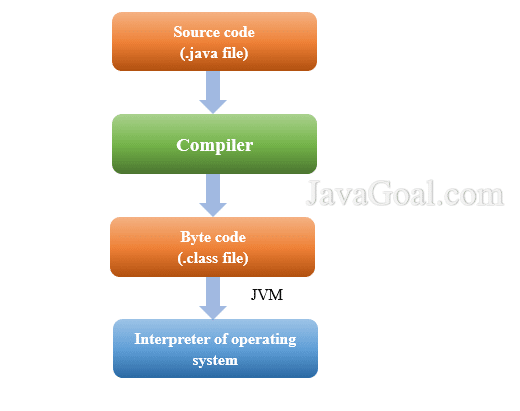
Java is a versatile, high-level programming language known for its portability and scalability. It is commonly used for developing enterprise-level applications, web applications, mobile apps, and more. Java follows the principle of “write once, run anywhere,” meaning that Java code can run on any platform that has a Java Virtual Machine (JVM) installed.

Key Features of Java:

  • Strongly typed language with static typing
  • Object-oriented programming (OOP) paradigm
  • Rich set of libraries and frameworks (e.g., Spring, Hibernate)
  • Excellent performance and scalability
  • Robust security features

Python

Python is a dynamic, interpreted programming language known for its simplicity and readability. It is widely used in various domains such as web development, data science, artificial intelligence, automation, and more. Python’s syntax is clean and easy to understand, making it an ideal choice for beginners as well as experienced developers.

Key Features of Python:

  • Dynamically typed language with automatic memory management
  • Supports multiple programming paradigms (e.g., OOP, functional programming)
  • Extensive standard library with built-in modules for various tasks
  • Rapid development cycle due to its simplicity
  • Broad community support and active ecosystem

Which Language Should You Choose?

The choice between Java and Python depends on your specific requirements and project goals. If you need a highly performant language for building large-scale applications with strict security requirements, Java may be the better option. On the other hand, if you prioritize readability, ease of use, and rapid development cycles, Python could be the right choice.

In conclusion, both Java and Python have their strengths and are valuable tools in a developer’s toolkit. Whether you choose Java or Python ultimately depends on the nature of your project and your personal preferences as a developer.


Top 5 Tips for Mastering Java and Python Programming

  1. Practice regularly to improve your skills in Java and Python.
  2. Utilize online resources such as tutorials, forums, and documentation for learning Java and Python.
  3. Join coding communities or clubs to collaborate with others and learn from their experiences in Java and Python.
  4. Break down complex problems into smaller tasks when working on projects in Java and Python.
  5. Stay updated with the latest features and updates in both Java and Python programming languages.

Practice regularly to improve your skills in Java and Python.

To enhance your proficiency in Java and Python, it is crucial to engage in consistent practice. Regular practice not only helps reinforce your understanding of the languages but also allows you to explore new concepts and refine your coding skills. By dedicating time each day to coding exercises, projects, or challenges in Java and Python, you can steadily improve your programming abilities and stay updated with the latest developments in both languages. Remember, practice makes progress, so make it a habit to code regularly to sharpen your skills in Java and Python.

Utilize online resources such as tutorials, forums, and documentation for learning Java and Python.

To enhance your proficiency in Java and Python, make the most of online resources like tutorials, forums, and documentation. These valuable tools provide a wealth of knowledge and support to help you grasp the intricacies of both programming languages. By actively engaging with these resources, you can deepen your understanding, troubleshoot challenges effectively, and stay updated on the latest developments in Java and Python programming.

Join coding communities or clubs to collaborate with others and learn from their experiences in Java and Python.

Joining coding communities or clubs is a valuable tip for aspiring programmers looking to enhance their skills in Java and Python. By collaborating with like-minded individuals, you can gain insights and learn from the experiences of others. These communities provide a platform for sharing knowledge, discussing best practices, and working on projects together, ultimately helping you grow as a developer in both Java and Python.

Break down complex problems into smaller tasks when working on projects in Java and Python.

When working on projects in Java and Python, it is essential to break down complex problems into smaller tasks. By dividing the problem into manageable components, developers can tackle each task more effectively and efficiently. This approach not only helps in maintaining clarity and focus but also makes it easier to debug and test the code. Breaking down complex problems into smaller tasks enables developers to approach the project systematically, leading to better organization and ultimately a more successful outcome.

Stay updated with the latest features and updates in both Java and Python programming languages.

It is essential to stay updated with the latest features and updates in both Java and Python programming languages. By keeping abreast of new developments, enhancements, and best practices in these languages, developers can leverage the full potential of Java and Python to create efficient, secure, and innovative solutions. Continuous learning and adaptation to the evolving landscape of programming languages ensure that developers remain competitive and equipped to tackle modern challenges in software development.

effective java

Unlocking the Secrets of Effective Java Programming

The Power of Effective Java Programming

The Power of Effective Java Programming

Java is a versatile and powerful programming language that is widely used in various applications and industries. To truly harness the full potential of Java, it is essential to understand and implement effective programming practices. This is where “Effective Java” comes into play.

What is Effective Java?

“Effective Java” is a renowned book written by Joshua Bloch, a distinguished software engineer who was formerly a chief architect at Google and a key contributor to the Java platform. The book offers invaluable insights and best practices for writing efficient, readable, and maintainable Java code.

Key Principles of Effective Java

Some key principles highlighted in “Effective Java” include:

  • Use of Design Patterns: The book emphasizes the importance of leveraging design patterns to solve common programming challenges effectively.
  • Effective Use of Generics: Understanding how to use generics in Java can lead to more type-safe and reusable code.
  • Error Handling: Proper error handling techniques are crucial for writing robust and reliable code.
  • Concurrency: Guidelines on writing concurrent programs that are efficient and free from race conditions are discussed in detail.
  • Performance Optimization: Tips on optimizing performance without sacrificing code clarity are provided to help developers create efficient applications.

The Impact of Effective Java

By following the recommendations outlined in “Effective Java,” developers can significantly enhance the quality of their codebase. Adopting these best practices not only results in cleaner and more maintainable code but also helps prevent common pitfalls that can lead to bugs and performance issues.

In Conclusion

“Effective Java” serves as a comprehensive guide for both novice and experienced Java developers looking to elevate their programming skills. By adhering to the principles laid out in this book, developers can write better code, improve productivity, and ultimately deliver high-quality software solutions.


6 Essential Tips for Writing Effective Java Code

  1. Follow naming conventions for classes, methods, and variables.
  2. Use meaningful and descriptive names for better code readability.
  3. Write small and focused methods to promote reusability and maintainability.
  4. Avoid using magic numbers in your code; define constants instead.
  5. Always handle exceptions properly to prevent unexpected program behavior.
  6. Regularly refactor your code to improve its design and performance.

Follow naming conventions for classes, methods, and variables.

Adhering to naming conventions for classes, methods, and variables is a fundamental aspect of writing effective Java code. Consistent and meaningful naming not only enhances code readability but also makes it easier for developers to understand the purpose and functionality of different components within the codebase. By following established naming conventions, such as using camelCase for method names and PascalCase for class names, developers can create code that is more intuitive, maintainable, and accessible to others working on the project.

Use meaningful and descriptive names for better code readability.

Using meaningful and descriptive names for variables, methods, and classes is a fundamental principle in effective Java programming. By choosing clear and expressive names that accurately reflect the purpose and functionality of each component, developers can greatly enhance code readability. Well-chosen names not only make the code easier to understand for others but also for the original developer when revisiting the code in the future. This practice promotes maintainability, reduces the risk of errors, and contributes to overall code quality.

Write small and focused methods to promote reusability and maintainability.

To enhance the reusability and maintainability of Java code, it is advisable to follow the tip of writing small and focused methods. By breaking down complex functionalities into smaller, more manageable units, developers can promote code reusability across different parts of the application. Additionally, having concise and focused methods makes it easier to understand, debug, and maintain the codebase in the long run. This practice not only improves the overall structure of the code but also contributes to better collaboration among team members working on the project.

Avoid using magic numbers in your code; define constants instead.

In effective Java programming, it is recommended to avoid using magic numbers in your code and instead define constants. Magic numbers are hard-coded numerical values scattered throughout the code, making it difficult to understand their significance. By defining constants with meaningful names, developers can improve code readability, maintainability, and reduce the risk of errors caused by unclear or arbitrary values. This practice enhances code quality and promotes better software design principles in Java development.

Always handle exceptions properly to prevent unexpected program behavior.

Properly handling exceptions in Java is a fundamental practice that can prevent unexpected program behavior and enhance the reliability of your code. By implementing exception handling mechanisms, developers can gracefully manage errors and failures, ensuring that their programs continue to function correctly even when unexpected issues arise. This proactive approach not only improves the robustness of the software but also facilitates troubleshooting and debugging processes, leading to more stable and predictable applications.

Regularly refactor your code to improve its design and performance.

Regularly refactoring your code is a crucial practice in effective Java programming. By continuously improving the design and performance of your code through refactoring, you ensure that it remains clean, maintainable, and efficient. Refactoring allows you to identify and eliminate redundant or poorly structured code, leading to enhanced readability and scalability. Embracing this tip not only results in a more robust codebase but also facilitates easier troubleshooting and future enhancements in your Java projects.

computer software engineer

Unlocking Innovation: The Role of a Computer Software Engineer in Today’s Tech Landscape

Computer Software Engineer

The Role of a Computer Software Engineer

A computer software engineer plays a crucial role in the development, design, and maintenance of software applications. These professionals are responsible for creating innovative solutions to meet the needs of businesses and individuals in today’s digital age.

Responsibilities of a Software Engineer

Software engineers are involved in every stage of the software development process. They analyze user requirements, design software solutions, write code, test applications for bugs and errors, and maintain existing software systems. These professionals work closely with other team members, such as project managers, designers, and quality assurance testers, to ensure that the final product meets all requirements.

Skills Required

To excel as a computer software engineer, one must possess strong technical skills in programming languages such as Java, C++, Python, or JavaScript. Problem-solving abilities, attention to detail, and creativity are also essential qualities for this role. Additionally, effective communication skills are vital for collaborating with team members and stakeholders throughout the development process.

Educational Background

Most computer software engineers hold a bachelor’s degree in computer science or a related field. Some professionals may pursue advanced degrees or certifications to further enhance their skills and knowledge in specific areas of software engineering.

Career Outlook

The demand for computer software engineers is expected to continue growing as technology becomes more integrated into various industries. With the rise of mobile applications, cloud computing, and artificial intelligence, there are abundant opportunities for skilled software engineers to make a significant impact in the tech industry.

Conclusion

In conclusion, computer software engineers play a vital role in shaping the future of technology through their expertise in developing innovative software solutions. Their contributions drive progress and innovation across industries worldwide.


5 Essential Tips for Excelling as a Computer Software Engineer

  1. Stay updated with the latest programming languages and technologies.
  2. Practice coding regularly to improve your skills and problem-solving abilities.
  3. Collaborate with other software engineers to learn from each other and work on projects together.
  4. Document your code properly for easier maintenance and future reference.
  5. Stay curious and never stop learning about new developments in the field of software engineering.

Stay updated with the latest programming languages and technologies.

It is crucial for computer software engineers to stay updated with the latest programming languages and technologies. By continuously learning and adapting to new advancements in the field, software engineers can enhance their skills, remain competitive in the job market, and create more efficient and innovative solutions for various projects. Keeping abreast of emerging trends ensures that software engineers can tackle complex challenges with confidence and contribute effectively to the ever-evolving tech industry.

Practice coding regularly to improve your skills and problem-solving abilities.

To enhance your proficiency as a computer software engineer, it is crucial to engage in regular coding practice. By consistently working on coding exercises and projects, you can sharpen your skills and enhance your problem-solving abilities. This practice not only helps you become more proficient in programming languages but also allows you to tackle complex challenges with confidence and creativity. Embracing regular coding practice as a routine can significantly contribute to your growth and success in the field of software engineering.

Collaborate with other software engineers to learn from each other and work on projects together.

Collaborating with other software engineers is a valuable tip for professionals in the field. By working together on projects and sharing knowledge, software engineers can learn from each other’s experiences, expand their skill sets, and tackle complex challenges more effectively. This collaborative approach not only fosters a sense of teamwork and camaraderie but also leads to the development of innovative solutions that benefit both the individual engineers and the projects they are working on. Embracing collaboration allows software engineers to leverage diverse perspectives and expertise, ultimately enhancing their growth and success in the dynamic world of technology.

Document your code properly for easier maintenance and future reference.

Properly documenting your code is essential for computer software engineers to facilitate easier maintenance and reference in the future. Clear and concise documentation helps developers understand the purpose and functionality of the code, making it simpler to troubleshoot issues, make updates, and collaborate with team members. By documenting code effectively, software engineers can ensure that their work remains accessible and comprehensible over time, ultimately contributing to more efficient and successful software development projects.

Stay curious and never stop learning about new developments in the field of software engineering.

It is crucial for computer software engineers to stay curious and continuously seek out new developments in the field of software engineering. By maintaining a mindset of curiosity and a commitment to lifelong learning, software engineers can stay at the forefront of technological advancements, enhance their skills, and adapt to evolving industry trends. Embracing a culture of continuous learning not only expands one’s knowledge base but also fosters innovation and ensures relevance in an ever-changing technological landscape.

java course

Mastering Java: Unlock Your Potential with a Comprehensive Java Course

The Benefits of Taking a Java Course

The Benefits of Taking a Java Course

Java is a versatile and widely-used programming language that powers many applications and systems across various industries. Whether you are a beginner looking to start your programming journey or an experienced developer aiming to enhance your skills, taking a Java course can offer numerous benefits.

In-Demand Skill

Java is one of the most in-demand programming languages in the job market. By learning Java, you increase your employability and open up opportunities for career advancement.

Versatility

Java is known for its versatility and compatibility with different platforms. With Java skills, you can develop a wide range of applications, from web and mobile apps to enterprise systems.

Strong Foundation

Studying Java provides a solid foundation in object-oriented programming principles, which are fundamental concepts applicable to many other languages. This knowledge can help you grasp other programming languages more easily in the future.

Community Support

The Java community is vast and active, offering support, resources, and networking opportunities for learners and professionals alike. Engaging with the Java community can enhance your learning experience and provide valuable insights.

Continuous Learning

Java is constantly evolving with new updates and features being introduced regularly. By taking a Java course, you stay updated with the latest trends and best practices in the industry, ensuring that your skills remain relevant.

Conclusion

Whether you are interested in pursuing a career in software development or simply want to expand your programming skills, enrolling in a Java course can be a rewarding investment in your future. With its widespread use, versatility, and strong community support, mastering Java can open doors to exciting opportunities in the tech world.


Mastering Java: 9 Essential Tips for Success in Your Course

  1. Start with the basics
  2. Practice regularly
  3. Utilize online resources
  4. Work on projects
  5. Understand object-oriented programming
  6. Debugging skills are crucial
  7. Stay updated
  8. Collaborate with others
  9. Be patient and persistent

Start with the basics

Starting with the basics is crucial when embarking on a Java course. By laying a strong foundation in fundamental concepts such as syntax, data types, and control structures, learners can build a solid understanding of Java programming principles. Mastering the basics not only sets the stage for more advanced topics but also ensures that students develop a clear and comprehensive knowledge base to tackle complex programming challenges effectively.

Practice regularly

Regular practice is a crucial aspect of mastering Java programming. By consistently practicing coding exercises, implementing projects, and solving problems, learners can reinforce their understanding of Java concepts, improve their problem-solving skills, and build confidence in their programming abilities. Practice not only helps solidify theoretical knowledge but also allows individuals to apply what they have learned in real-world scenarios, ultimately enhancing their proficiency in Java development.

Utilize online resources

Utilizing online resources is a valuable tip when taking a Java course. The internet is filled with a wealth of information, tutorials, forums, and coding platforms that can supplement your learning experience. By leveraging online resources, you can access additional practice exercises, real-world projects, and community support to enhance your understanding of Java programming concepts. Engaging with online resources not only reinforces your knowledge but also allows you to stay updated on the latest trends and advancements in the Java programming language.

Work on projects

Working on projects is a crucial tip for anyone taking a Java course. Applying theoretical knowledge to practical, real-world projects helps reinforce learning and deepen understanding of Java concepts. By working on projects, students can gain hands-on experience, troubleshoot issues, and enhance their problem-solving skills. Additionally, completing projects allows individuals to showcase their Java proficiency to potential employers or clients, making them stand out in the competitive job market.

Understand object-oriented programming

Understanding object-oriented programming is essential when taking a Java course. Object-oriented programming (OOP) is a paradigm that allows developers to model real-world entities as objects, making code more organized, reusable, and easier to maintain. By grasping OOP concepts such as classes, objects, inheritance, and polymorphism, students can effectively design and implement Java applications. A solid understanding of OOP not only enhances one’s proficiency in Java but also lays a strong foundation for mastering other programming languages in the future.

Debugging skills are crucial

Developing strong debugging skills is crucial for anyone learning Java or any programming language. Debugging is the process of identifying and fixing errors in code, and it plays a vital role in software development. By honing your debugging skills, you not only become more efficient at troubleshooting issues but also gain a deeper understanding of how code works. Effective debugging can save you time and frustration, helping you write cleaner and more reliable programs.

Stay updated

Staying updated with the latest trends and advancements in Java is crucial for anyone looking to excel in their programming skills. By keeping abreast of new features, updates, and best practices in the Java ecosystem, you ensure that your knowledge remains current and relevant. Continuous learning not only enhances your expertise but also demonstrates your commitment to professional growth and adaptability in the ever-evolving field of software development.

Collaborate with others

Collaborating with others while taking a Java course can greatly enhance your learning experience. By working with peers, you can gain different perspectives, share knowledge, and solve problems collectively. Collaborative projects allow you to apply your Java skills in real-world scenarios and improve your teamwork and communication skills. Additionally, engaging in group discussions and code reviews can help you identify areas for improvement and learn new techniques from your peers. Overall, teamwork not only enriches your understanding of Java but also fosters a supportive learning environment that encourages growth and creativity.

Be patient and persistent

In a Java course, it is essential to remember the value of patience and persistence. Learning a programming language like Java can be challenging, and mastering it takes time and dedication. By staying patient and persistent, students can overcome obstacles, grasp complex concepts, and ultimately become proficient Java developers. Consistent practice and a willingness to persevere through difficulties are key to achieving success in mastering Java programming skills.

java app

Mastering Java App Development: Building Powerful Applications with Java

The Power of Java Applications

The Power of Java Applications

Java is a versatile programming language that has gained immense popularity for its ability to create robust and scalable applications. Java applications are used in a wide range of industries, from web development to mobile apps and enterprise software solutions.

One of the key strengths of Java applications is their platform independence. This means that a Java application can run on any device or operating system that has a Java Virtual Machine (JVM) installed. This portability makes Java an ideal choice for developing cross-platform applications that reach a larger audience.

Java’s rich set of libraries and frameworks provide developers with the tools they need to build complex and feature-rich applications efficiently. Whether you are developing a simple desktop application or a sophisticated web-based system, Java offers the flexibility and scalability required to meet your project’s demands.

Furthermore, Java’s strong emphasis on security makes it a popular choice for developing secure applications. With built-in features like automatic memory management and strong type checking, Java helps developers write code that is less prone to common vulnerabilities such as buffer overflows or memory leaks.

Java’s community support is another factor that contributes to its popularity. The vast community of Java developers worldwide ensures that there are plenty of resources, tutorials, and forums available for developers looking to enhance their skills or troubleshoot issues they encounter during development.

In conclusion, Java applications offer unparalleled versatility, portability, security, and community support. Whether you are a seasoned developer or just starting your programming journey, exploring the world of Java applications can open up a world of possibilities for creating innovative and powerful software solutions.


9 Essential Tips for Building Robust and Maintainable Java Applications

  1. 1. Write clean and readable code to improve maintainability.
  2. 2. Follow naming conventions to enhance code consistency.
  3. 3. Use meaningful comments to explain complex logic or algorithms.
  4. 4. Break down large functions into smaller, reusable methods for better organization.
  5. 5. Implement error handling to gracefully manage exceptions and prevent crashes.
  6. 6. Optimize performance by avoiding unnecessary loops or operations.
  7. 7. Utilize design patterns to solve common problems effectively.
  8. 8. Test your application thoroughly with unit tests and integration tests.
  9. 9. Keep learning and stay updated with the latest Java features and best practices.

1. Write clean and readable code to improve maintainability.

Writing clean and readable code is crucial when developing Java applications to enhance maintainability. By following best practices and adhering to coding standards, developers can ensure that their code is easy to understand and modify in the future. Clean code not only makes it simpler for other team members to collaborate on the project but also reduces the chances of introducing bugs during maintenance. Prioritizing readability in code can lead to more efficient debugging, faster updates, and overall smoother development processes for Java applications.

2. Follow naming conventions to enhance code consistency.

Following naming conventions is a crucial practice in Java application development as it enhances code consistency and readability. By adhering to established naming conventions, developers can create code that is easier to understand and maintain. Consistent naming of classes, methods, variables, and other elements not only improves the overall quality of the codebase but also promotes collaboration among team members. When everyone follows the same naming conventions, it becomes simpler to navigate through the code, identify functionalities, and make modifications without confusion. This simple tip can have a significant impact on the efficiency and effectiveness of Java application development projects.

3. Use meaningful comments to explain complex logic or algorithms.

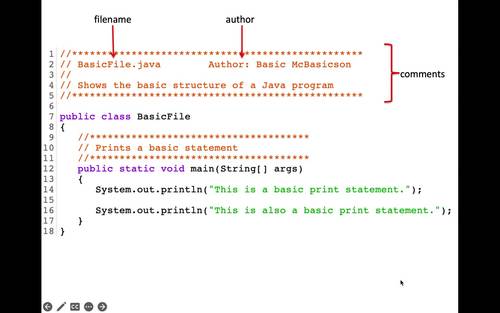
When developing a Java application, it is crucial to utilize meaningful comments to elucidate intricate logic or algorithms. By incorporating clear and concise comments within the codebase, developers can enhance the readability and maintainability of the application. These comments serve as valuable documentation for understanding the purpose behind complex logic, facilitating collaboration among team members, and aiding in future troubleshooting and modifications. Embracing this practice not only promotes code clarity but also contributes to the overall efficiency and effectiveness of the Java application development process.

4. Break down large functions into smaller, reusable methods for better organization.

Breaking down large functions into smaller, reusable methods is a valuable tip in Java application development. By dividing complex tasks into smaller, more manageable chunks, developers can improve the organization and maintainability of their code. This practice not only enhances readability but also promotes code reusability, making it easier to maintain and update the application in the future. Additionally, breaking down functions into smaller methods allows for better testing and debugging, as issues can be isolated and addressed more effectively. Overall, adopting this approach leads to more efficient and structured Java applications.

5. Implement error handling to gracefully manage exceptions and prevent crashes.

Implementing error handling is a crucial aspect of developing Java applications to ensure smooth operation and prevent unexpected crashes. By gracefully managing exceptions, developers can anticipate potential errors and handle them appropriately, maintaining the application’s stability and enhancing the user experience. Proper error handling not only helps in identifying issues promptly but also allows for effective troubleshooting and debugging, leading to more robust and reliable Java applications.

6. Optimize performance by avoiding unnecessary loops or operations.

To optimize the performance of a Java application, it is crucial to avoid unnecessary loops or operations. By minimizing the number of loops and streamlining operations within the code, developers can significantly improve the efficiency and speed of their application. Unnecessary loops can lead to increased processing time and resource consumption, impacting the overall performance of the software. Therefore, by carefully assessing and optimizing the logic within loops and operations, developers can enhance the performance of their Java application and deliver a more responsive user experience.

7. Utilize design patterns to solve common problems effectively.

Utilizing design patterns in Java applications is a valuable strategy to solve common problems effectively. By leveraging established design patterns such as Singleton, Factory, or Observer, developers can streamline their code structure, improve maintainability, and enhance scalability. Design patterns provide proven solutions to recurring design challenges, allowing developers to write cleaner and more efficient code while promoting best practices in software development. Incorporating design patterns in Java applications not only enhances code quality but also fosters a deeper understanding of software architecture principles among developers.

8. Test your application thoroughly with unit tests and integration tests.

Testing your Java application thoroughly with unit tests and integration tests is crucial for ensuring its reliability and functionality. Unit tests allow you to test individual components of your code in isolation, verifying that each part works as intended. On the other hand, integration tests help you assess how different parts of your application work together as a whole. By conducting both types of tests diligently, you can identify and address any issues early in the development process, leading to a more robust and stable Java application in the end.

9. Keep learning and stay updated with the latest Java features and best practices.

To ensure the success of your Java applications, it is crucial to continuously expand your knowledge and stay informed about the latest Java features and best practices. By keeping up with advancements in the Java ecosystem, you can leverage new tools, techniques, and optimizations to enhance the performance, security, and scalability of your applications. Embracing a mindset of lifelong learning in Java development not only sharpens your skills but also empowers you to adapt to industry trends and deliver cutting-edge solutions that meet evolving user needs.