cfchris.com

Loading

Archives 2025

java latest version

Exploring the Exciting Features of Java’s Latest Version

Exploring the Latest Version of Java

Exploring the Latest Version of Java

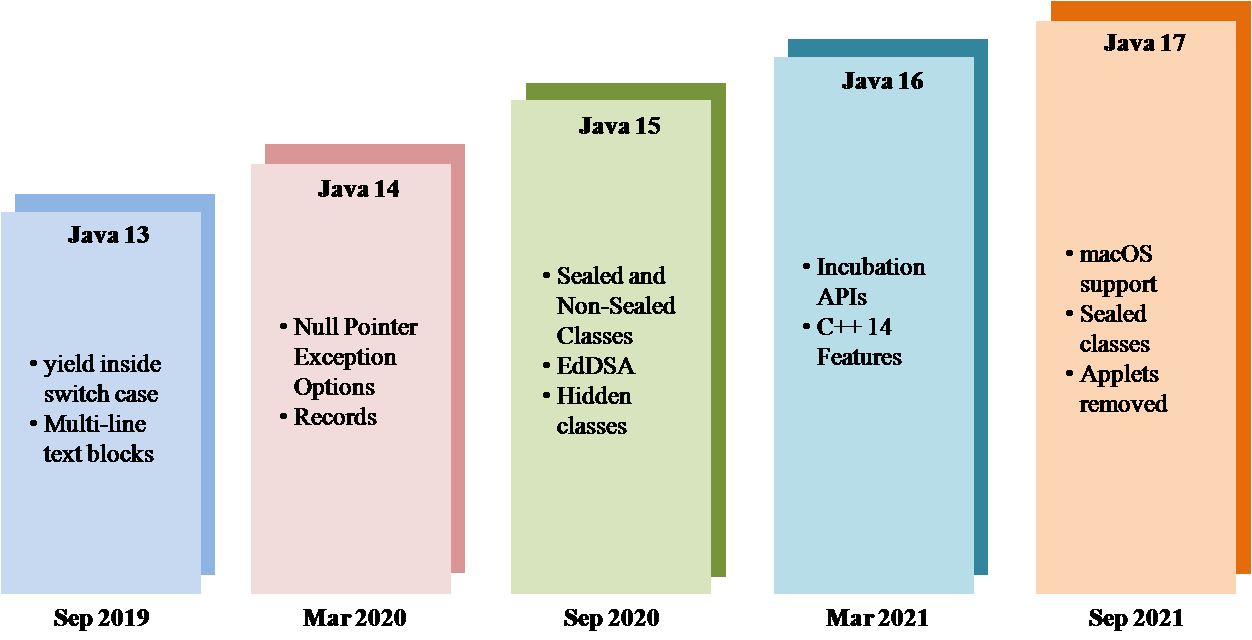
Java, one of the most popular programming languages in the world, continues to evolve with each new version. The latest release, Java 17, brings a host of new features and improvements that enhance developer productivity and application performance.

New Features in Java 17:

  • JEP 356: Enhanced Pseudo-Random Number Generators – Java 17 introduces new interfaces and implementations for pseudo-random number generators, offering developers more flexibility and control over random number generation in their applications.
  • JEP 382: New macOS Rendering Pipeline – With Java 17, macOS users can benefit from a new rendering pipeline that improves the performance and user experience of Java applications on Apple’s operating system.
  • JEP 391: macOS/AArch64 Port – This enhancement brings official support for running Java applications on macOS devices powered by Apple Silicon chips, further expanding Java’s compatibility across different hardware architectures.
  • JEP 411: Deprecate Security Manager for Removal – In an effort to simplify and modernize the platform, Java 17 deprecates the Security Manager feature with plans to remove it in a future release. Developers are encouraged to migrate away from using Security Manager in their applications.

Performance Improvements:

In addition to new features, Java 17 also includes various performance enhancements aimed at optimizing the execution speed and memory efficiency of Java applications. Developers can expect improved runtime performance and reduced memory footprint when using the latest version of Java.

Upgrade Considerations:

For developers considering upgrading to Java 17, it is important to review the release notes and ensure compatibility with existing codebases and third-party libraries. Testing your applications on the new version is recommended to identify any potential issues or compatibility concerns before deploying them into production environments.

Overall, Java 17 represents another significant milestone in the ongoing evolution of the language, offering developers new tools and capabilities to build robust and efficient software solutions. Whether you are a seasoned Java developer or just starting with the language, exploring the latest version of Java can open up exciting possibilities for your projects.


Everything You Need to Know About the Latest Version of Java: FAQs and Key Insights

  1. What is the latest version of Java?
  2. What are the new features in the latest version of Java?
  3. How can I upgrade to the latest version of Java?
  4. Is it necessary to update to the latest version of Java?
  5. Are there any performance improvements in the latest version of Java?
  6. What considerations should I take into account before upgrading to the latest version of Java?
  7. Is Java 17 backward compatible with previous versions?
  8. Where can I find more information about the changes and updates in the latest version of Java?

What is the latest version of Java?

The latest version of Java is Java 17. Released with a range of new features and performance improvements, Java 17 continues to enhance developer productivity and application efficiency. With updates such as enhanced pseudo-random number generators, a new macOS rendering pipeline, and official support for macOS devices powered by Apple Silicon chips, Java 17 offers developers more flexibility and compatibility across different platforms. It is recommended for developers to stay up-to-date with the latest version of Java to leverage its advancements and ensure optimal performance in their projects.

What are the new features in the latest version of Java?

The latest version of Java, Java 17, introduces a range of new features that enhance developer productivity and application performance. Some of the key enhancements include an enhanced pseudo-random number generator system (JEP 356) that provides developers with more flexibility in random number generation. Additionally, macOS users benefit from a new rendering pipeline (JEP 382) that improves the performance of Java applications on Apple’s operating system. Furthermore, the introduction of official support for running Java applications on macOS devices powered by Apple Silicon chips (JEP 391) expands Java’s compatibility across different hardware architectures. Lastly, Java 17 deprecates the Security Manager feature for future removal (JEP 411), encouraging developers to migrate away from using it in their applications. These new features in Java 17 demonstrate the language’s commitment to innovation and improvement in each release.

How can I upgrade to the latest version of Java?

To upgrade to the latest version of Java, you can follow a few simple steps. First, visit the official Java website to download the newest version of Java. Make sure to select the appropriate version for your operating system. Next, run the installer and follow the on-screen instructions to complete the installation process. If you already have an older version of Java installed on your system, the installer may prompt you to uninstall it before proceeding with the upgrade. Once the installation is complete, restart your computer to apply the changes. By keeping your Java installation up-to-date, you can benefit from enhanced features, improved performance, and important security updates provided in the latest version.

Is it necessary to update to the latest version of Java?

It is often recommended to update to the latest version of Java to ensure that your applications benefit from the newest features, performance improvements, and security enhancements offered by the updated release. Staying up-to-date with Java versions can help address vulnerabilities, improve compatibility with modern systems, and optimize the overall performance of your software. However, the decision to update should also consider factors such as compatibility with existing codebases and third-party libraries, as well as any potential impact on production environments. Regularly evaluating the benefits and implications of upgrading to the latest version of Java can help developers make informed decisions that align with their specific needs and requirements.

Are there any performance improvements in the latest version of Java?

In the latest version of Java, developers can expect to see notable performance improvements that enhance the overall execution speed and memory efficiency of Java applications. These enhancements are designed to optimize runtime performance and reduce the memory footprint, resulting in better responsiveness and scalability for Java-based software. By leveraging the performance improvements in the latest Java version, developers can create more efficient and high-performing applications that meet the demands of modern computing environments.

What considerations should I take into account before upgrading to the latest version of Java?

Before upgrading to the latest version of Java, there are several considerations that developers should keep in mind. Firstly, it is crucial to review the release notes of the new version to understand the changes, new features, and potential compatibility issues that may arise with existing codebases or third-party libraries. Testing your applications on the new version is highly recommended to identify any bugs or issues before deploying them into production environments. Additionally, ensuring that all dependencies and tools used in your projects are compatible with the latest Java version is essential to prevent any disruptions in your development workflow. By carefully evaluating these factors and preparing accordingly, developers can smoothly transition to the latest version of Java and take advantage of its enhanced features and performance improvements.

Is Java 17 backward compatible with previous versions?

Java 17 maintains Java’s strong commitment to backward compatibility with previous versions. Developers can rest assured that applications written in earlier versions of Java will continue to run seamlessly on Java 17 without requiring any modifications. This backward compatibility ensures that existing codebases and libraries can be easily migrated to the latest version, allowing developers to leverage the new features and improvements in Java 17 while maintaining the stability and reliability of their applications.

Where can I find more information about the changes and updates in the latest version of Java?

If you are looking for more information about the changes and updates in the latest version of Java, a good place to start is the official Java website. The Java website typically provides detailed release notes and documentation that highlight the new features, enhancements, and performance improvements introduced in the latest version of the language. Additionally, developer forums, tech blogs, and online communities dedicated to Java programming often discuss and analyze the changes in the latest Java release, offering insights and practical examples to help developers understand and leverage the new features effectively. By exploring these resources, you can stay informed about the latest developments in Java and make informed decisions when upgrading your projects to the newest version.
learn java

Master Java Programming: Learn Java Like a Pro

Learn Java: A Comprehensive Guide

Learn Java: A Comprehensive Guide

Java is a versatile and widely-used programming language that powers countless applications, from mobile apps to enterprise software. Whether you are a beginner or an experienced developer looking to expand your skills, learning Java can open up a world of opportunities for you.

Why Learn Java?

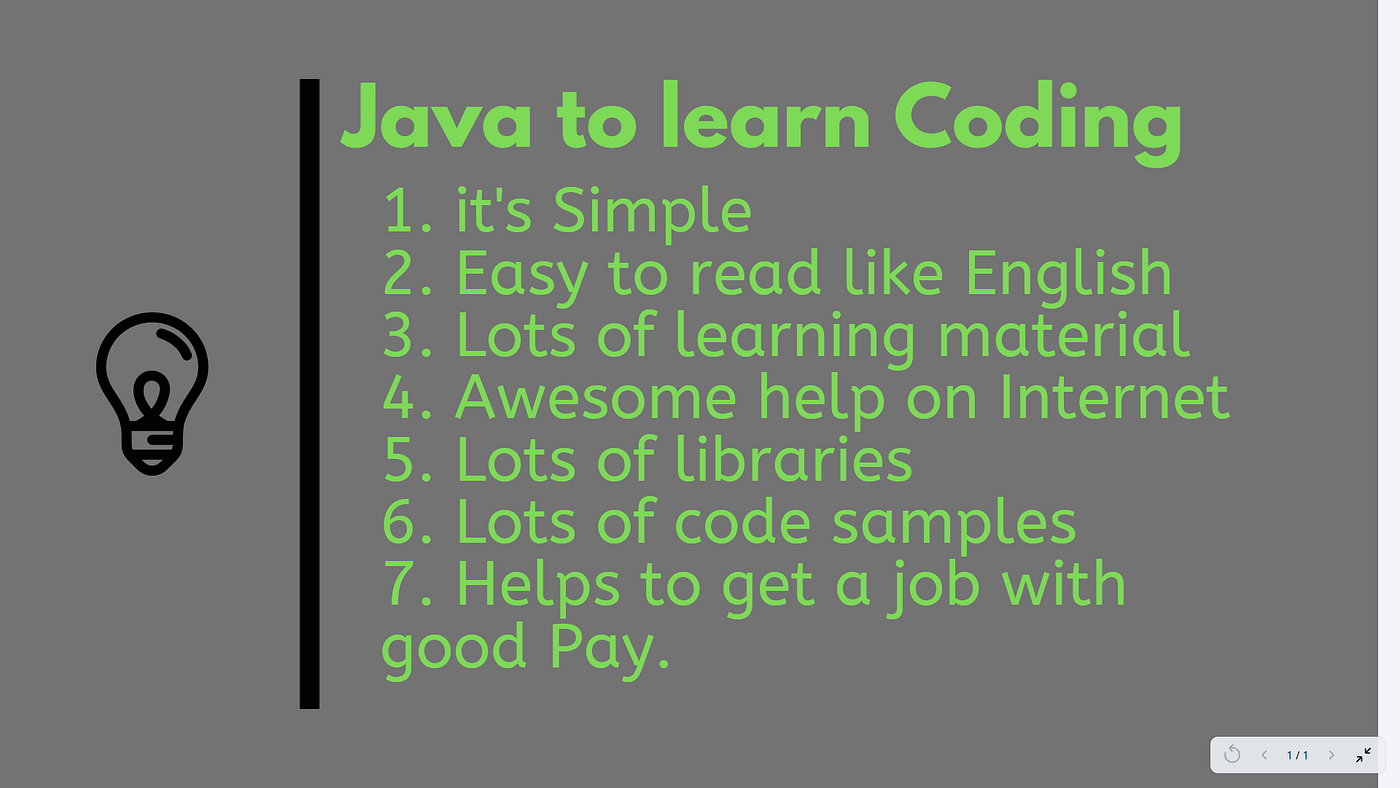
Java is known for its platform independence, meaning that once you write a Java program, it can run on any device that has a Java Virtual Machine (JVM). This makes Java a popular choice for developing cross-platform applications.

In addition, Java’s robust libraries and frameworks make it easier to build complex applications efficiently. Its strong community support and vast resources also make learning Java more accessible and enjoyable.

Getting Started with Java

If you are new to programming, don’t worry! Java’s syntax is relatively easy to learn compared to other languages. You can start by installing the Java Development Kit (JDK) on your computer and using an Integrated Development Environment (IDE) like Eclipse or IntelliJ IDEA to write and run your code.

Begin with the basics, such as variables, data types, loops, and conditional statements. As you progress, dive into object-oriented programming concepts like classes, objects, inheritance, and polymorphism.

Advanced Topics in Java

Once you have a solid understanding of the fundamentals, you can explore more advanced topics in Java like multithreading, exception handling, database connectivity using JDBC, GUI programming with Swing or JavaFX, and web development with frameworks like Spring or Hibernate.

Practice Makes Perfect

To truly master Java programming, practice is key. Challenge yourself with coding exercises on platforms like LeetCode or HackerRank. Build small projects to apply what you have learned and gain hands-on experience working with real-world problems.

Conclusion

Learning Java can be a rewarding journey that opens up endless possibilities in the world of software development. Whether you aspire to be a mobile app developer, web developer, or software engineer, mastering Java will equip you with the skills needed to succeed in today’s tech-driven world.


Top 8 FAQs About Learning Java: A Guide for Beginners

  1. What is Java and why should I learn it?
  2. Is Java difficult to learn for beginners?
  3. What are the basic concepts I need to understand in Java?
  4. How can I start learning Java programming?
  5. Are there any recommended resources or tutorials for learning Java?
  6. What are the key features of Java that make it a popular programming language?
  7. Can I become a successful programmer by learning Java?
  8. What career opportunities are available for those who know Java?

What is Java and why should I learn it?

Java is a versatile and powerful programming language that is widely used in various domains, from mobile app development to enterprise software solutions. Learning Java is beneficial for several reasons. Firstly, Java’s platform independence allows programs to run on any device with a Java Virtual Machine (JVM), making it ideal for cross-platform development. Additionally, Java’s extensive libraries and frameworks simplify the process of building complex applications. Its strong community support and vast resources also make it an accessible language for beginners and experienced developers alike. Overall, mastering Java opens up a world of opportunities in the tech industry and equips you with valuable skills that are in high demand.

Is Java difficult to learn for beginners?

For beginners, learning Java may seem challenging at first due to its syntax and object-oriented programming concepts. However, with dedication and practice, Java can become more manageable to grasp. Many resources, tutorials, and online courses are available to help beginners understand Java effectively. Breaking down the learning process into smaller steps and focusing on practical applications can make learning Java less intimidating for newcomers. Ultimately, while Java may present some initial hurdles, the rewards of mastering this versatile language are well worth the effort for aspiring programmers.

What are the basic concepts I need to understand in Java?

To effectively learn Java, it is essential to grasp the basic concepts that form the foundation of the language. Understanding fundamental concepts such as variables, data types, control structures (like loops and conditional statements), methods, classes, and objects is crucial. Object-oriented programming principles like inheritance, encapsulation, polymorphism, and abstraction are also key components to comprehend. By mastering these core concepts, learners can build a strong understanding of Java programming and pave the way for more advanced topics in software development.

How can I start learning Java programming?

To start learning Java programming, it is recommended to begin by installing the Java Development Kit (JDK) on your computer and selecting an Integrated Development Environment (IDE) such as Eclipse or IntelliJ IDEA. Familiarize yourself with basic concepts like variables, data types, loops, and conditional statements. Utilize online resources, tutorials, and practice exercises to reinforce your understanding. As you progress, delve into object-oriented programming principles and gradually explore more advanced topics in Java to enhance your skills and knowledge. Remember that consistent practice and hands-on experience are key to mastering Java programming effectively.

When it comes to learning Java, one of the most frequently asked questions is about recommended resources or tutorials. There are numerous high-quality resources available for beginners and experienced developers alike. Online platforms like Codecademy, Udemy, and Coursera offer comprehensive Java courses with interactive lessons and hands-on projects. Additionally, websites like Oracle’s Java Tutorials, Baeldung, and Java Code Geeks provide in-depth articles, tutorials, and code examples to help learners enhance their Java skills. Books such as “Head First Java” by Kathy Sierra and Bert Bates or “Effective Java” by Joshua Bloch are also highly recommended for those looking to deepen their understanding of the language. With a wealth of resources at your disposal, embarking on your journey to learn Java has never been more accessible and rewarding.

Java’s popularity as a programming language can be attributed to its key features that set it apart from others. One of the main reasons for Java’s widespread adoption is its platform independence, allowing developers to write code once and run it on any device with a Java Virtual Machine (JVM). Additionally, Java’s robust standard library and extensive ecosystem of frameworks simplify the development process, making it easier to build complex applications efficiently. Its strong emphasis on security, scalability, and performance further solidify Java’s position as a top choice for a wide range of applications across different industries.

Can I become a successful programmer by learning Java?

Many aspiring programmers wonder if learning Java can lead them to success in the field. The answer is a resounding yes. Java is a powerful and versatile programming language widely used in various domains, making it a valuable skill to possess. By mastering Java, you not only gain proficiency in a popular language but also develop problem-solving abilities and a strong foundation in object-oriented programming. With dedication, practice, and continuous learning, becoming a successful programmer through Java is not only achievable but also opens up numerous opportunities in the ever-evolving tech industry.

What career opportunities are available for those who know Java?

Java is a highly sought-after programming language in the tech industry, offering a wide range of career opportunities for those who master it. Professionals proficient in Java can explore roles such as Java developer, software engineer, web developer, mobile app developer, system architect, and more. With Java’s versatility and widespread use in various domains like finance, healthcare, e-commerce, and gaming, individuals skilled in Java have the advantage of pursuing diverse career paths and securing rewarding positions in the ever-evolving field of technology.

learn java programming

Master Java Programming: Learn the Language of Versatility and Opportunity

Learn Java Programming

The Benefits of Learning Java Programming

Java is a widely-used programming language known for its versatility and robustness. Learning Java can open up a world of opportunities for aspiring programmers and professionals looking to enhance their skills. Here are some key benefits of learning Java programming:

Versatility

Java is used in a variety of applications, from web development to mobile app development and enterprise software. By learning Java, you can work on a wide range of projects and industries, making you a versatile and in-demand developer.

Object-Oriented Programming

Java is an object-oriented programming language, which means that it focuses on creating reusable code components called objects. This approach promotes code organization, reusability, and scalability, making it easier to manage complex projects.

Platform Independence

One of the key features of Java is its platform independence. Java programs can run on any device that has a Java Virtual Machine (JVM) installed, regardless of the underlying operating system. This makes Java applications highly portable and accessible across different platforms.

Strong Community Support

Java has a large and active community of developers who contribute to open-source projects, provide support through forums and tutorials, and collaborate on improving the language. By learning Java, you can tap into this vast knowledge base and network with like-minded professionals.

Career Opportunities

Proficiency in Java programming opens up numerous career opportunities in the tech industry. Many companies look for Java developers to work on their projects, offering competitive salaries and benefits to skilled professionals. Whether you are interested in software development, web design, or data analysis, knowing Java can give your career a significant boost.

In conclusion,

Learning Java programming is a valuable investment in your future as a programmer. With its versatility, object-oriented approach, platform independence, community support, and career prospects, mastering Java can set you on the path to success in the ever-evolving world of technology.


6 Essential Tips for Mastering Java Programming

  1. Start with the basics
  2. Practice regularly
  3. Utilize online resources
  4. Work on projects
  5. Collaborate with others
  6. Stay updated

Start with the basics

When embarking on the journey to learn Java programming, it is essential to start with the basics. Building a strong foundation in fundamental concepts such as variables, data types, control structures, and object-oriented programming principles is crucial for mastering Java effectively. By understanding the core concepts from the beginning, learners can progress confidently and tackle more complex topics with ease as they advance in their Java programming skills.

Practice regularly

Regular practice is essential when learning Java programming. By consistently working on coding exercises, projects, and challenges, you can reinforce your understanding of Java concepts, improve your problem-solving skills, and build confidence in your programming abilities. Practice helps solidify your knowledge and allows you to apply what you’ve learned in a practical setting, ultimately leading to mastery of Java programming. Make practice a routine part of your learning process to see significant progress and growth in your Java skills.

Utilize online resources

Utilizing online resources is a valuable tip for learning Java programming. The internet is a treasure trove of tutorials, forums, coding challenges, and courses that can provide you with additional support and guidance as you navigate the intricacies of Java. Online resources offer the flexibility to learn at your own pace, access a diverse range of learning materials, and engage with a global community of fellow learners and experienced developers. By taking advantage of these resources, you can enhance your understanding of Java concepts, stay updated on industry trends, and practice your coding skills in a dynamic and interactive environment.

Work on projects

Working on projects is a crucial tip for learning Java programming effectively. By applying your knowledge to real-world projects, you can gain hands-on experience, troubleshoot issues, and solidify your understanding of Java concepts. Projects allow you to practice problem-solving skills, enhance your creativity, and build a portfolio that showcases your skills to potential employers. Whether it’s developing a simple application or working on a complex software project, the practical experience gained from project work is invaluable in mastering Java programming.

Collaborate with others

Collaborating with others while learning Java programming can greatly enhance your understanding and skills. By working with peers, mentors, or online communities, you can gain valuable insights, receive feedback on your code, and learn new techniques and best practices. Collaboration not only fosters a sense of teamwork but also exposes you to different perspectives and approaches to problem-solving, ultimately helping you become a more well-rounded Java programmer.

Stay updated

To excel in learning Java programming, it is essential to stay updated with the latest developments and updates in the language. Java is a dynamic programming language that continuously evolves with new features, enhancements, and best practices. By staying informed about the latest trends, updates, and tools in Java programming, you can enhance your skills, adapt to industry changes, and ensure that your knowledge remains relevant and up-to-date. Embracing a mindset of continuous learning and staying updated will help you become a proficient Java programmer equipped to tackle new challenges and opportunities in the field.

javascript tutorial

Mastering JavaScript: A Comprehensive Tutorial for Beginners

JavaScript Tutorial

JavaScript Tutorial: A Beginner’s Guide

JavaScript is a powerful programming language that is widely used for creating dynamic and interactive web pages. Whether you are a beginner or have some experience with coding, this tutorial will help you understand the basics of JavaScript.

What is JavaScript?

JavaScript is a lightweight, interpreted programming language that adds interactivity to web pages. It runs on the client-side, meaning it is executed on the user’s browser rather than the server. JavaScript can be used to create animations, validate forms, manipulate HTML elements, and much more.

Getting Started with JavaScript

To start using JavaScript in your web projects, you can include it directly in your HTML code using the <script> tag. You can also link an external JavaScript file to your HTML document.

Syntax and Features

JavaScript syntax is similar to other programming languages like Java and C. It uses variables, data types, functions, loops, and conditional statements to control the flow of a program. Understanding these basic concepts is essential for writing effective JavaScript code.

Common Use Cases

Some common use cases of JavaScript include form validation, creating interactive maps, image sliders, responsive menus, and much more. With JavaScript’s versatility, the possibilities are endless for enhancing user experience on websites.

Resources for Learning

If you want to dive deeper into JavaScript programming, there are plenty of resources available online such as tutorials, documentation, forums, and online courses. Websites like MDN Web Docs and W3Schools offer comprehensive guides for learning JavaScript from scratch.

Conclusion

JavaScript is an essential skill for web developers looking to create dynamic and engaging websites. By mastering the fundamentals of JavaScript programming, you can unlock endless possibilities for building interactive web applications.

Start your journey with JavaScript today and unleash your creativity in web development!


Essential FAQs for Beginners: Understanding and Learning JavaScript for Web Development

  1. 1. What is JavaScript and why is it important for web development?
  2. 2. How can I start learning JavaScript as a beginner?
  3. 3. What are the key concepts to understand in JavaScript programming?
  4. 4. Are there any recommended resources or tutorials for learning JavaScript?
  5. 5. What are some common use cases of JavaScript in web development?

1. What is JavaScript and why is it important for web development?

JavaScript is a versatile and essential programming language for web development. It is primarily used to add interactivity and dynamic elements to websites, making them more engaging and user-friendly. JavaScript allows developers to create features such as interactive forms, animations, dynamic content updates, and much more. Its importance in web development lies in its ability to enhance the user experience by providing functionality that goes beyond static HTML and CSS. By mastering JavaScript, developers can create modern and responsive websites that cater to the evolving needs of users in the digital age.

2. How can I start learning JavaScript as a beginner?

For beginners looking to start learning JavaScript, there are several recommended steps to take. First, familiarize yourself with basic programming concepts such as variables, data types, loops, and functions. Next, explore online resources like tutorials, interactive coding platforms, and JavaScript documentation to gain a foundational understanding of the language. Practice writing simple scripts and experiment with code examples to reinforce your learning. Additionally, consider enrolling in beginner-friendly JavaScript courses or joining coding communities to seek guidance and support from experienced developers. By taking these initial steps and staying consistent in your learning journey, you can gradually build your skills and confidence in mastering JavaScript programming.

3. What are the key concepts to understand in JavaScript programming?

To excel in JavaScript programming, it is crucial to grasp key concepts such as variables, data types, functions, loops, and conditional statements. Understanding how to manipulate these elements effectively allows developers to control the flow of their programs and create dynamic and interactive web applications. Mastery of these fundamental concepts forms the backbone of JavaScript programming and empowers developers to write efficient and robust code that enhances user experience on websites.

For those seeking to learn JavaScript, there are numerous recommended resources and tutorials available to help you master the language. Websites like MDN Web Docs, W3Schools, Codecademy, and freeCodeCamp offer comprehensive guides and interactive lessons for beginners and advanced learners alike. Additionally, online platforms such as Udemy, Coursera, and Pluralsight provide structured courses taught by industry professionals to deepen your understanding of JavaScript programming concepts. Whether you prefer written tutorials, video lessons, or hands-on coding exercises, these resources offer a wealth of knowledge to support your learning journey in mastering JavaScript.

5. What are some common use cases of JavaScript in web development?

In web development, JavaScript is utilized in various common use cases to enhance user experience and add interactivity to websites. Some of the typical scenarios where JavaScript is employed include form validation to ensure data input accuracy, creating dynamic and interactive maps for better navigation, implementing image sliders for showcasing content in a visually appealing manner, developing responsive menus that adapt to different screen sizes, and enabling real-time updates without needing to reload the entire webpage. JavaScript’s versatility makes it a valuable tool for web developers looking to create engaging and functional websites.

java w3 schools

Unlocking Java Mastery with W3Schools

Exploring Java with W3Schools

Exploring Java with W3Schools

Java is a versatile and powerful programming language that is widely used for developing a variety of applications, from web and mobile apps to enterprise systems. For beginners and experienced developers alike, W3Schools offers a comprehensive resource for learning and mastering Java.

Why Choose W3Schools for Java?

W3Schools provides easy-to-understand tutorials, examples, and exercises that cover all aspects of Java programming. Whether you are just starting out or looking to enhance your skills, W3Schools offers a structured learning path that caters to your needs.

Key Features of W3Schools Java Resources

  • Interactive Java tutorials with live examples
  • Hands-on exercises to practice coding skills
  • Detailed explanations of Java concepts and syntax
  • Reference guides for Java libraries and frameworks
  • Quizzes to test your knowledge and reinforce learning

Benefits of Learning Java with W3Schools

By using W3Schools for learning Java, you can:

  • Gain a solid foundation in Java programming principles
  • Develop real-world applications using Java technologies
  • Stay updated on the latest trends and best practices in Java development
  • Connect with a community of learners and experts for support and collaboration

Start Your Journey with W3Schools Today!

No matter your level of expertise, W3Schools offers the resources you need to excel in Java programming. Dive into the world of Java with confidence and unleash your creativity with the help of W3Schools.

“Java is to JavaScript what Car is to Carpet.” – Chris Heilmann

© 2021 ExploringJavaWithW3Schools.com. All rights reserved.


Essential FAQs for Learning Java on W3Schools

  1. 1. What is Java and why is it important?
  2. 2. How can I start learning Java on W3Schools?
  3. 3. Are the Java tutorials on W3Schools suitable for beginners?
  4. 4. Can I practice coding exercises in Java on W3Schools?
  5. 5. Does W3Schools provide certification or assessments for Java proficiency?
  6. 6. Are there interactive tools available for learning Java concepts on W3Schools?
  7. 7. How can I get help or support while learning Java with W3Schools?

1. What is Java and why is it important?

Java is a versatile and robust programming language that is widely used for developing a variety of applications, ranging from web and mobile apps to enterprise systems. It is important due to its platform independence, which allows Java programs to run on any device that has a Java Virtual Machine (JVM). Java’s object-oriented nature, strong memory management, and rich set of libraries make it a popular choice for building scalable and secure software solutions. Its versatility, performance, and community support have solidified Java’s position as a key player in the world of programming languages.

2. How can I start learning Java on W3Schools?

To start learning Java on W3Schools, beginners can follow a structured approach that includes interactive tutorials, hands-on exercises, and comprehensive explanations of Java concepts and syntax. By navigating to the Java section on the W3Schools website, users can access a wealth of resources designed to help them build a solid foundation in Java programming. Starting with the basics and gradually progressing through more advanced topics, learners can engage with live examples, practice coding skills through exercises, and test their understanding with quizzes. W3Schools provides a user-friendly platform for individuals to kickstart their Java learning journey effectively and efficiently.

3. Are the Java tutorials on W3Schools suitable for beginners?

The Java tutorials available on W3Schools are highly suitable for beginners looking to learn Java programming. These tutorials are designed to be beginner-friendly, providing clear explanations, step-by-step instructions, and interactive examples that make it easy for novices to grasp Java concepts. Whether you are new to programming or transitioning from another language, the structured approach of W3Schools’ Java tutorials ensures that beginners can build a solid foundation and progress at their own pace in mastering Java development.

4. Can I practice coding exercises in Java on W3Schools?

Yes, you can practice coding exercises in Java on W3Schools. W3Schools offers a range of interactive coding exercises specifically designed to help you enhance your Java programming skills. These exercises provide hands-on practice opportunities that allow you to apply the concepts you’ve learned in a practical setting. By engaging with these coding exercises, you can reinforce your understanding of Java syntax, logic, and problem-solving techniques, ultimately improving your proficiency in Java programming.

5. Does W3Schools provide certification or assessments for Java proficiency?

W3Schools does not provide certification or assessments for Java proficiency. While W3Schools offers comprehensive tutorials, examples, and exercises to help users learn Java programming, they do not offer formal certification programs or assessments to test proficiency in Java. Users can utilize the resources provided by W3Schools to enhance their skills and knowledge in Java but will need to seek certification through other avenues if desired.

6. Are there interactive tools available for learning Java concepts on W3Schools?

Yes, W3Schools provides interactive tools that are invaluable for learning Java concepts. These tools allow learners to practice coding in real-time, experiment with different scenarios, and reinforce their understanding of Java programming principles. By engaging with these interactive resources, users can gain hands-on experience and enhance their skills in a dynamic and engaging way. Whether you are a beginner or an experienced developer, the interactive tools on W3Schools offer a practical and effective way to master Java concepts.

7. How can I get help or support while learning Java with W3Schools?

If you ever find yourself needing assistance or support while learning Java with W3Schools, there are several avenues available to you. W3Schools offers a community forum where you can ask questions, seek advice, and engage with fellow learners and experts. Additionally, you can explore the extensive documentation and tutorials on the website to clarify any doubts or confusion you may have. W3Schools prioritizes user support and strives to ensure that learners have access to the resources they need to succeed in their Java learning journey.

java tutor

Master Java Programming with a Skilled Java Tutor

The Benefits of Hiring a Java Tutor

The Benefits of Hiring a Java Tutor

Learning Java programming language can be a challenging task, especially for beginners. That’s where a Java tutor can make a significant difference in your learning journey. Whether you are a student looking to excel in your computer science courses or a professional aiming to enhance your programming skills, here are some benefits of hiring a Java tutor:

Personalized Learning Experience

One of the primary advantages of working with a Java tutor is the personalized attention you receive. A tutor can tailor the lessons to match your learning style and pace, ensuring that you grasp the concepts effectively.

Expert Guidance

A Java tutor is an expert in the field with extensive knowledge and experience in programming. They can provide valuable insights, tips, and tricks that textbooks or online resources may not offer. With their guidance, you can gain a deeper understanding of Java programming principles.

Hands-On Practice

Practice makes perfect, and a Java tutor can help you apply theoretical knowledge into practical coding exercises. By working on real-world projects under the guidance of a tutor, you can strengthen your programming skills and build confidence in writing Java code.

Clarification of Doubts

It’s common to encounter doubts and questions while learning complex subjects like Java programming. A Java tutor is there to address your queries promptly, clarify concepts that seem confusing, and provide detailed explanations to ensure that you have a solid grasp on the material.

Motivation and Accountability

Staying motivated throughout your learning journey is crucial for success. A Java tutor can inspire and encourage you to stay focused on your goals. Additionally, having regular tutoring sessions creates accountability, keeping you on track with your learning schedule.

In conclusion, hiring a Java tutor offers numerous benefits that can accelerate your learning progress and boost your confidence in mastering the Java programming language. Whether you are just starting or looking to advance your skills further, investing in a Java tutor is a wise decision that can lead to rewarding outcomes in your programming career.


Top FAQs About Learning Java: Costs, Easy Methods, Free Resources, and Self-Teaching

  1. How much does a Java tutor cost?
  2. How to learn Java easily?
  3. Can I learn Java for free?
  4. Can Java be self taught?

How much does a Java tutor cost?

When it comes to the cost of hiring a Java tutor, the fees can vary depending on several factors such as the tutor’s experience, qualifications, location, and the level of expertise required. Generally, Java tutors may charge hourly rates or offer package deals for multiple sessions. It’s important to consider the value that a skilled Java tutor can bring to your learning experience and career advancement. Investing in a Java tutor who can provide personalized guidance and support may prove to be a worthwhile investment in mastering the intricacies of Java programming.

How to learn Java easily?

Learning Java easily requires a structured approach and dedication to mastering the fundamentals of the programming language. One effective method is to seek guidance from a Java tutor who can provide personalized lessons tailored to your learning style. Additionally, practicing regularly, working on coding exercises, and building projects can help reinforce your understanding of Java concepts. Utilizing online resources, such as tutorials, forums, and documentation, can also supplement your learning process. By staying motivated, setting realistic goals, and seeking support when needed, you can make learning Java an accessible and rewarding experience.

Can I learn Java for free?

Many individuals wonder if they can learn Java for free. The answer is yes! There are numerous resources available online that offer free tutorials, courses, and documentation to help beginners grasp the fundamentals of Java programming. Platforms like Codecademy, Coursera, and YouTube provide a wealth of educational content at no cost. While paid options may offer more comprehensive learning experiences, aspiring Java learners can certainly take advantage of the many free resources available to kickstart their journey into the world of Java programming.

Can Java be self taught?

Learning Java on your own is definitely possible through self-teaching. With the abundance of online resources, tutorials, and practice exercises available, individuals can acquire a solid understanding of Java programming without formal instruction. However, while self-teaching can be effective for some, it may lack the personalized guidance and feedback that a Java tutor can provide. Working with a Java tutor offers the advantage of expert guidance, tailored learning experiences, and immediate clarification of doubts, ultimately enhancing your proficiency in Java programming and accelerating your learning journey.

java jdk download

Streamline Your Development Process with Java JDK Download

Article: Java JDK Download

The Importance of Java JDK Download

Java Development Kit (JDK) is a crucial tool for Java developers as it provides the necessary components to develop, compile, and run Java applications. Whether you are a beginner or an experienced developer, having the JDK installed on your system is essential for Java programming.

Downloading the Java JDK

To download the latest version of Java JDK, visit the official Oracle website or use a trusted source like OpenJDK. Make sure to select the appropriate version based on your operating system (Windows, macOS, Linux) and architecture (32-bit or 64-bit).

Installation Process

Once you have downloaded the JDK installer, follow the installation instructions provided by Oracle or OpenJDK. The installation process typically involves setting up environment variables and configuring your IDE (Integrated Development Environment) to recognize the JDK.

Benefits of Using Java JDK

  • Development Tools: JDK includes tools like javac (Java Compiler), java (Java Runtime Environment), and javadoc (Java Documentation Generator) that are essential for Java development.
  • Compatibility: By using the official Java JDK, you ensure compatibility with various Java libraries, frameworks, and tools.
  • Security Updates: Oracle regularly releases security updates and patches for the JDK to protect against vulnerabilities and ensure a secure development environment.
  • Performance Optimization: The JDK is optimized for performance, providing efficient execution of Java code and improved runtime performance.

In Conclusion

Downloading and installing the Java Development Kit is a fundamental step for anyone looking to develop Java applications. By having access to the tools and libraries provided by the JDK, developers can create robust and efficient software solutions that leverage the power of Java programming language.


8 Essential Tips for Downloading and Installing Java JDK Safely and Effectively

  1. Ensure you download the JDK from the official Oracle website to avoid potential security risks.
  2. Check your system requirements before downloading to ensure compatibility with your operating system.
  3. Select the appropriate JDK version based on your project requirements and Java development needs.
  4. Consider downloading the JDK bundled with an Integrated Development Environment (IDE) for a more streamlined development experience.
  5. Verify the integrity of the downloaded JDK file by comparing its checksum with the one provided on the official website.
  6. Follow installation instructions carefully to ensure a successful setup of the JDK on your system.
  7. Keep track of JDK updates and consider setting up automatic updates to stay current with security patches and new features.
  8. Explore additional resources such as tutorials and documentation to maximize your usage of the Java Development Kit.

Ensure you download the JDK from the official Oracle website to avoid potential security risks.

When downloading the Java JDK, it is crucial to ensure that you obtain it from the official Oracle website to mitigate potential security risks. By obtaining the JDK from a trusted and verified source like Oracle, you can be confident that you are getting a genuine and secure version of the software. This precaution helps safeguard your system against any malicious threats or vulnerabilities that may be present in unauthorized or counterfeit versions of the JDK. Prioritizing security when downloading software is essential for maintaining a safe and reliable development environment.

Check your system requirements before downloading to ensure compatibility with your operating system.

Before downloading the Java JDK, it is essential to check your system requirements to ensure compatibility with your operating system. By verifying that your system meets the necessary specifications, you can avoid installation issues and ensure a smooth setup process. Taking this precautionary step will help you download the correct version of the JDK that is compatible with your operating system, enabling you to start developing Java applications without any compatibility-related obstacles.

Select the appropriate JDK version based on your project requirements and Java development needs.

When downloading the Java JDK, it is crucial to select the appropriate version that aligns with your project requirements and Java development needs. Choosing the right JDK version ensures compatibility with your development environment and allows you to leverage the features and enhancements that best suit your programming goals. Whether you are working on a specific project or exploring new Java functionalities, selecting the right JDK version sets the foundation for successful and efficient Java development practices.

Consider downloading the JDK bundled with an Integrated Development Environment (IDE) for a more streamlined development experience.

When downloading the Java Development Kit (JDK), it is advisable to consider opting for a version bundled with an Integrated Development Environment (IDE) for a more streamlined development experience. By choosing a JDK package that includes an IDE, developers can benefit from having all the necessary tools in one integrated platform, facilitating coding, debugging, and testing processes within a cohesive environment. This approach can enhance productivity and efficiency in Java application development by providing a seamless workflow for software creation and deployment.

Verify the integrity of the downloaded JDK file by comparing its checksum with the one provided on the official website.

It is highly recommended to verify the integrity of the downloaded Java JDK file by comparing its checksum with the one provided on the official website. This additional step ensures that the file has not been tampered with or corrupted during the download process. By confirming the checksum, you can have peace of mind knowing that you have obtained a genuine and secure copy of the JDK, reducing the risk of potential issues during installation and development.

Follow installation instructions carefully to ensure a successful setup of the JDK on your system.

It is crucial to follow the installation instructions carefully when downloading the Java JDK to guarantee a successful setup on your system. By adhering to the provided guidelines, you can avoid potential errors and ensure that the JDK is properly configured for your development environment. Paying attention to each step of the installation process will help you leverage the full capabilities of the JDK and streamline your Java development workflow effectively.

Keep track of JDK updates and consider setting up automatic updates to stay current with security patches and new features.

It is crucial to stay informed about Java JDK updates to ensure your development environment remains secure and up-to-date. Consider enabling automatic updates for the JDK to receive timely security patches and access new features as they become available. By actively managing JDK updates, you can enhance the performance, stability, and security of your Java applications while staying aligned with the latest advancements in the Java ecosystem.

Explore additional resources such as tutorials and documentation to maximize your usage of the Java Development Kit.

To maximize your usage of the Java Development Kit, it is highly recommended to explore additional resources such as tutorials and documentation. By delving into these supplementary materials, developers can gain a deeper understanding of the JDK’s features and functionalities, enabling them to harness its full potential in their Java development projects. Tutorials can provide practical guidance on using specific tools within the JDK, while documentation offers comprehensive insights into various aspects of Java programming. Embracing these resources not only enhances proficiency but also empowers developers to create more robust and efficient Java applications.

consultancy

Navigating Success: The Power of Consultancy in Business

The Importance of Consultancy in Business

The Importance of Consultancy in Business

Consultancy plays a crucial role in the success of businesses across various industries. Whether it’s a startup looking for guidance on market entry strategies or a well-established corporation seeking to streamline its operations, consulting services offer valuable insights and expertise that can make a significant difference.

Benefits of Consultancy

One of the key benefits of consultancy is the access to specialized knowledge and skills that may not be readily available within the organization. Consultants bring a fresh perspective and experience from working with different clients, allowing them to offer innovative solutions to complex problems.

Consultants also provide an objective viewpoint, free from internal biases or politics. This impartiality enables them to identify areas for improvement and implement changes without being influenced by internal dynamics.

Types of Consultancy Services

Consultancy services come in various forms, including:

  • Management consultancy: focusing on strategic planning, organizational structure, and performance improvement.
  • IT consultancy: assisting with technology adoption, system integration, and cybersecurity.
  • Financial consultancy: offering expertise in financial planning, risk management, and investment strategies.
  • HR consultancy: providing support in recruitment, training, and employee development.

Choosing the Right Consultant

When selecting a consultant for your business needs, it’s essential to consider their experience, track record, and compatibility with your organization’s culture. A good consultant should be able to communicate effectively, understand your goals, and tailor their approach to meet your specific requirements.

Conclusion

In conclusion, consultancy is a valuable resource for businesses seeking expert advice and guidance in achieving their objectives. By leveraging the knowledge and skills of consultants, organizations can overcome challenges, drive growth, and stay competitive in today’s dynamic business environment.


Understanding Consultancy: Key Questions Answered

  1. What is the meaning of the word consultancy?
  2. What does a consultancy do?
  3. Which consultancy means?
  4. What is the difference between consulting and consultancy?
  5. What is consultancy services do?

What is the meaning of the word consultancy?

Consultancy, in the context of business and professional services, refers to the practice of providing expert advice and guidance to individuals or organizations seeking assistance in a particular area. A consultancy typically involves a consultant or a team of consultants who possess specialized knowledge, skills, and experience relevant to the client’s needs. The primary goal of consultancy is to help clients solve problems, make informed decisions, improve performance, and achieve their desired outcomes through strategic planning, analysis, and implementation of tailored solutions. Ultimately, consultancy serves as a valuable resource for individuals and businesses looking to leverage external expertise to address challenges and maximize opportunities in their respective fields.

What does a consultancy do?

A consultancy provides professional advice and expertise to individuals, businesses, or organizations seeking assistance in various areas. Consultants analyze the client’s needs, identify challenges or opportunities, and offer tailored solutions to help them achieve their goals. Depending on the consultancy’s specialization, services may include strategic planning, process optimization, technology implementation, financial analysis, or organizational restructuring. Ultimately, consultancies aim to add value by sharing their knowledge and experience to support clients in making informed decisions and driving positive change within their operations.

Which consultancy means?

Consultancy refers to the practice of providing expert advice and guidance in a particular field or industry. Consultants are professionals who offer their specialized knowledge and skills to help individuals, businesses, or organizations solve problems, make informed decisions, and improve performance. The essence of consultancy lies in offering objective insights, innovative solutions, and strategic recommendations tailored to meet the specific needs and goals of the client. By engaging with consultants, individuals and businesses can benefit from external perspectives, expertise, and experience that can lead to enhanced efficiency, effectiveness, and success in their endeavors.

What is the difference between consulting and consultancy?

When it comes to the terms “consulting” and “consultancy,” the main difference lies in their usage and regional preferences. In general, “consulting” is more commonly used in American English to refer to the practice of providing expert advice or guidance on specific issues or projects. On the other hand, “consultancy” is often favored in British English and other Commonwealth countries as a broader term encompassing the professional services provided by consultants. While the distinction may seem subtle, both terms essentially refer to the same concept of offering specialized expertise to help individuals or organizations achieve their goals effectively.

What is consultancy services do?

Consultancy services encompass a wide range of expertise and support aimed at helping businesses address specific challenges, achieve their goals, and optimize their operations. Consultants bring specialized knowledge, skills, and experience to the table, offering strategic advice, innovative solutions, and practical recommendations tailored to the unique needs of each client. Whether it’s management consultancy focusing on organizational efficiency, IT consultancy assisting with technology implementation, or financial consultancy providing insights into investment strategies, consultancy services play a vital role in guiding businesses towards success by providing objective perspectives and expert guidance.

artificial intelligence machine learning

Exploring the Intersection of Artificial Intelligence and Machine Learning: A Deep Dive into Cutting-Edge Technologies

Understanding Artificial Intelligence and Machine Learning

Understanding Artificial Intelligence and Machine Learning

In recent years, artificial intelligence (AI) and machine learning (ML) have become integral components of technological advancement. These technologies are transforming industries, enhancing efficiency, and driving innovation across various sectors.

What is Artificial Intelligence?

Artificial intelligence refers to the simulation of human intelligence in machines that are programmed to think and learn like humans. AI systems can perform tasks such as recognizing speech, solving problems, making decisions, and translating languages.

What is Machine Learning?

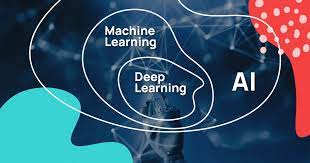
Machine learning is a subset of AI that focuses on the development of algorithms that allow computers to learn from and make predictions based on data. It involves training models using large datasets to identify patterns and make informed decisions without explicit programming.

The Relationship Between AI and ML

While AI encompasses a broad range of technologies aimed at mimicking human cognitive functions, machine learning is specifically concerned with the creation of algorithms that enable machines to learn from data. In essence, machine learning is one way to achieve artificial intelligence.

Applications of AI and ML

  • Healthcare: AI and ML are used for diagnosing diseases, predicting patient outcomes, and personalizing treatment plans.
  • Finance: These technologies help in fraud detection, risk management, algorithmic trading, and personalized banking services.
  • E-commerce: AI-driven recommendation systems enhance customer experience by suggesting products based on user behavior.
  • Autonomous Vehicles: Self-driving cars use machine learning algorithms to navigate roads safely by recognizing objects and making real-time decisions.

The Future of AI and ML

The future of artificial intelligence and machine learning holds immense potential. As these technologies continue to evolve, they will likely lead to more sophisticated applications in various fields such as healthcare diagnostics, climate modeling, smart cities development, and beyond. However, ethical considerations surrounding privacy, security, and the impact on employment must be addressed as these technologies advance.

Conclusion

The integration of artificial intelligence and machine learning into everyday life is reshaping how we interact with technology. By understanding their capabilities and implications, we can harness their power responsibly to create a better future for all.


Understanding AI and Machine Learning: Answers to 7 Common Questions

  1. What is the difference between machine learning and AI?
  2. What are the 4 types of AI machines?
  3. What is an example of AI and ML?
  4. What is AI but not ML?
  5. What is different between AI and ML?
  6. Is artificial intelligence a machine learning?
  7. What is machine learning in artificial intelligence?

What is the difference between machine learning and AI?

Artificial intelligence (AI) and machine learning (ML) are often used interchangeably, but they refer to different concepts within the realm of computer science. AI is a broader field that encompasses the creation of machines capable of performing tasks that typically require human intelligence, such as reasoning, problem-solving, and understanding language. Machine learning, on the other hand, is a subset of AI focused specifically on developing algorithms that enable computers to learn from data and improve their performance over time without being explicitly programmed for each task. In essence, while AI aims to simulate human cognitive functions broadly, machine learning provides the tools and techniques for achieving this by allowing systems to learn from experience and adapt to new information.

What are the 4 types of AI machines?

Artificial intelligence is often categorized into four types based on their capabilities and functionalities. The first type is *Reactive Machines*, which are the most basic form of AI systems designed to perform specific tasks without memory or past experiences, such as IBM’s Deep Blue chess program. The second type is *Limited Memory*, which can use past experiences to inform future decisions, commonly found in self-driving cars that analyze data from the environment to make real-time decisions. The third type is *Theory of Mind*, a more advanced AI that, in theory, would understand emotions and human thought processes; however, this level of AI remains largely theoretical at this point. Finally, *Self-aware AI* represents the most sophisticated form of artificial intelligence, capable of self-awareness and consciousness; this type remains purely conceptual as no such machines currently exist. Each type represents a step toward greater complexity and capability in AI systems.

What is an example of AI and ML?

An example that illustrates the capabilities of artificial intelligence (AI) and machine learning (ML) is the use of recommendation systems by online streaming platforms like Netflix. These platforms employ ML algorithms to analyze user behavior, preferences, and viewing history to suggest personalized movie or TV show recommendations. By continuously learning from user interactions and feedback, the AI-powered recommendation system enhances user experience by offering content tailored to individual tastes, ultimately increasing user engagement and satisfaction.

What is AI but not ML?

Artificial Intelligence (AI) encompasses a broad range of technologies designed to mimic human cognitive functions, such as reasoning, problem-solving, and understanding language. While machine learning (ML) is a subset of AI focused on algorithms that allow systems to learn from data and improve over time, not all AI involves machine learning. For instance, rule-based systems or expert systems are examples of AI that do not use ML. These systems rely on predefined rules and logic to make decisions or solve problems, rather than learning from data. Such AI applications can be effective in environments where the rules are well-defined and the variables are limited, demonstrating that AI can exist independently of machine learning techniques.

What is different between AI and ML?

Artificial intelligence (AI) and machine learning (ML) are closely related yet distinct concepts within the realm of computer science. AI refers to the broader concept of machines being able to carry out tasks in a way that we would consider “smart,” encompassing systems that can mimic human intelligence, including reasoning, problem-solving, and understanding language. Machine learning, on the other hand, is a subset of AI that specifically focuses on the ability of machines to learn from data. Rather than being explicitly programmed to perform a task, ML algorithms are designed to identify patterns and make decisions based on input data. In essence, while all machine learning is a form of AI, not all AI involves machine learning. AI can include rule-based systems and other techniques that do not rely on learning from data.

Is artificial intelligence a machine learning?

Artificial intelligence (AI) and machine learning (ML) are often mentioned together, but they are not the same thing. AI is a broad field that focuses on creating systems capable of performing tasks that would typically require human intelligence, such as understanding natural language, recognizing patterns, and making decisions. Machine learning, on the other hand, is a subset of AI that involves the development of algorithms and statistical models that enable machines to improve their performance on a specific task through experience and data analysis. In essence, while all machine learning is part of artificial intelligence, not all artificial intelligence involves machine learning. Machine learning provides one of the techniques through which AI can be realized by allowing systems to learn from data and improve over time without being explicitly programmed for each specific task.

What is machine learning in artificial intelligence?

Machine learning in artificial intelligence is a specialized area that focuses on developing algorithms and statistical models that enable computers to improve their performance on tasks through experience. Unlike traditional programming, where a computer follows explicit instructions, machine learning allows systems to learn from data patterns and make decisions with minimal human intervention. By training models on vast amounts of data, machine learning enables AI systems to recognize patterns, predict outcomes, and adapt to new information over time. This capability is fundamental in applications such as image recognition, natural language processing, and autonomous driving, where the ability to learn from data is crucial for success.