
cfchris.com

Loading

app programmer

What Does an App Programmer Do? Skills, Responsibilities, and Career Insights

What Does an App Programmer Do?

An app programmer creates and maintains software applications for mobile devices, computers, and the web. They turn ideas and requirements into working features, writing code that helps people complete tasks, find information, communicate, and enjoy digital experiences.

App programming combines technical problem-solving with an understanding of how people use software. A successful app needs more than code: it should be useful, reliable, secure, and easy to navigate.

What App Programmers Work On

An app programmer’s work depends on the type of product they build. Common projects include:

  • Mobile apps: Applications for iOS and Android phones and tablets.
  • Web apps: Interactive software people access through a web browser.
  • Desktop apps: Programs designed for Windows, macOS, or Linux computers.
  • Cross-platform apps: Applications built to run on multiple platforms, often using a shared codebase.

Programmers may build an app from the ground up or improve an existing product. Their responsibilities can include adding features, fixing bugs, connecting the app to databases or online services, and updating it as operating systems and user needs change.

Typical Responsibilities

App programming is often a collaborative process. Depending on the project and team, an app programmer may:

  • Review project requirements and help plan how the app should work.
  • Write, test, and maintain code.
  • Build interfaces and connect them to application features.
  • Work with designers, product managers, and other developers.
  • Find and fix technical problems.
  • Improve performance, accessibility, and security.
  • Prepare updates and help publish the app.

Skills and Tools

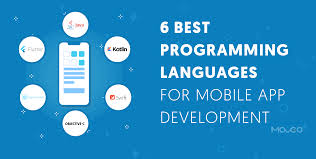
The skills required depend on the platform and the project. Mobile programmers may use languages and frameworks such as Swift for Apple platforms, Kotlin for Android, or cross-platform tools such as Flutter and React Native. Web app programmers may work with JavaScript, TypeScript, and related frameworks. Other languages and tools are used for desktop software, back-end services, and data storage.

Alongside programming knowledge, app programmers benefit from skills such as:

  • Problem-solving: Breaking complex requirements into manageable steps.
  • Testing and debugging: Identifying problems and checking that changes work as expected.
  • Communication: Explaining technical choices and collaborating with a team.
  • Attention to detail: Catching errors that could affect usability or reliability.
  • Adaptability: Learning new tools and responding to changing project needs.
  • Security awareness: Helping protect user data and reduce common risks.

How an App Is Built

App development usually moves through several stages. The team first defines the problem the app should solve and identifies its intended users. Next, designers and developers plan the features and user experience. Programmers then build the software, test it, and refine it based on results and feedback.

After release, the work continues. Apps may need bug fixes, security updates, new features, and compatibility changes. Ongoing maintenance helps keep an app dependable as devices, platforms, and user expectations evolve.

Choosing an App Programmer

When hiring an app programmer or development team, start by describing the app’s purpose, audience, and essential features. Ask about relevant project experience, development practices, testing, security, and plans for maintenance. It is also helpful to discuss communication, timelines, and how changes will be handled during the project.

A clear project scope can make it easier to compare proposals and set realistic expectations. For larger projects, building a small first version can help test the idea before investing in additional features.

Why App Programmers Matter

App programmers help transform concepts into practical digital products. Their work supports everything from everyday tools to complex business systems. By combining coding skills with thoughtful planning and testing, they help create apps that are useful, dependable, and designed around the people who use them.


App Programmer FAQs: Roles, Career Paths, Languages, Salaries, and Hiring Costs

  1. What does an app programmer do?
  2. How do I become an app programmer?
  3. What programming languages do app programmers use?
  4. How much does an app programmer earn?
  5. What is the difference between an app programmer and an app developer?
  6. How much does it cost to hire an app programmer?

What does an app programmer do?

An app programmer designs, builds, tests, and maintains software applications for mobile devices, computers, or the web. They write code to create features, fix bugs, connect apps to databases and online services, and improve performance, security, and usability. App programmers often work with designers, project managers, and other developers to turn an idea into a reliable product and keep it updated over time.

How do I become an app programmer?

To become an app programmer, start by learning programming fundamentals, then choose a platform—such as iOS, Android, web, or cross-platform development—and study the languages and tools used for it. Build small projects to practice, create a portfolio that demonstrates your work, and learn essential skills like debugging, testing, and version control. Online courses, tutorials, formal education, and personal projects can all help you gain experience. As you progress, contribute to projects or pursue internships and entry-level roles, and keep learning as app technologies evolve.

What programming languages do app programmers use?

App programmers use different programming languages depending on the type of app and platform. For iOS apps, they commonly use Swift, while Android apps are often built with Kotlin or Java. Web apps may use JavaScript or TypeScript, and cross-platform apps can be developed with tools such as Flutter, which uses Dart, or React Native, which uses JavaScript or TypeScript. The right language depends on the app’s features, performance needs, and the devices it must support.

How much does an app programmer earn?

An app programmer’s earnings depend on experience, location, specialization, and whether they work as an employee or freelancer. In the U.S., many full-time app programmers earn roughly $70,000 to $150,000 per year, with senior developers and specialists in high-demand areas potentially earning more. Freelancers may charge hourly or project-based rates, which vary based on their skills and the scope of the work.

What is the difference between an app programmer and an app developer?

An app programmer primarily writes, tests, and maintains the code that makes an application work. An app developer often has a broader role, which may include planning features, designing the user experience, choosing technologies, coordinating development, and preparing the app for release. In everyday conversation, however, the terms are often used interchangeably, and responsibilities vary by company and project.

How much does it cost to hire an app programmer?

The cost to hire an app programmer depends on the app’s complexity, the platforms it needs to support, the programmer’s experience, and the project’s location and timeline. Programmers may charge by the hour or provide a fixed project estimate; a simple app usually costs less than a custom app with advanced features, integrations, or ongoing maintenance. Before hiring, outline your requirements and ask for a detailed estimate that explains what’s included, such as design, testing, launch, and post-launch support.


airbnb software engineer

Airbnb Software Engineer: Role, Skills, and Interview Preparation

What Does an Airbnb Software Engineer Do?

An Airbnb software engineer helps build and maintain the technology behind Airbnb’s travel marketplace. The work can include developing features for guests and hosts, improving search and booking experiences, strengthening platform reliability, and creating tools that support Airbnb’s operations.

The exact responsibilities depend on the team, level, and role. Airbnb’s engineering work spans areas such as web and mobile applications, backend services, data infrastructure, payments, trust and safety, and machine learning.

Common Responsibilities

Software engineers at a company like Airbnb may contribute to the full development lifecycle, from understanding a problem to shipping and supporting a solution. Typical responsibilities can include:

  • Designing, building, testing, and maintaining software
  • Developing reliable services and user-facing features
  • Collaborating with product managers, designers, data scientists, and other engineers
  • Reviewing code and helping maintain engineering standards
  • Investigating bugs and improving performance, scalability, and security
  • Using data and user feedback to evaluate product improvements

For example, an engineer working on search might help guests find relevant stays, while someone on a host-facing team could develop tools that make it easier to manage listings and reservations.

Skills and Experience

Requirements vary by opening, so candidates should review each job description carefully. Many software engineering roles call for a strong foundation in programming, software design, data structures, and algorithms. Depending on the position, employers may also look for experience with distributed systems, mobile development, web technologies, databases, or cloud infrastructure.

Technical skills matter, but so do communication and collaboration. Engineers often work across teams and need to explain tradeoffs, incorporate feedback, and make thoughtful decisions about how a change may affect users and the broader platform.

How to Prepare for an Airbnb Software Engineer Interview

Interview formats can change and may differ by role and seniority. The recruiter or hiring team should provide the most accurate information about a specific process. In general, preparation may include:

  • Reviewing fundamentals: Practice solving coding problems and explaining your approach, including its time and space complexity.
  • Practicing system design: Be ready to discuss how you would design a reliable, scalable service and explain the tradeoffs involved.
  • Preparing project examples: Describe your role, the challenge, the decisions you made, and the outcome. Be clear about what you personally contributed.
  • Thinking about users: Consider how product and engineering choices affect guests, hosts, and other people who use the platform.
  • Preparing questions: Ask about the team’s goals, technical challenges, collaboration practices, and expectations for the role.

Working as a Software Engineer at Airbnb

Airbnb’s products serve people across many markets, so engineering decisions can involve complex technical and real-world considerations. Teams may need to balance usability, reliability, safety, privacy, and the needs of different users. The details of the work and workplace experience depend on the organization, team, location, and position.

Candidates can learn more by reviewing Airbnb’s current careers site, reading individual job descriptions, and asking recruiters about team responsibilities and interview expectations. Because openings and requirements change, current listings are the best source for role-specific information.

Is an Airbnb Software Engineering Role Right for You?

An Airbnb software engineering role may appeal to developers who enjoy solving challenging technical problems and building products used by a broad community. A strong candidate can pair solid engineering fundamentals with curiosity, clear communication, and an ability to collaborate across disciplines.


Top 8 FAQs About Becoming a Software Engineer at Airbnb

  1. How much Airbnb pays software developers?
  2. Is it difficult to get hired at Airbnb?
  3. What engineer makes $500,000 a year?
  4. Is it hard to get a job at Airbnb?
  5. How do I become a software engineer for Airbnb?
  6. Can Airbnb be a full time job?
  7. Can you make $500,000 as a Software Engineer?
  8. How much do software engineers at Airbnb make?

How much Airbnb pays software developers?

Airbnb does not pay software developers one fixed salary: compensation depends on role, level, location, and experience. In the U.S., total compensation may include base salary, an annual bonus, and stock-based compensation, so reported figures can differ significantly from base pay alone. For the most accurate estimate, check the salary range in the specific job posting and confirm the compensation details with Airbnb’s recruiter.

Is it difficult to get hired at Airbnb?

Yes, getting hired as a software engineer at Airbnb can be competitive. The process may assess coding fundamentals, problem-solving, system design, communication, and relevant experience, with expectations varying by role and seniority. Strong preparation helps: review the job description, practice explaining your technical decisions, and be ready to discuss your impact on past projects. Hiring requirements and interview steps can change, so check the current listing and confirm details with the recruiter.

What engineer makes $500,000 a year?

At Airbnb, an annual compensation package of $500,000 or more may be possible for some highly experienced senior, staff, or principal software engineers, particularly when stock and bonuses are included. That figure is not a typical salary or guaranteed pay: compensation varies by level, role, location, performance, and the value of equity over time. For a specific estimate, check current job listings and reliable compensation data, and distinguish base salary from total compensation.

Is it hard to get a job at Airbnb?

Getting a job at Airbnb can be competitive, as roles may attract many qualified candidates and the hiring process can assess technical skills, problem-solving, communication, and relevant experience. The level of difficulty depends on the position, team, location, and your background. Preparing thoroughly—by reviewing the job requirements, practicing role-specific interview questions, and clearly describing your past work—can help you present your strengths.

How do I become a software engineer for Airbnb?

To become a software engineer at Airbnb, build strong programming and computer science fundamentals, then develop practical experience by creating projects, contributing to open-source software, or working in engineering roles. Review Airbnb’s current job postings to find positions that match your skills and experience, and tailor your résumé to highlight relevant accomplishments. Prepare for the interview process by practicing coding, system design (for applicable roles), and clear explanations of your past projects. Requirements and interview steps vary by position, so use the job listing and guidance from the recruiting team as your most reliable sources.

Can Airbnb be a full time job?

Yes, working as a software engineer at Airbnb can be a full-time job. Airbnb hires full-time engineers for a range of teams and specialties, though role availability, location, and employment terms vary. Check Airbnb’s current careers page for open positions and review each listing for details about the role, schedule, and work arrangement.

Can you make $500,000 as a Software Engineer?

Yes, it’s possible for a software engineer to earn $500,000 or more in total annual compensation, but it’s uncommon and typically reflects a senior or staff-level role at a high-paying technology company. Total compensation may include salary, bonuses, and stock, whose value can change over time; it also varies by level, location, experience, and market conditions. At Airbnb, as elsewhere, pay depends on the specific role and offer, so check current job listings and reliable compensation data rather than treating $500,000 as a typical salary.

How much do software engineers at Airbnb make?

Software engineer compensation at Airbnb varies by role, experience level, and work location. Total pay may include base salary, stock-based compensation, and a bonus, so reported figures can differ substantially. For the most accurate estimate, check the salary range in the specific job listing and compare recent compensation reports for the same level and location.

nearshore it development

Nearshore IT Development: A Practical Guide for Growing Businesses

Nearshore IT Development: A Practical Guide for Growing Businesses

Building and maintaining software takes the right mix of technical skill, clear communication, and reliable project management. For companies that need to expand their development capacity, nearshore IT development can offer a useful alternative to hiring an entirely local team or working with a faraway provider.

What Is Nearshore IT Development?

Nearshore IT development is a form of outsourcing in which a business works with software developers or technology teams in nearby countries or regions. The teams are located outside the company’s home country but are typically closer in time zone and geography than offshore partners.

For a U.S. company, a nearshore partner might be based in Latin America or another nearby region. The exact location matters less than whether the team can support the company’s technical needs, communication practices, schedule, and security requirements.

How Nearshore Development Works

A nearshore engagement can take several forms. A company might hire a partner to deliver a complete software project, add developers to an existing team, or provide specialized expertise for a defined period. Common areas of work include:

  • Web and mobile application development
  • Cloud migration and infrastructure
  • Quality assurance and software testing
  • Data engineering and analytics
  • Cybersecurity and application maintenance
  • Product design and user experience

The arrangement can be project-based or ongoing. In either case, the company and provider should agree on goals, responsibilities, communication routines, delivery milestones, and how success will be measured.

Potential Benefits of Nearshore IT Development

More Overlapping Work Hours

Nearby time zones can make it easier to schedule meetings, review work, and resolve questions during the same business day. This overlap may be especially valuable for projects that require frequent collaboration or quick feedback.

Access to a Broader Talent Pool

Nearshore partnerships can help companies reach skilled professionals beyond their local hiring market. This can be useful when a business needs a particular technology skill, wants to expand a team quickly, or has difficulty filling specialized roles locally.

Flexible Team Capacity

External development teams can give a company additional capacity without requiring every role to become a permanent internal position. Depending on the provider and agreement, a team can be scaled up or adjusted as project needs change.

More Convenient Collaboration

Geographic proximity may make occasional in-person planning sessions or workshops more practical than with a distant provider. Even when teams work remotely, a closer location can simplify coordination and reduce the strain of large time differences.

Potential Cost Advantages

Nearshore development may cost less than hiring equivalent talent in some local markets, but savings are not guaranteed. Rates, project complexity, management effort, travel, and the cost of rework all affect the total. Comparing providers solely by hourly rate can lead to a misleading picture of value.

Nearshore, Offshore, and Onshore: What’s the Difference?

Onshore development generally means working with a team in the same country. Nearshore development involves a nearby country or region, while offshore development usually refers to a more distant location. These labels describe geography, not quality. A strong partner can be found in any model, and a poor fit can occur in any model as well.

When comparing options, consider more than distance. Evaluate communication, relevant experience, team stability, security practices, contract terms, and the provider’s ability to work with your existing processes.

Challenges to Plan For

Nearshore development still requires thoughtful management. A partner may work in a different legal environment, use different communication norms, or have limited familiarity with a company’s systems. Requirements can also be misunderstood if project goals and decision-making responsibilities are unclear.

To reduce these risks, document expectations early, establish a shared communication plan, and make sure the provider understands how the product will be used. Assign internal owners who can answer questions and make timely decisions. Treat the external team as a working partner rather than a task queue.

How to Choose a Nearshore Development Partner

Define the Work

Before speaking with providers, identify the problem to solve, the skills required, the expected timeline, and any constraints. A clear scope makes it easier to assess proposals and compare potential partners.

Assess Relevant Experience

Look for experience with projects of similar complexity, industry requirements, and technology. Ask how the team handled challenges, testing, deployment, and ongoing support—not just what technologies appear on a résumé.

Meet the People Who Will Do the Work

The sales team may not be the team assigned to your project. Ask to meet the proposed technical leads and developers, understand how responsibilities are divided, and learn how the provider handles staffing changes.

Review Communication and Delivery Practices

Discuss meeting schedules, documentation, project tracking, code reviews, testing, and escalation procedures. Ask how progress and risks will be reported, and make sure the proposed process fits your organization.

Check Security and Ownership Terms

Review how the provider protects data and systems, manages access, and handles incidents. Contracts should clearly address confidentiality, intellectual property, deliverables, data handling, and the process for ending the engagement.

Start with a Well-Defined Engagement

A small initial project or pilot can help both sides test communication, technical fit, and delivery practices. Set clear acceptance criteria and review the results before expanding the relationship.

Making a Nearshore Partnership Successful

Successful nearshore development depends on shared ownership. Keep product decisions close to the people who understand the business, give developers access to the context they need, and provide feedback regularly. Agree on measurable outcomes such as delivery milestones, defect rates, system performance, or user adoption.

It also helps to invest in team relationships. Introductions, clear documentation, inclusive meetings, and respectful communication can make collaboration smoother across organizations and cultures.

Is Nearshore IT Development Right for Your Business?

Nearshore development may be a good fit when your company needs additional technical capacity, values substantial time-zone overlap, and has the management practices needed to work with a distributed team. It may be less suitable when requirements are highly uncertain, internal decision-makers are unavailable, or the work depends on frequent hands-on coordination that has not been planned for.

The best choice comes from matching the engagement model to the work. With clear goals, careful partner selection, and consistent communication, nearshore IT development can help a business extend its capabilities while keeping collaboration practical and focused.


Nearshore IT Development: 7 Frequently Asked Questions

  1. What is the latest technology in software development?
  2. What does nearshore mean in technology?
  3. Can you give me an example of nearshore outsourcing?
  4. What is the difference between nearshore and offshore software development?
  5. What is an example of nearshore?
  6. What is the nearshore software development model?
  7. What is nearshore development?

What is the latest technology in software development?

There is no single “latest” technology in software development, but several major trends are shaping the field, including AI-assisted coding, generative AI integration, cloud-native applications, and platform engineering. Developers are also adopting technologies such as WebAssembly for running software across environments and memory-safe languages like Rust for performance-sensitive applications. For businesses considering nearshore IT development, the priority should be choosing a partner who can evaluate these technologies against specific project needs, security requirements, and long-term maintenance costs—not simply adopt the newest tools.

What does nearshore mean in technology?

In technology, “nearshore” means working with a software development team or IT service provider in a nearby country or region rather than hiring only locally or partnering with a distant offshore team. For U.S. companies, nearshore partners are often based in Latin America. The closer location may offer more overlapping work hours and easier collaboration, though the exact benefits depend on the team, project, and working arrangements.

Can you give me an example of nearshore outsourcing?

A U.S. company that needs a mobile app might partner with a software development team in Mexico or Colombia. Because the teams are in nearby time zones, they can more easily coordinate meetings, review designs, and address questions during overlapping work hours. The nearshore team could handle app development and testing while the company’s in-house staff manages product priorities and business requirements.

What is the difference between nearshore and offshore software development?

Nearshore software development means working with a team in a nearby country or region, while offshore development involves a team farther away, often across several time zones. Nearshore teams may offer more overlapping business hours, easier real-time communication, and more convenient travel for in-person meetings. Offshore teams can provide access to a broader talent pool and may have different cost advantages. The best choice depends on your project’s needs, budget, communication preferences, and the provider’s expertise—not location alone.

What is an example of nearshore?

An example of nearshore IT development is a U.S. company partnering with a software development team in Mexico to build a web application. Because the teams are in nearby countries and often share overlapping work hours, they can more easily schedule meetings, discuss requirements, and address issues during the same business day. The arrangement is considered nearshore because the development team is based in a geographically close country—not in the company’s home country or a distant region.

What is the nearshore software development model?

The nearshore software development model is a way for a company to work with a software team in a nearby country or region rather than hiring only locally or partnering with a distant offshore provider. The nearshore team may build a complete product, support an existing project, or add specialized skills to an in-house team. Because the teams are often in similar time zones, they can typically coordinate meetings, share feedback, and resolve issues during overlapping work hours. The arrangement can offer access to a wider talent pool and flexible capacity, but its success depends on choosing a qualified partner and setting clear expectations for communication, responsibilities, security, and delivery.

What is nearshore development?

Nearshore development is a way for a company to work with software developers or IT teams in a nearby country or region. Unlike offshore outsourcing, which often involves a significant time-zone difference, nearshore teams typically share more working hours with the client, making it easier to communicate, collaborate, and address issues in real time. Businesses use nearshore development to access skilled talent, add flexibility to their teams, and build or maintain technology products.

java react

Mastering the Art of Java and React Integration for Modern Web Development

Java and React: A Powerful Combination for Modern Web Development

Java and React: A Powerful Combination for Modern Web Development

In the world of web development, Java and React have emerged as two powerful technologies that, when combined, offer a robust solution for building modern web applications. Let’s explore how Java and React work together seamlessly to create dynamic and interactive web experiences.

The Strengths of Java

Java is a versatile programming language known for its reliability, scalability, and performance. It is commonly used for backend development due to its strong typing system, extensive libraries, and platform independence. Java’s object-oriented approach makes it ideal for building complex applications that can handle high traffic and large datasets efficiently.

The Power of React

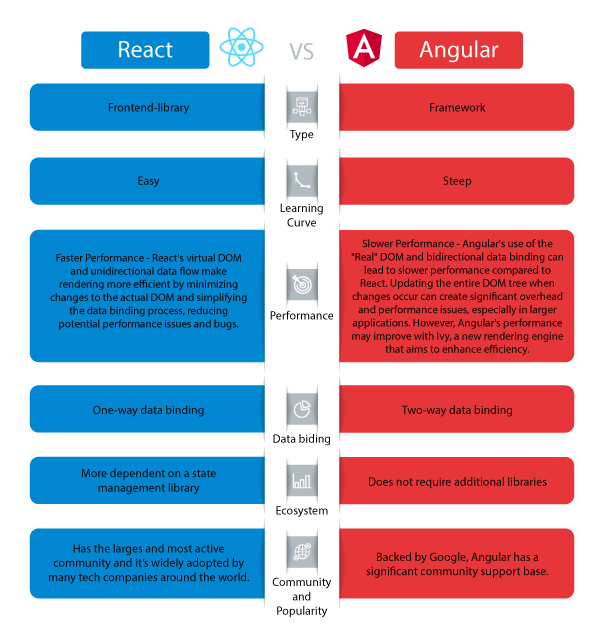
React is a popular JavaScript library developed by Facebook for building user interfaces. It allows developers to create interactive and responsive UI components that can be easily reused across different parts of an application. React’s virtual DOM (Document Object Model) enables efficient rendering of changes, resulting in faster performance and improved user experience.

Integration of Java with React

By combining Java on the backend with React on the frontend, developers can leverage the strengths of both technologies to create full-stack web applications. Java provides a robust server-side infrastructure for handling business logic, data processing, and database operations, while React handles the presentation layer with its declarative component-based architecture.

Through RESTful APIs or GraphQL endpoints, Java communicates with the React frontend to exchange data seamlessly between the client and server. This decoupled architecture enables developers to maintain clean code separation between the frontend and backend layers, making it easier to scale and maintain the application over time.

Benefits of Using Java and React Together

  • Scalability: Java’s scalability combined with React’s component-based architecture allows developers to build scalable web applications that can grow with user demand.
  • Performance: The efficient rendering mechanism of React paired with Java’s optimized backend processing results in high-performance web applications.
  • Maintainability: Separation of concerns between frontend and backend codebases simplifies maintenance tasks and facilitates code reusability.
  • User Experience: The interactive user interfaces created with React enhance the overall user experience of the application.

In Conclusion

The combination of Java and React offers a winning formula for developing modern web applications that are scalable, performant, maintainable, and user-friendly. By harnessing the strengths of these two technologies together, developers can deliver cutting-edge solutions that meet the demands of today’s dynamic digital landscape.


Exploring Java and React: Key FAQs for Web Development Integration

  1. What is Java?
  2. What is React?
  3. How can Java and React be used together?
  4. What are the advantages of using Java and React in web development?
  5. Are there any limitations or challenges when integrating Java with React?
  6. Can you provide examples of popular websites or applications built using Java and React?

What is Java?

Java is a versatile and robust programming language known for its reliability, scalability, and platform independence. It is widely used in backend development to build complex applications that can handle high traffic and large datasets efficiently. Java’s object-oriented approach, extensive libraries, and strong typing system make it a popular choice for developers looking to create secure and high-performance software solutions.

What is React?

React is a popular JavaScript library developed by Facebook for building user interfaces. It allows developers to create interactive and responsive UI components that can be easily reused across different parts of an application. React’s virtual DOM (Document Object Model) enables efficient rendering of changes, resulting in faster performance and improved user experience. With its declarative component-based architecture, React simplifies the process of building dynamic web interfaces and has become a go-to choice for frontend development in modern web applications.

How can Java and React be used together?

When it comes to integrating Java and React, developers can harness the strengths of both technologies to create powerful web applications. Java, with its robust backend capabilities, can handle business logic, data processing, and database operations effectively. On the other hand, React excels in building interactive and responsive user interfaces on the frontend. By establishing communication between Java backend services and React frontend components through APIs or other means, developers can achieve a seamless integration that ensures efficient data exchange and clean code separation. This collaborative approach allows for the development of scalable, high-performance web applications that deliver a superior user experience.

What are the advantages of using Java and React in web development?

When it comes to web development, leveraging Java and React offers a multitude of advantages. The combination of Java’s robust backend capabilities and React’s interactive frontend features results in a powerful synergy that enhances the development process. Java provides reliability, scalability, and performance on the server-side, while React simplifies the creation of dynamic user interfaces on the client-side. This integration allows for seamless communication between the frontend and backend components, enabling developers to build scalable, high-performance web applications with improved maintainability and enhanced user experience. By harnessing the strengths of both Java and React, developers can create modern web solutions that excel in functionality and performance.

Are there any limitations or challenges when integrating Java with React?

When integrating Java with React, developers may encounter certain limitations and challenges that need to be addressed. One common challenge is managing the communication between the frontend React components and the backend Java services effectively. Ensuring seamless data exchange through APIs and handling asynchronous operations can require careful coordination to maintain a smooth interaction between the two layers. Additionally, differences in programming paradigms between Java and React, such as object-oriented versus component-based approaches, may require developers to adapt their mindset and code structure to ensure compatibility and maintainability. Overall, while integrating Java with React offers numerous benefits, understanding and overcoming these limitations and challenges is crucial for a successful integration process.

Certainly! Several popular websites and applications have been built using the powerful combination of Java and React. One notable example is Facebook, which utilizes React for its frontend interface to deliver a seamless and interactive user experience, while Java powers its backend infrastructure to handle complex data processing and server-side operations. Another well-known platform that leverages Java and React is Airbnb, where Java manages the backend logic and data management, while React creates dynamic and responsive user interfaces for browsing listings and making bookings. These successful implementations showcase how Java and React work together harmoniously to create high-performance web applications that cater to millions of users worldwide.

javascript code examples

Exploring the Power of JavaScript Through Code Examples

The Power of JavaScript: Exploring Code Examples

JavaScript is a versatile programming language that is widely used in web development to create dynamic and interactive websites. With its flexibility and ease of use, JavaScript allows developers to add functionality and interactivity to their web pages. Let’s explore some code examples to showcase the power of JavaScript:

Example 1: Displaying a Welcome Message

With just a few lines of JavaScript code, you can display a personalized welcome message to your website visitors:

“`html

Welcome Message Example

“`

Example 2: Creating an Interactive Button

You can make your website more engaging by adding an interactive button that changes its text when clicked:

“`html

Interactive Button Example

“`

Example 3: Validating Form Input

JavaScript can also be used to validate user input in forms to ensure data integrity:

“`html

“`

These examples demonstrate just a fraction of what JavaScript can do. By leveraging the power of JavaScript, developers can create dynamic, responsive, and user-friendly web applications that enhance the overall user experience.


8 Commonly Asked Questions About JavaScript Code Examples and Their Solutions

  1. 1. How can I display a message using JavaScript?
  2. 2. How do I create interactive elements like buttons with JavaScript?
  3. 3. What are some common uses of JavaScript in web development?
  4. 4. Can you provide examples of form validation using JavaScript?
  5. 5. How can I manipulate the DOM (Document Object Model) with JavaScript?
  6. 6. What is event handling in JavaScript and how is it used in code examples?
  7. 7. How do I make AJAX (Asynchronous JavaScript and XML) requests with JavaScript?
  8. 8. Are there any resources or tutorials for beginners to learn about JavaScript code examples?

1. How can I display a message using JavaScript?

To display a message using JavaScript, developers can use the `alert()`, `prompt()`, or `document.write()` functions. The `alert()` function creates a pop-up dialog box with a message, while the `prompt()` function prompts the user to input text. Additionally, the `document.write()` function can dynamically write content directly to the HTML document. By incorporating these functions into their code, developers can easily showcase messages and interact with users in a simple and effective manner using JavaScript.

2. How do I create interactive elements like buttons with JavaScript?

To create interactive elements like buttons using JavaScript, you can utilize event handling to define actions that occur when the button is clicked. By assigning a function to the button’s onclick event, you can specify the behavior you want the button to exhibit when interacted with. This allows you to dynamically change the content of the button or perform specific actions based on user input. JavaScript provides a flexible and powerful way to add interactivity to your web pages, giving you the ability to create engaging user experiences through custom functionality and behavior.

3. What are some common uses of JavaScript in web development?

JavaScript is a foundational element in web development, offering a wide range of functionalities that enhance user interaction and experience on websites. Some common uses of JavaScript in web development include form validation to ensure data accuracy, creating interactive elements like buttons and sliders for engaging user interfaces, implementing dynamic content updates without reloading the entire page, and integrating with APIs to fetch and display real-time data. JavaScript also plays a crucial role in animations, user authentication processes, handling events such as clicks or scrolls, and optimizing website performance through asynchronous loading of resources. Overall, JavaScript is essential for building modern, dynamic websites that deliver a seamless and interactive user experience.

4. Can you provide examples of form validation using JavaScript?

Certainly! Form validation using JavaScript is a common practice in web development to ensure that user input meets specific criteria before being submitted. By incorporating JavaScript code into the form, developers can create custom validation rules such as checking for required fields, validating email addresses, or ensuring that input data falls within a certain range. These validations help improve the user experience by providing real-time feedback and preventing erroneous data from being submitted. Overall, form validation with JavaScript is a powerful tool that enhances the functionality and reliability of web forms.

5. How can I manipulate the DOM (Document Object Model) with JavaScript?

To manipulate the DOM (Document Object Model) with JavaScript, developers can use a variety of methods and properties provided by the language. By accessing elements within the DOM tree using selectors like getElementById, getElementsByClassName, or querySelector, developers can dynamically change content, styles, attributes, and even create new elements on a web page. Additionally, event listeners can be attached to DOM elements to respond to user interactions such as clicks or key presses. Through these techniques, JavaScript empowers developers to create dynamic and interactive web experiences by manipulating the structure and content of the DOM in real-time.

6. What is event handling in JavaScript and how is it used in code examples?

Event handling in JavaScript refers to the process of defining and assigning functions to be executed when a specific event occurs, such as a user clicking a button or hovering over an element on a webpage. In code examples, event handling is implemented by using event listeners to listen for certain events and trigger corresponding actions. For instance, a click event on a button can be captured using an event listener, which then calls a function to perform a specific task, like displaying a message or updating content on the page. Event handling is crucial in creating interactive and dynamic web applications that respond to user actions in real-time, enhancing the overall user experience.

7. How do I make AJAX (Asynchronous JavaScript and XML) requests with JavaScript?

To make AJAX (Asynchronous JavaScript and XML) requests with JavaScript, developers can use the XMLHttpRequest object to send and receive data from a web server without having to reload the entire page. By utilizing AJAX, developers can create dynamic and interactive web applications that fetch data in the background, providing a seamless user experience. With the XMLHttpRequest object, developers can specify the type of request (GET or POST), define the URL endpoint, handle response data asynchronously, and update the webpage content dynamically based on the retrieved data. AJAX has revolutionized web development by enabling real-time updates and improved performance without disrupting the user’s browsing experience.

8. Are there any resources or tutorials for beginners to learn about JavaScript code examples?

For beginners looking to learn about JavaScript code examples, there are plenty of resources and tutorials available online. Websites like Codecademy, W3Schools, and Mozilla Developer Network offer comprehensive guides and interactive lessons that cover a wide range of JavaScript topics, including code examples. Additionally, platforms like YouTube and Udemy host video tutorials that cater to different learning styles. By exploring these resources, beginners can gain a solid understanding of JavaScript fundamentals and practice writing their own code examples to enhance their skills.

java applet

Exploring the Legacy of Java Applets in Modern Web Development

The Power of Java Applets in Web Development

The Power of Java Applets in Web Development

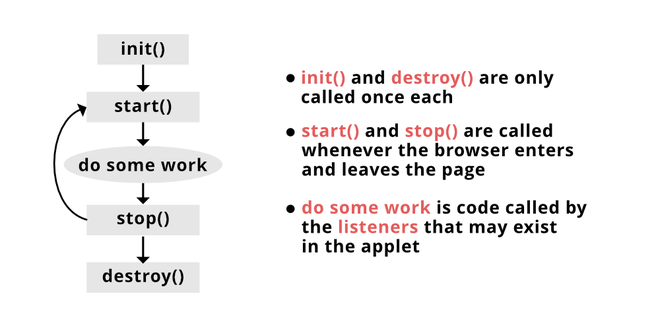
Java applets have been a significant technology in web development for many years. They are small applications written in Java that can be embedded into web pages to provide interactive features and functionality.

One of the key advantages of using Java applets is their platform independence. Since Java is a cross-platform language, applets can run on any system that has a Java Virtual Machine (JVM) installed, making them accessible to a wide audience.

Java applets are also known for their security features. They run in a sandbox environment that restricts their access to the system resources, providing a layer of protection against malicious activities.

With Java applets, developers can create dynamic and interactive content on web pages, such as games, animations, data visualizations, and more. This versatility makes them a valuable tool for enhancing user experience and engagement.

However, it’s essential to note that the use of Java applets has declined in recent years due to security concerns and the rise of other technologies like HTML5 and JavaScript. Despite this decline, Java applets still hold relevance in certain niche applications where their unique capabilities are required.

In conclusion, while the popularity of Java applets may have waned over time, their power and versatility in web development remain undeniable. For developers looking to add interactive elements to their web projects with cross-platform compatibility, Java applets can still be a valuable asset.


Understanding Java Applets: Key Questions and Insights for Web Development

  1. What is a Java applet?
  2. How do Java applets differ from standalone Java applications?
  3. Why are Java applets used in web development?
  4. What are the advantages of using Java applets?
  5. Are Java applets still relevant in modern web development?
  6. How do you embed a Java applet into a web page?
  7. What security considerations should be taken into account when using Java applets?

What is a Java applet?

A Java applet is a small application written in the Java programming language that can be embedded into web pages to provide interactive features and functionality. Unlike standalone Java applications, which are launched independently by the user, Java applets run within a web browser environment. They are often used to create dynamic content on websites, such as animations, games, data visualizations, and more. Java applets benefit from platform independence, allowing them to run on any system with a Java Virtual Machine (JVM) installed. Despite their declining popularity due to security concerns and the emergence of alternative technologies, Java applets still offer unique capabilities for developers seeking cross-platform compatibility in their web projects.

How do Java applets differ from standalone Java applications?

Java applets and standalone Java applications differ in their execution environments and intended use. Java applets are small Java programs that run within a web browser using a Java plugin. They are designed to be embedded in web pages to provide interactive content and functionality. On the other hand, standalone Java applications are programs that run independently on a user’s system without the need for a web browser. They have direct access to system resources and can perform tasks such as file manipulation, database operations, and more. While both applets and standalone applications are written in Java, their deployment methods and capabilities vary significantly, catering to different use cases and environments.

Why are Java applets used in web development?

Java applets are used in web development for their ability to provide dynamic and interactive content on web pages. One of the primary reasons for using Java applets is their platform independence, allowing them to run on any system with a Java Virtual Machine (JVM) installed. This cross-platform compatibility makes Java applets accessible to a wide audience. Additionally, Java applets offer enhanced security features by running in a sandbox environment that limits their access to system resources, mitigating potential security risks. Their versatility in creating engaging elements such as games, animations, and data visualizations makes Java applets a valuable tool for developers seeking to enhance user experience and interactivity on websites.

What are the advantages of using Java applets?

One of the frequently asked questions about Java applets is regarding their advantages. Java applets offer several benefits, including platform independence, security features, and the ability to create dynamic and interactive content on web pages. Their cross-platform compatibility allows them to run on any system with a Java Virtual Machine (JVM) installed, making them accessible to a wide audience. Additionally, Java applets operate in a secure sandbox environment that limits their access to system resources, enhancing overall security. Developers can leverage Java applets to enhance user experience by incorporating interactive elements like games, animations, and data visualizations into their web projects. Despite a decline in usage due to security concerns and the emergence of alternative technologies, Java applets remain valuable for specific applications requiring their unique capabilities.

Are Java applets still relevant in modern web development?

The relevance of Java applets in modern web development is a commonly debated topic. While Java applets were once a popular choice for creating interactive content on web pages, their usage has declined in recent years due to security concerns and the emergence of alternative technologies like HTML5 and JavaScript. Despite this decline, Java applets still hold value in niche applications where their unique capabilities, such as platform independence and security features, are required. Developers evaluating the use of Java applets in modern web projects should consider their specific needs for cross-platform compatibility and interactive functionality to determine if Java applets are still a relevant solution for their development requirements.

How do you embed a Java applet into a web page?

To embed a Java applet into a web page, you typically need to include the necessary HTML code within the webpage’s source code. This involves using the <applet> tag and specifying attributes such as the applet’s class file, width, height, and any other parameters required by the applet. Additionally, you may need to ensure that the Java applet’s class files are hosted on a server accessible to the web page. By following these steps and correctly configuring the <applet> tag, you can seamlessly integrate a Java applet into your web page and provide users with an interactive and engaging experience.

What security considerations should be taken into account when using Java applets?

When using Java applets, it is crucial to consider security implications to protect users and their systems. Java applets run in a sandbox environment with restricted access to system resources, but it’s essential to ensure that the applet code is from a trusted source to prevent malicious activities. Regularly update the Java Runtime Environment (JRE) to patch any security vulnerabilities. Limit the privileges granted to the applet and use digital signatures to verify the authenticity of the code. Additionally, consider implementing secure coding practices and monitoring for any suspicious behavior when incorporating Java applets into web applications. By addressing these security considerations, developers can mitigate risks and enhance the overall safety of using Java applets on websites.

Unlocking the Potential of Artificial Intelligence Websites: A Guide to Enhanced User Experiences

The Rise of Artificial Intelligence Websites

The Rise of Artificial Intelligence Websites

In recent years, artificial intelligence (AI) has become an integral part of various industries, transforming how businesses operate and interact with their customers. One area where AI is making a significant impact is in the development and functionality of websites.

What Are AI-Powered Websites?

AI-powered websites utilize artificial intelligence technologies to enhance user experience, streamline operations, and provide personalized content. These websites can analyze user behavior, predict preferences, and adapt in real-time to meet the needs of their visitors.

Key Features of AI Websites

  • Personalization: AI algorithms analyze user data to deliver tailored content and recommendations.
  • Chatbots: AI-driven chatbots provide instant customer support and answer common queries 24/7.
  • Predictive Analysis: By analyzing trends and patterns, AI can forecast future behaviors and outcomes.
  • Voice Search Optimization: With the rise of voice-activated devices, AI helps optimize websites for voice search queries.
  • Content Creation: Some advanced AI systems can generate content based on specific criteria or topics.

The Benefits of Using AI on Websites

The integration of AI into websites offers numerous advantages for businesses looking to enhance their digital presence. Some key benefits include:

  1. Improved User Engagement: Personalized experiences keep users engaged longer and increase conversion rates.
  2. Enhanced Customer Support: Chatbots provide quick responses, improving customer satisfaction without requiring human intervention.
  3. Data-Driven Decisions: With access to vast amounts of data, businesses can make informed decisions based on real insights rather than assumptions.
  4. Cognitive Automation: Routine tasks are automated, allowing human resources to focus on more strategic activities.

The Future of AI in Web Development

The future looks promising for the integration of artificial intelligence in web development. As technology continues to evolve, we can expect even more sophisticated applications that will further revolutionize how we interact with digital platforms. From augmented reality experiences to hyper-personalized content delivery, the possibilities are endless.

The challenge lies in ensuring ethical use and maintaining transparency when deploying these technologies. As developers harness the power of AI, they must also consider privacy concerns and strive for responsible implementation that benefits both businesses and consumers alike.

© 2023 The Tech Journal


9 Essential Tips for Optimizing Your Website for AI Compatibility and Engagement

  1. Ensure your website is mobile-friendly for AI assistants to access information easily.
  2. Optimize your website’s loading speed to provide a seamless experience for AI algorithms.
  3. Include structured data markup to help search engines better understand your content.
  4. Create high-quality, relevant content that appeals to both human visitors and AI crawlers.
  5. Implement natural language processing techniques for better interaction with voice-based AI systems.
  6. Use alt text for images to make them understandable by screen readers and image recognition AI.
  7. Regularly update and maintain your website to stay relevant in the ever-evolving field of AI.
  8. Incorporate chatbots or virtual assistants on your site for enhanced user engagement and support.
  9. Protect user data and privacy by following best practices in AI ethics and security.

Ensure your website is mobile-friendly for AI assistants to access information easily.

In today’s digital age, ensuring that your website is mobile-friendly is crucial, especially for AI assistants that access and deliver information to users. With the increasing reliance on smartphones and voice-activated devices, AI assistants like Siri, Google Assistant, and Alexa often retrieve data from websites to answer user queries. A mobile-friendly design ensures that these AI tools can efficiently navigate and extract relevant information from your site. This not only enhances the user experience by providing quick and accurate responses but also improves your website’s visibility and accessibility in search results. By optimizing for mobile, you ensure that both human users and AI systems can interact seamlessly with your content, ultimately driving more traffic and engagement.

Optimize your website’s loading speed to provide a seamless experience for AI algorithms.

Optimizing your website’s loading speed is crucial for providing a seamless experience not only for users but also for AI algorithms that interact with your site. Fast-loading pages ensure that AI-driven features, such as chatbots and personalized content recommendations, can operate efficiently and without delay. A slow website can hinder the performance of these AI tools, leading to a less effective user experience and potentially driving visitors away. By prioritizing speed optimization techniques—such as compressing images, leveraging browser caching, and minimizing server response times—you create an environment where both human users and AI systems can function optimally, ultimately enhancing engagement and satisfaction.

Include structured data markup to help search engines better understand your content.

Including structured data markup on your artificial intelligence website is a crucial tip to enhance its visibility and relevance in search engine results. By incorporating structured data, you provide search engines with additional context about your content, making it easier for them to interpret and display relevant information to users. This markup not only improves the understanding of your website’s content but also increases the likelihood of appearing in rich snippets and other prominent search features, ultimately driving more traffic to your site.

Create high-quality, relevant content that appeals to both human visitors and AI crawlers.

Creating high-quality, relevant content is crucial for the success of an artificial intelligence website. This approach ensures that human visitors find the information engaging and valuable, keeping them on the site longer and encouraging return visits. At the same time, well-crafted content is essential for AI crawlers, which index websites for search engines. By using clear language, appropriate keywords, and structured data, a website can improve its search engine ranking, making it easier for potential visitors to discover. Balancing content that appeals to both humans and AI requires understanding user intent and search algorithms, ultimately enhancing user experience and visibility.

Implement natural language processing techniques for better interaction with voice-based AI systems.

Implementing natural language processing (NLP) techniques on an artificial intelligence website can significantly enhance interaction with voice-based AI systems. NLP allows these systems to understand, interpret, and respond to human language in a way that feels natural and intuitive. By leveraging NLP, websites can offer more accurate voice recognition, better context understanding, and more relevant responses to user queries. This not only improves the overall user experience but also increases accessibility for users who prefer or require voice interactions. As a result, businesses can engage a broader audience and provide seamless communication between users and AI-driven services.

Use alt text for images to make them understandable by screen readers and image recognition AI.

In the realm of artificial intelligence websites, a crucial tip is to utilize alt text for images to ensure accessibility for users relying on screen readers and image recognition AI. By incorporating descriptive alt text, website creators can make visual content understandable to those with visual impairments, enabling them to comprehend the context and significance of the images. This practice not only enhances inclusivity but also optimizes the overall user experience by providing valuable information through alternative means.

Regularly update and maintain your website to stay relevant in the ever-evolving field of AI.

In the rapidly advancing field of artificial intelligence, it’s crucial to regularly update and maintain your website to stay relevant and competitive. AI technologies are constantly evolving, with new advancements and breakthroughs emerging frequently. By keeping your website up-to-date, you ensure that it reflects the latest trends and innovations in AI, providing users with current information and insights. Regular maintenance also helps improve website performance, security, and user experience, making it more appealing to visitors. Staying proactive in updating content and features not only enhances credibility but also positions your website as a leader in the dynamic world of AI technology.

Incorporate chatbots or virtual assistants on your site for enhanced user engagement and support.

By incorporating chatbots or virtual assistants on your website, you can significantly enhance user engagement and provide valuable support to your visitors. These AI-powered tools offer instant responses to queries, guide users through the site, and personalize interactions based on individual preferences. By integrating chatbots or virtual assistants, you create a seamless and interactive experience for users, leading to improved satisfaction and increased retention rates on your website.

Protect user data and privacy by following best practices in AI ethics and security.

Protecting user data and privacy is paramount when developing and managing an artificial intelligence website. By adhering to best practices in AI ethics and security, developers can ensure that sensitive information is safeguarded against unauthorized access and misuse. This involves implementing robust encryption methods, regularly updating security protocols, and being transparent with users about data collection practices. Additionally, obtaining explicit consent before gathering personal information and providing users with control over their data are essential steps in building trust. By prioritizing these measures, AI websites can foster a secure environment that respects user privacy while leveraging the power of artificial intelligence.

c++ mobile app development

Harnessing the Power of C++ in Mobile App Development

C++ Mobile App Development

The Power of C++ in Mobile App Development

When it comes to mobile app development, C++ is a versatile and powerful programming language that offers a wide range of benefits. While languages like Java and Swift are popular choices for mobile app development, C++ has its own unique advantages that make it a compelling option for developers.

Performance and Efficiency

One of the key strengths of C++ is its performance capabilities. C++ is a high-performance language that allows developers to create fast and efficient mobile apps. This is particularly important for apps that require complex calculations, real-time processing, or high-speed graphics rendering.

Cross-Platform Compatibility

C++ is a portable language, meaning that code written in C++ can be easily adapted to run on multiple platforms. This makes it an ideal choice for developers looking to create apps that can run on both Android and iOS devices without having to rewrite the code from scratch.

Access to Low-Level Features

With C++, developers have access to low-level features of the device’s hardware, allowing for greater control and optimization of the app’s performance. This level of control is especially beneficial for gaming apps or apps that require direct interaction with hardware components.

Integration with Existing Codebases

C++ can be seamlessly integrated with existing codebases written in other languages like Java or Objective-C. This makes it easier for developers to incorporate C++ components into their mobile apps without having to rebuild everything from scratch.

Conclusion

In conclusion, C++ offers a powerful set of tools and capabilities for mobile app development. Its performance, cross-platform compatibility, access to low-level features, and ease of integration make it a valuable choice for developers looking to create high-quality mobile apps.


8 Essential Tips for Successful C++ Mobile App Development

  1. Choose the right mobile development framework that supports C++ such as Qt or Xamarin.
  2. Optimize your code for mobile devices to ensure smooth performance.
  3. Utilize platform-specific features and APIs to enhance user experience.
  4. Implement responsive design principles for different screen sizes and orientations.
  5. Pay attention to memory management to prevent memory leaks in your C++ code.
  6. Use debugging tools and techniques specific to mobile development for efficient troubleshooting.
  7. Test your app thoroughly on various mobile devices to ensure compatibility and functionality.
  8. Stay updated with the latest trends and best practices in C++ mobile app development.

Choose the right mobile development framework that supports C++ such as Qt or Xamarin.

When embarking on C++ mobile app development, it is crucial to select the appropriate mobile development framework that fully supports C++. Frameworks like Qt and Xamarin are excellent choices as they provide robust support for C++ programming, enabling developers to leverage the language’s capabilities effectively. By opting for a framework that is compatible with C++, developers can streamline the app development process, enhance cross-platform compatibility, and maximize the performance of their mobile applications. Making an informed decision on the mobile development framework can significantly impact the success and efficiency of C++ mobile app projects.

Optimize your code for mobile devices to ensure smooth performance.

Optimizing your code for mobile devices is crucial in C++ mobile app development to guarantee smooth performance. By fine-tuning your code to be efficient and resource-friendly, you can enhance the overall user experience and ensure that your app runs seamlessly on various mobile devices. Strategies such as minimizing memory usage, optimizing algorithms, and reducing unnecessary computations can significantly improve the performance of your app, allowing users to enjoy a fast and responsive application on their smartphones or tablets.

Utilize platform-specific features and APIs to enhance user experience.

To enhance the user experience in C++ mobile app development, it is crucial to leverage platform-specific features and APIs. By utilizing these resources tailored to each operating system, developers can tap into unique functionalities that enhance the app’s performance and user engagement. Whether it’s integrating native UI components, leveraging device sensors, or optimizing for specific platform behaviors, incorporating platform-specific features can elevate the overall user experience and make the app more intuitive and responsive for users on different devices.

Implement responsive design principles for different screen sizes and orientations.

When developing mobile apps using C++, it is essential to implement responsive design principles to ensure optimal user experience across various screen sizes and orientations. By incorporating responsive design techniques, such as fluid layouts and media queries, developers can create apps that adapt seamlessly to different screen dimensions and device orientations. This approach not only enhances usability but also improves the overall visual appeal of the app, making it more engaging for users on a wide range of mobile devices.

Pay attention to memory management to prevent memory leaks in your C++ code.

Proper memory management is crucial in C++ mobile app development to avoid memory leaks that can lead to performance issues and app crashes. By paying close attention to memory allocation and deallocation, developers can ensure that their code efficiently utilizes memory resources and prevents potential vulnerabilities. Implementing smart pointers, using RAII (Resource Acquisition Is Initialization) principles, and regularly testing for memory leaks are essential practices to maintain the stability and reliability of C++ mobile apps.

Use debugging tools and techniques specific to mobile development for efficient troubleshooting.

When developing mobile apps using C++, it is essential to utilize debugging tools and techniques tailored to mobile development for efficient troubleshooting. These specialized tools enable developers to pinpoint and resolve issues specific to mobile platforms, such as memory management, performance optimization, and device compatibility. By leveraging these debugging resources, developers can streamline the troubleshooting process, identify bugs quickly, and ensure the overall stability and performance of their C++ mobile apps.

Test your app thoroughly on various mobile devices to ensure compatibility and functionality.

To ensure the compatibility and functionality of your C++ mobile app, it is crucial to thoroughly test it on a variety of mobile devices. Testing on different devices helps identify any potential issues related to screen sizes, resolutions, operating systems, and hardware specifications. By conducting comprehensive testing, developers can ensure that their app performs seamlessly across a wide range of devices, providing a consistent user experience and maximizing its reach in the mobile market.

Staying updated with the latest trends and best practices in C++ mobile app development is crucial for developers aiming to create cutting-edge and efficient applications. By keeping abreast of new advancements and industry standards, developers can leverage innovative techniques and tools to enhance the performance, user experience, and overall quality of their mobile apps. Continuous learning and adaptation to emerging trends ensure that developers remain competitive in the ever-evolving landscape of mobile app development, ultimately leading to the creation of successful and impactful applications.

mobile app programming

Mastering Mobile App Programming: A Guide to Developing Innovative Apps

The World of Mobile App Programming

The World of Mobile App Programming

Mobile app programming has revolutionized the way we interact with technology. With the rise of smartphones and tablets, mobile applications have become an integral part of our daily lives. From social media platforms to productivity tools, there seems to be an app for everything.

What is Mobile App Programming?

Mobile app programming involves the development of applications specifically designed to run on mobile devices. This includes smartphones, tablets, and other portable gadgets. Developers use various programming languages and tools to create these apps, catering to different operating systems like iOS and Android.

The Importance of Mobile App Programming

In today’s digital age, mobile apps play a crucial role in enhancing user experience and providing convenient solutions for various needs. Businesses leverage mobile apps to reach a wider audience, increase customer engagement, and boost brand visibility. Individuals rely on mobile apps for entertainment, communication, shopping, and more.

Popular Programming Languages for Mobile App Development

There are several programming languages commonly used in mobile app development:

  • Java: Primarily used for Android app development.
  • Swift: The preferred language for iOS app development.
  • Kotlin: A modern language compatible with Android development.
  • JavaScript: Widely used for cross-platform app development with frameworks like React Native.

The Future of Mobile App Programming

As technology continues to advance, the field of mobile app programming is evolving rapidly. Developers are exploring new trends such as artificial intelligence, augmented reality, and Internet of Things (IoT) integration in mobile apps. The future promises even more innovative and immersive experiences for users worldwide.

In Conclusion

Mobile app programming is a dynamic and exciting field that drives innovation in the digital landscape. Whether you’re a developer creating cutting-edge applications or a user enjoying the benefits of mobile apps, this technology has undoubtedly transformed how we interact with our devices and the world around us.


6 Essential Tips for Successful Mobile App Programming

  1. Follow platform-specific design guidelines for a consistent user experience.
  2. Optimize your app’s performance by minimizing resource usage and enhancing code efficiency.
  3. Regularly test your app on different devices to ensure compatibility and responsiveness.
  4. Implement robust security measures to protect user data and prevent unauthorized access.
  5. Utilize analytics tools to gather insights on user behavior and improve app functionality.
  6. Stay updated with the latest mobile app development trends and technologies to enhance your skills.

Follow platform-specific design guidelines for a consistent user experience.

When delving into mobile app programming, it is crucial to adhere to platform-specific design guidelines to ensure a consistent user experience. By following these guidelines set by operating systems like iOS and Android, developers can create apps that seamlessly integrate with the native look and feel of each platform. This approach not only enhances usability but also helps in establishing familiarity for users, ultimately leading to a more intuitive and engaging interaction with the app.

Optimize your app’s performance by minimizing resource usage and enhancing code efficiency.

To optimize your mobile app’s performance, it is crucial to focus on minimizing resource usage and enhancing code efficiency. By carefully managing resources such as memory, CPU, and network bandwidth, you can ensure that your app runs smoothly and responds quickly to user interactions. Additionally, writing efficient code that follows best practices and avoids unnecessary operations can significantly improve the overall performance of your app. Prioritizing these aspects during the development process will result in a more responsive and user-friendly mobile application.

Regularly test your app on different devices to ensure compatibility and responsiveness.

Regularly testing your mobile app on various devices is crucial to guarantee its compatibility and responsiveness across different platforms. By conducting thorough testing, developers can identify and address any potential issues or inconsistencies that may arise on specific devices. This proactive approach not only enhances the user experience but also helps maintain the app’s functionality and performance standards. Prioritizing device testing ensures that your app delivers a seamless experience to a diverse range of users, ultimately contributing to its success in the competitive app market.

Implement robust security measures to protect user data and prevent unauthorized access.

Implementing robust security measures is paramount in mobile app programming to safeguard user data and mitigate the risk of unauthorized access. By prioritizing security protocols such as encryption, authentication mechanisms, and secure data storage practices, developers can instill trust and confidence in their app users. Protecting sensitive information not only upholds user privacy but also fosters a secure digital environment where data breaches and cyber threats are minimized. By proactively addressing security concerns, developers demonstrate their commitment to ensuring the integrity and confidentiality of user data within their mobile applications.

Utilize analytics tools to gather insights on user behavior and improve app functionality.

To enhance the performance and user experience of your mobile app, it is essential to leverage analytics tools that provide valuable data on user behavior. By analyzing metrics such as user engagement, retention rates, and in-app interactions, developers can gain insights into how users interact with the app and identify areas for improvement. Utilizing analytics tools not only helps in understanding user preferences but also enables developers to make data-driven decisions to enhance app functionality and optimize overall performance.

Staying updated with the latest mobile app development trends and technologies is essential for enhancing your skills in this dynamic field. By keeping abreast of new advancements, you can expand your knowledge, stay competitive, and adapt to the ever-changing demands of the industry. Embracing innovation and learning about emerging technologies will not only sharpen your expertise but also enable you to create cutting-edge mobile applications that resonate with modern users.

custom mobile application development company

Empowering Your Business: Custom Mobile Application Development Company Tailored for Success

Custom Mobile Application Development Company

The Importance of Choosing a Custom Mobile Application Development Company

In today’s digital age, mobile applications have become essential tools for businesses looking to enhance their online presence and engage with customers on a more personal level. With the increasing demand for mobile apps, the need for custom solutions tailored to specific business requirements has also grown significantly.

When it comes to developing a mobile application that stands out from the competition and meets the unique needs of your business, partnering with a custom mobile application development company is crucial. These companies specialize in creating bespoke mobile apps that are designed to address your specific goals and objectives.

Benefits of Working with a Custom Mobile App Development Company:

  • Personalized Solutions: Custom app development companies take the time to understand your business requirements and create tailored solutions that align with your brand identity and objectives.
  • Enhanced User Experience: By focusing on user-centric design and functionality, custom mobile apps provide a seamless and intuitive experience for your customers, leading to higher engagement and retention rates.
  • Scalability and Flexibility: Custom apps are built to scale as your business grows, allowing for future enhancements and updates to meet evolving market demands.
  • Technical Expertise: Custom app development companies have a team of experienced developers who are well-versed in the latest technologies and trends, ensuring that your app is built using best practices and industry standards.
  • Support and Maintenance: After launching your custom mobile app, these companies provide ongoing support and maintenance services to ensure optimal performance and functionality.

Whether you are looking to create an e-commerce app, a productivity tool, or a customer relationship management system, partnering with a custom mobile application development company can help you bring your vision to life effectively. By investing in a custom solution, you can differentiate your brand in the competitive app market and deliver value to your target audience.

If you’re ready to take your business to the next level with a customized mobile app, consider working with a reputable custom mobile application development company that can turn your ideas into reality.


Top 6 FAQs About Partnering with a Custom Mobile App Development Company

  1. 1. What is the process of developing a custom mobile application?
  2. 2. How long does it take to develop a custom mobile app?
  3. 3. What factors determine the cost of custom mobile app development?
  4. 4. Can you provide examples of custom mobile apps you have developed in the past?
  5. 5. Do you offer post-launch support and maintenance for custom mobile apps?
  6. 6. How do you ensure that the custom mobile app aligns with our business goals and requirements?

1. What is the process of developing a custom mobile application?

The process of developing a custom mobile application typically involves several key stages. It begins with a thorough discovery phase, where the development team collaborates closely with the client to gather requirements, define objectives, and outline the app’s features and functionality. Following this, the design phase focuses on creating wireframes and prototypes to visualize the app’s user interface and user experience. Development then takes center stage, where coding and programming bring the app to life according to the agreed-upon specifications. Testing is a critical step to ensure the app functions seamlessly across various devices and platforms. Finally, deployment involves launching the app on app stores and providing ongoing support and maintenance post-launch to address any issues or implement updates as needed.

2. How long does it take to develop a custom mobile app?

When considering the development timeline for a custom mobile app, it is essential to understand that the duration can vary significantly based on various factors. The complexity of the app, features and functionalities required, design intricacies, integration with backend systems, testing phases, and client feedback loops all play a role in determining the timeframe. On average, a custom mobile app development process can take anywhere from a few weeks to several months to complete. It is crucial for businesses to work closely with their chosen custom mobile application development company to establish clear project milestones and timelines to ensure a successful and timely delivery of the app.

3. What factors determine the cost of custom mobile app development?

When considering the cost of custom mobile app development, several key factors come into play. These factors include the complexity of the app’s features and functionality, the platform(s) it will be built for (iOS, Android, or both), the design requirements, integration with third-party services, backend infrastructure needs, ongoing maintenance and support, as well as the location and expertise of the development team. Each of these elements contributes to the overall cost estimation for creating a custom mobile application that meets your specific business goals and user needs.

4. Can you provide examples of custom mobile apps you have developed in the past?

When considering a custom mobile application development company, a frequently asked question is, “Can you provide examples of custom mobile apps you have developed in the past?” This question is crucial as it allows potential clients to assess the company’s expertise and experience in creating tailored solutions. By reviewing past projects and case studies, clients can gain insight into the company’s capabilities, design aesthetics, functionality, and overall success in delivering customized mobile applications that meet specific business needs. Providing examples of previous work not only showcases the company’s proficiency but also helps clients envision the possibilities for their own custom mobile app development project.

5. Do you offer post-launch support and maintenance for custom mobile apps?

Ensuring the success and longevity of your custom mobile application is a top priority for us. We understand the importance of post-launch support and maintenance in keeping your app running smoothly and meeting evolving user needs. Our custom mobile application development company is dedicated to providing comprehensive post-launch support services, including regular maintenance, updates, bug fixes, and technical assistance. You can rely on our team to be there every step of the way to ensure that your custom mobile app continues to deliver optimal performance and user satisfaction long after its launch.

6. How do you ensure that the custom mobile app aligns with our business goals and requirements?

When selecting a custom mobile application development company, ensuring that the app aligns with your business goals and requirements is crucial. A reputable company will begin by conducting a thorough analysis of your business objectives, target audience, and market landscape. They will collaborate closely with you to gather detailed requirements and preferences for the app’s features, design, and functionality. Through effective communication, regular feedback sessions, and prototyping, the development team will work diligently to tailor the mobile app to meet your specific needs while aligning it with your overarching business goals. By following a structured development process that prioritizes your input and vision, the custom mobile app will be crafted to reflect your brand identity and deliver tangible value to your users.