cfchris.com

Loading

embedded development

Exploring the Innovations of Embedded Development

The World of Embedded Development

The World of Embedded Development

Embedded development is a fascinating field that plays a crucial role in powering the devices we use every day. From smartphones to smart home appliances, embedded systems are at the heart of modern technology.

So, what exactly is embedded development? In simple terms, it involves designing and programming small computing systems that are embedded within larger devices or machinery. These systems are dedicated to specific functions and operate with minimal human intervention.

One of the key challenges in embedded development is optimizing performance while working within constraints such as limited processing power, memory, and energy consumption. Developers must carefully design efficient algorithms and code to ensure that the embedded system functions reliably and effectively.

Embedded developers work with a variety of hardware platforms and programming languages, depending on the requirements of the project. Common languages used in embedded development include C, C++, and assembly language. They also utilize specialized tools and software to debug and test their code thoroughly.

As technology continues to advance, the demand for skilled embedded developers is on the rise. Companies across industries rely on these experts to create innovative solutions that drive progress and improve efficiency. Whether it’s designing wearable devices or implementing IoT solutions, embedded developers are at the forefront of innovation.

In conclusion, embedded development is a dynamic and rewarding field that offers endless opportunities for creativity and problem-solving. As we look towards a future filled with smart devices and interconnected systems, the role of embedded developers will only become more vital in shaping our digital world.


Top 8 Frequently Asked Questions About Embedded Development

  1. What is embedded development?
  2. What programming languages are commonly used in embedded development?
  3. How does embedded development differ from traditional software development?
  4. What are the key challenges faced by embedded developers?
  5. Which industries rely heavily on embedded systems?
  6. What tools and software are essential for embedded development?
  7. How can one start a career in embedded development?
  8. What are some examples of popular devices that use embedded systems?

What is embedded development?

Embedded development refers to the process of designing and programming small computing systems that are integrated within larger devices or machinery to perform specific functions autonomously. These embedded systems are dedicated to executing predefined tasks efficiently with minimal human intervention. Embedded development involves optimizing performance within constraints such as limited processing power, memory, and energy consumption. Skilled developers in this field work with a variety of hardware platforms and programming languages to create reliable and effective solutions for a wide range of applications in modern technology.

What programming languages are commonly used in embedded development?

In the realm of embedded development, several programming languages are commonly utilized to craft efficient and reliable systems. Among the popular choices are C, C++, and assembly language. These languages offer developers the flexibility and control needed to optimize performance while working within the constraints of limited resources typical in embedded systems. By leveraging these languages, developers can create robust code that powers a wide array of devices and machinery, showcasing the versatility and power of embedded development in today’s technological landscape.

How does embedded development differ from traditional software development?

In the realm of technology, the distinction between embedded development and traditional software development lies in their respective focuses and applications. Embedded development involves creating software that is specifically tailored to operate within embedded systems, such as microcontrollers or IoT devices, where space, power, and processing constraints are prevalent. In contrast, traditional software development typically revolves around designing applications for general-purpose computing devices like computers and smartphones, with a broader scope and fewer hardware limitations. The specialized nature of embedded development necessitates a deep understanding of hardware-software interactions and optimization techniques to ensure efficient performance within constrained environments.

What are the key challenges faced by embedded developers?

Embedded developers face several key challenges in their work. One of the primary challenges is optimizing performance within the constraints of limited resources such as processing power, memory, and energy consumption. They must carefully design efficient algorithms and code to ensure that the embedded system operates reliably and effectively. Additionally, staying up-to-date with rapidly evolving technology and hardware platforms is essential for embedded developers to create innovative solutions that meet the demands of modern devices and applications. Debugging and testing code thoroughly to ensure functionality and security are also critical challenges faced by embedded developers in their day-to-day work.

Which industries rely heavily on embedded systems?

Various industries rely heavily on embedded systems to power their products and services. The automotive industry utilizes embedded systems in vehicles for functions such as engine control, navigation systems, and driver assistance features. The healthcare sector employs embedded systems in medical devices like pacemakers, insulin pumps, and monitoring equipment to improve patient care. Additionally, the consumer electronics industry incorporates embedded systems into smartphones, smart TVs, and home appliances to deliver enhanced functionality and connectivity. Industrial automation relies on embedded systems for controlling machinery and optimizing manufacturing processes. Overall, industries such as automotive, healthcare, consumer electronics, and industrial automation heavily depend on embedded systems for innovation and efficiency in their operations.

What tools and software are essential for embedded development?

When it comes to embedded development, having the right tools and software is crucial for success. Essential tools for embedded development include integrated development environments (IDEs) like Eclipse or Visual Studio, which provide a comprehensive platform for writing, compiling, and debugging code. Additionally, software tools such as compilers, debuggers, and simulators are essential for testing and optimizing code for embedded systems. Version control systems like Git help manage code changes efficiently, while hardware debugging tools such as JTAG interfaces enable developers to troubleshoot issues at the hardware level. Overall, a well-equipped toolbox of software and tools is essential for streamlining the development process and ensuring the reliability of embedded systems.

How can one start a career in embedded development?

To start a career in embedded development, individuals can begin by gaining a strong foundation in computer science and programming languages such as C and C++. Acquiring knowledge of electronics and microcontrollers is also essential. Engaging in hands-on projects, such as building simple embedded systems or participating in coding competitions, can help develop practical skills. Pursuing internships or entry-level positions in companies that specialize in embedded systems is another valuable step towards entering the field. Continuous learning and staying updated on industry trends through online courses, workshops, and networking with professionals can further enhance one’s prospects in starting a successful career in embedded development.

Embedded systems are ubiquitous in our daily lives, powering a wide range of popular devices that we rely on regularly. Some examples of these devices include smartphones, smartwatches, digital cameras, home appliances like smart thermostats and refrigerators, automobile navigation systems, medical devices such as pacemakers and insulin pumps, and industrial machinery like robotics and automation systems. These devices leverage embedded systems to perform specific functions efficiently and reliably, showcasing the versatility and importance of embedded development in modern technology.

java programming for beginners

Java Programming for Beginners: A Step-by-Step Guide to Learning Java

Java Programming for Beginners

Java Programming for Beginners

If you are new to programming and looking to learn a versatile language that is widely used in the industry, Java is an excellent choice. Java is known for its simplicity, readability, and platform independence, making it a popular language for beginners.

Why Learn Java?

Java is a great language to start with because of its:

  • Simplicity: Java syntax is easy to understand and learn.
  • Readability: Java code is clean and organized, making it easier to maintain and debug.
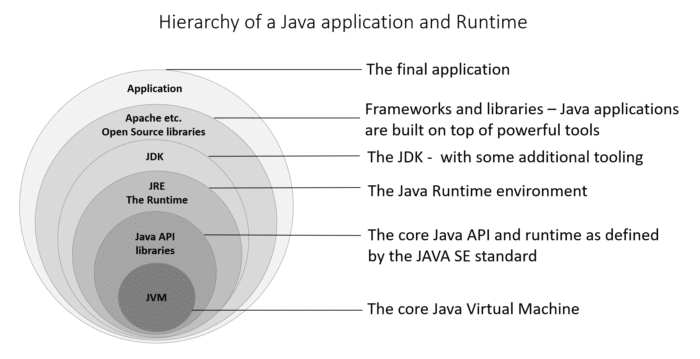
  • Platform Independence: Java programs can run on any device that has a Java Virtual Machine (JVM).
  • Versatility: Java is used in various applications, from web development to mobile apps.

Getting Started with Java

To start programming in Java, you will need to:

  1. Install JDK: Download and install the Java Development Kit (JDK) from the official Oracle website.
  2. Select an IDE: Choose an Integrated Development Environment (IDE) like Eclipse or IntelliJ IDEA for writing and running your Java code.
  3. Learn the Basics: Begin with basic concepts such as variables, data types, loops, and conditional statements.
  4. Practice Coding: The best way to learn programming is by practicing. Start with simple programs and gradually move on to more complex projects.

Resources for Learning Java

There are numerous resources available online to help you learn Java, including:

Coding in Java: A Rewarding Journey

Learning Java programming can be a rewarding journey that opens up a world of opportunities in software development. Whether you are interested in building web applications, mobile apps, or enterprise software, mastering Java can pave the way for a successful career in programming.


7 Essential Tips for Beginners to Master Java Programming

  1. Start with the basics
  2. Practice coding regularly to improve your skills and understanding of Java.
  3. Utilize online resources such as tutorials, forums, and documentation for guidance.
  4. Understand object-oriented programming concepts like classes and objects.
  5. Debug your code regularly to identify and fix errors early on.
  6. Collaborate with other Java programmers to learn from their experiences and get feedback on your code.
  7. Stay patient and persistent – mastering Java programming takes time and practice.

Start with the basics

Starting with the basics is a crucial tip for beginners diving into Java programming. By building a strong foundation in fundamental concepts like variables, data types, loops, and conditional statements, newcomers can grasp the core principles of the language and gradually progress to more advanced topics. Mastering these basics not only enhances understanding but also lays the groundwork for tackling complex programming challenges with confidence and ease.

Practice coding regularly to improve your skills and understanding of Java.

To enhance your skills and deepen your understanding of Java programming, it is crucial to practice coding regularly. By consistently working on coding exercises and projects, you not only reinforce your knowledge of Java syntax and concepts but also develop problem-solving skills essential for becoming a proficient programmer. Through consistent practice, you will gain confidence in writing code, identify areas for improvement, and gradually master the art of Java programming.

Utilize online resources such as tutorials, forums, and documentation for guidance.

Beginners in Java programming can greatly benefit from utilizing online resources such as tutorials, forums, and documentation for guidance. These resources provide valuable insights, tips, and solutions to common programming challenges. Tutorials offer step-by-step instructions on various Java concepts, while forums allow beginners to ask questions and interact with a community of experienced developers. Additionally, documentation serves as a comprehensive reference guide for understanding Java libraries and functions. By leveraging these online resources, beginners can enhance their learning experience and progress more effectively in their Java programming journey.

Understand object-oriented programming concepts like classes and objects.

To excel in Java programming as a beginner, it is crucial to grasp fundamental object-oriented programming concepts such as classes and objects. Classes serve as blueprints for creating objects, which are instances of these classes. Understanding how classes define the structure and behavior of objects is essential for building robust and scalable Java applications. By mastering these concepts, beginners can lay a solid foundation for writing efficient and well-organized code in Java.

Debug your code regularly to identify and fix errors early on.

Regularly debugging your code is a crucial tip for beginners in Java programming. By actively identifying and fixing errors early on in the development process, you can ensure that your code is clean, efficient, and free of bugs. Debugging not only helps you understand how your program works but also improves your problem-solving skills and overall coding proficiency. Embracing this practice will ultimately lead to smoother development experiences and more robust Java applications.

Collaborate with other Java programmers to learn from their experiences and get feedback on your code.

Collaborating with other Java programmers is a valuable tip for beginners looking to enhance their programming skills. By engaging with a community of Java enthusiasts, you can learn from their experiences, gain insights into best practices, and receive constructive feedback on your code. This collaborative approach not only fosters a supportive learning environment but also exposes you to diverse perspectives and innovative solutions that can help you grow as a Java programmer.

Stay patient and persistent – mastering Java programming takes time and practice.

Staying patient and persistent is crucial when embarking on the journey of learning Java programming as a beginner. Mastering Java requires dedication, practice, and a willingness to learn from mistakes. It’s important to understand that progress may be gradual, but with consistent effort and perseverance, you can build a solid foundation in Java programming that will serve you well in your coding endeavors. Remember, Rome wasn’t built in a day, and the same goes for mastering the intricacies of Java programming.

java main

Exploring the Significance of the Java Main Method

The Importance of Java Main Method

The Importance of Java Main Method

When it comes to Java programming, the main method plays a crucial role. It is the entry point of any Java program, where the execution begins. Understanding the main method is essential for every Java developer.

What is the Main Method?

In Java, the main method is defined as:

public static void main(String[] args) {

// Program logic goes here

}

The main method is where the program starts its execution. When you run a Java application, the JVM (Java Virtual Machine) looks for the main method and starts executing from there.

Key Points about the Main Method:

  • The main method must be declared as public static void.
  • It must have a parameter of type String[] args, which allows command-line arguments to be passed to the program.
  • The return type of the main method is void, indicating that it does not return any value.

Why is the Main Method Important?

The main method serves as a starting point for your Java program. It allows you to define what actions should be taken when the program is executed. You can initialize variables, call other methods, and control the flow of your application from within the main method.

Furthermore, understanding how to work with command-line arguments passed to the main method can make your programs more flexible and versatile.

Conclusion

In conclusion, the main method in Java is a fundamental concept that every programmer should grasp. By mastering how to write and utilize the main method effectively, you can create robust and functional Java applications that meet your specific requirements.


9 Essential Tips for Understanding the Java Main Method

  1. The main method in Java serves as the entry point for a Java application.
  2. The main method must be declared as public, static, and void.
  3. The main method takes an array of Strings (String[]) as its parameter, which can be used to pass command line arguments.
  4. The main method is where the execution of a Java program begins.
  5. You can only have one main method in a class in Java.
  6. The signature of the main method must be exactly
  7. It is common practice to put the actual logic of your program in other methods and call them from the main method.
  8. ‘System.out.println()’ statements are often used within the main method for outputting information to the console.
  9. Remember that any code outside of the main method will not be executed automatically.

The main method in Java serves as the entry point for a Java application.

The main method in Java serves as the entry point for a Java application. It is where the program’s execution begins, and the Java Virtual Machine (JVM) starts running the code. Understanding and correctly implementing the main method is crucial for developers as it allows them to define the initial actions to be taken when the program is launched. By grasping the significance of the main method, programmers can effectively structure their Java applications and control their flow from the very start.

The main method must be declared as public, static, and void.

In Java programming, it is essential to ensure that the main method is declared with the modifiers “public,” “static,” and “void.” The “public” modifier allows the main method to be accessed from outside the class, making it the entry point of the program. The “static” modifier indicates that the main method belongs to the class itself rather than an instance of the class. Lastly, the “void” return type specifies that the main method does not return any value upon completion. By adhering to these requirements, developers can effectively define and execute their Java programs with clarity and consistency.

The main method takes an array of Strings (String[]) as its parameter, which can be used to pass command line arguments.

In Java programming, the main method is a critical component that serves as the entry point for executing a program. One key aspect to note is that the main method accepts an array of Strings (String[]) as its parameter. This feature allows developers to pass command line arguments to the program, enabling greater flexibility and customization in how the Java application behaves based on external inputs. By leveraging this capability effectively, developers can create dynamic and interactive programs that respond to varying input parameters provided at runtime.

The main method is where the execution of a Java program begins.

The main method in Java serves as the starting point for the execution of a Java program. It is the entry point where the JVM (Java Virtual Machine) begins running the program’s code. Understanding the significance of the main method is crucial for Java developers, as it allows them to define the initial actions and logic that set the program in motion. By grasping the role of the main method, programmers can effectively structure their Java applications and control how they function from the very beginning of execution.

You can only have one main method in a class in Java.

In Java, it is important to note that you can only have one main method in a class. This restriction is a fundamental rule in Java programming, as the main method serves as the entry point for executing a Java program. Having multiple main methods within the same class would create ambiguity for the JVM (Java Virtual Machine) to determine which main method to execute. By adhering to this rule and having a single main method in a class, you ensure clarity and consistency in your Java applications, allowing for smooth execution and proper control of program flow.

The signature of the main method must be exactly

In Java, it is crucial to adhere to the specific signature requirements of the main method. The signature of the main method must be exactly as follows: “public static void main(String[] args)”. Any deviation from this precise format can lead to errors and prevent the Java Virtual Machine (JVM) from recognizing the entry point of the program. Therefore, ensuring that the main method’s signature matches this exact structure is essential for the successful execution of a Java application.

It is common practice to put the actual logic of your program in other methods and call them from the main method.

In Java programming, it is a common practice to separate the actual logic of your program into other methods and then call these methods from the main method. By doing so, you can achieve better organization and maintainability of your code. This approach allows you to break down the functionality of your program into smaller, more manageable parts, making it easier to understand and debug. Additionally, it promotes code reusability and modularity, enabling you to easily modify or expand your program in the future without affecting the overall structure.

‘System.out.println()’ statements are often used within the main method for outputting information to the console.

In Java programming, the main method serves as the entry point for executing a program. One common practice within the main method is to use the ‘System.out.println()’ statement for outputting information to the console. This statement allows developers to display messages, variables, or any other relevant data during program execution. By incorporating ‘System.out.println()’ statements effectively within the main method, developers can provide valuable insights and feedback to users, making their Java applications more informative and user-friendly.

Remember that any code outside of the main method will not be executed automatically.

In Java, it is important to remember that any code outside of the main method will not be executed automatically. The main method serves as the entry point for the program, and only code written within this method will be executed when the program is run. Any additional logic or functions placed outside of the main method will need to be explicitly called from within the main method in order to be executed. Understanding this concept is crucial for structuring Java programs effectively and ensuring that all intended actions are carried out during program execution.

java for beginners

Java for Beginners: A Step-by-Step Guide to Learning Programming

Java for Beginners

Java for Beginners: A Comprehensive Guide

If you are new to programming and looking to learn a versatile and widely-used language, Java is an excellent choice. Java is known for its simplicity, readability, and vast community support, making it ideal for beginners to start their coding journey.

Why Learn Java?

Java is a high-level programming language that is platform-independent, meaning you can write code once and run it on any device that supports Java. This feature makes Java versatile and widely used in various applications, from web development to mobile apps.

Key Concepts in Java

As a beginner learning Java, you will come across essential concepts such as:

  • Variables: Used to store data values.
  • Control Structures: Including loops and conditional statements.
  • Classes and Objects: The building blocks of Java programs.
  • Inheritance and Polymorphism: Important concepts in object-oriented programming.
  • Exception Handling: Dealing with errors in your code.

Resources for Learning Java

If you are eager to start your journey into Java programming, there are plenty of resources available online. Websites like Codecademy, Coursera, and Oracle’s official Java tutorials offer step-by-step lessons tailored for beginners.

Your First Java Program

To get started with coding in Java, begin by writing a simple “Hello World” program. This classic program prints the text “Hello World” on the screen and serves as an excellent introduction to basic syntax in Java.


public class HelloWorld {

public static void main(String[] args) {

System.out.println("Hello World");

}

}

Coding Challenges

To enhance your skills and understanding of Java, consider participating in coding challenges on platforms like LeetCode or HackerRank. These challenges provide real-world problems that can help you practice your coding skills and improve your problem-solving abilities.

In Conclusion

Learning Java as a beginner can open up a world of opportunities in the programming field. With dedication, practice, and the right resources, you can master this powerful language and embark on a rewarding career as a software developer or programmer.


Top 8 Frequently Asked Questions About Learning Java for Beginners

  1. Can you learn Java as a beginner?
  2. Will Java be replaced by AI?
  3. What are the 4 pillars of Java?
  4. How can I start to learn Java?
  5. Can I teach myself Java?
  6. Which is harder, C++ or Java?
  7. What is Java basics for beginners?
  8. Is Java easy to learn for beginners?

Can you learn Java as a beginner?

For beginners looking to delve into the world of programming, learning Java is not only possible but highly recommended. Java’s user-friendly syntax, extensive documentation, and robust community support make it an excellent choice for those starting their coding journey. With dedication, practice, and access to various online resources tailored for beginners, mastering Java can be a rewarding experience that lays a solid foundation for further exploration in the field of software development.

Will Java be replaced by AI?

While artificial intelligence is advancing rapidly and influencing many aspects of technology, it is unlikely that AI will replace Java in the foreseeable future. Java is a robust and versatile programming language that has been widely adopted across various industries for its reliability, scalability, and platform independence. AI technologies often rely on programming languages like Java to build applications and frameworks. Instead of replacing Java, AI is more likely to complement it by enhancing development processes and creating more sophisticated tools that can streamline coding tasks. As a result, Java remains an essential skill for developers, especially as they integrate AI capabilities into their projects.

What are the 4 pillars of Java?

The four pillars of Java are key concepts that form the foundation of the language and are essential for beginners to understand. These pillars include: Object-Oriented Programming (OOP), which emphasizes the use of classes and objects for organizing code; Inheritance, allowing classes to inherit attributes and methods from other classes; Encapsulation, which involves bundling data and methods into a single unit; and Polymorphism, enabling objects to take on multiple forms based on their context. Mastery of these pillars is crucial for building robust and efficient Java programs.

How can I start to learn Java?

For beginners looking to start learning Java, a great way to begin is by familiarizing yourself with the basic syntax and concepts of the language. Online tutorials, courses, and books dedicated to Java programming can provide a structured approach to learning. Setting up a development environment on your computer and practicing writing simple programs can help reinforce your understanding of Java fundamentals. Additionally, engaging in coding challenges and projects can further enhance your skills and confidence in using Java. Remember that consistent practice, patience, and a willingness to explore and experiment are key to mastering Java as a beginner.

Can I teach myself Java?

Teaching yourself Java is absolutely possible for beginners. With the abundance of online resources, tutorials, and practice exercises available, you can learn Java at your own pace and convenience. Many successful programmers have started by teaching themselves Java through self-study and hands-on practice. By dedicating time and effort to understanding the key concepts of Java programming, you can build a solid foundation and gradually advance your skills in this versatile language. Remember, persistence and a passion for learning are key to mastering Java on your own.

Which is harder, C++ or Java?

When it comes to comparing the difficulty level between C++ and Java for beginners, opinions may vary. Both C++ and Java are powerful programming languages with their own complexities and learning curves. Some beginners find C++ more challenging due to its low-level features and strict syntax, while others may perceive Java as easier to grasp because of its simpler syntax and automatic memory management. Ultimately, the difficulty of learning C++ or Java depends on individual preferences, prior programming experience, and the specific goals of the learner. It is recommended for beginners to explore both languages and determine which one aligns better with their interests and objectives in the field of programming.

What is Java basics for beginners?

For beginners diving into Java programming, understanding the basics is crucial to building a strong foundation. Java basics encompass fundamental concepts such as variables, control structures, classes and objects, inheritance, polymorphism, and exception handling. These core principles form the building blocks of Java programs and are essential for beginners to grasp in order to write efficient and functional code. By mastering these Java basics, beginners can progress confidently in their learning journey and unlock the full potential of this versatile programming language.

Is Java easy to learn for beginners?

For beginners diving into the world of programming, the question of whether Java is easy to learn often arises. Java, known for its simplicity and readability, is considered beginner-friendly due to its straightforward syntax and vast community support. While mastering any programming language requires dedication and practice, Java’s clear structure and extensive resources tailored for beginners make it a popular choice for those starting their coding journey. With commitment and the right guidance, beginners can find Java to be an accessible and rewarding language to learn.

java projects for beginners

Exploring Fun and Educational Java Projects for Beginners

Java Projects for Beginners

Java Projects for Beginners

If you are new to programming and looking to enhance your skills, starting with Java projects can be a great way to dive into the world of coding. Java is a versatile and widely-used programming language that is beginner-friendly and offers a wealth of resources to help you get started.

Why Choose Java for Beginners?

Java is known for its simplicity and readability, making it an ideal choice for beginners. It is a versatile language that can be used for a variety of applications, including web development, mobile app development, and software engineering.

Java Projects Ideas for Beginners

Here are some simple Java project ideas that are perfect for beginners:

  1. Calculator: Create a basic calculator application that can perform simple arithmetic operations like addition, subtraction, multiplication, and division.
  2. To-Do List: Build a to-do list application where users can add tasks, mark them as completed, and delete them as needed.
  3. Temperature Converter: Develop a program that converts temperatures between Fahrenheit and Celsius.
  4. Simple Game: Create a text-based game like Hangman or Tic-Tac-Toe to practice basic programming concepts.
  5. Contact Book: Design an application that stores and displays contact information such as names, phone numbers, and emails.

Tips for Starting Your Java Project

When starting your Java project as a beginner, remember the following tips:

  • Start Small: Begin with simple projects to grasp the fundamentals before moving on to more complex tasks.
  • Use Online Resources: Take advantage of online tutorials, forums, and documentation to learn new concepts and troubleshoot issues.
  • Practice Regularly: Consistent practice is key to improving your coding skills. Set aside time each day to work on your projects.

In conclusion, embarking on Java projects as a beginner can be an exciting journey that opens up numerous possibilities in the world of programming. By starting with simple projects and gradually expanding your knowledge base, you can build a strong foundation in Java programming that will serve you well in your coding endeavors.


Getting Started with Java: Beginner-Friendly Projects and Tips

  1. How to make a simple Java project?
  2. Can a beginner start with Java?
  3. What is a good project for Java?
  4. What should be my first Java project?

How to make a simple Java project?

Creating a simple Java project for beginners involves a few key steps. To start, you can set up your development environment by installing the Java Development Kit (JDK) and an Integrated Development Environment (IDE) like Eclipse or IntelliJ IDEA. Next, you can create a new Java project in your IDE, define a main class with a “public static void main(String[] args)” method, and begin writing your code to implement the desired functionality. It’s important to break down the project into smaller tasks, test your code regularly, and seek help from online resources or forums if you encounter any challenges. By following these steps and practicing regularly, beginners can successfully create their first simple Java project and gain valuable programming experience.

Can a beginner start with Java?

Starting with Java as a beginner is definitely possible and highly recommended. Java is known for its beginner-friendly syntax, extensive documentation, and strong community support, making it an excellent choice for those new to programming. With a plethora of resources available online, including tutorials, forums, and sample projects, beginners can easily grasp the basics of Java and start building their own projects in no time. By diving into Java projects early on, beginners can gain valuable hands-on experience and develop a solid foundation in programming that will serve them well as they progress in their coding journey.

What is a good project for Java?

When it comes to selecting a suitable project for beginners in Java, a common recommendation is to start with a simple and practical application that aligns with your interests and learning goals. Projects like a basic calculator, to-do list manager, or even a simple game can be excellent choices as they allow beginners to apply fundamental Java concepts in a hands-on manner. These projects not only help in understanding core programming principles but also provide a solid foundation for tackling more complex Java projects in the future. Ultimately, the key is to choose a project that sparks your curiosity and motivates you to explore the diverse capabilities of Java programming.

What should be my first Java project?

When considering your first Java project as a beginner, it is essential to choose a project that aligns with your current skill level and interests. A common recommendation for beginners is to start with a simple project like creating a basic calculator application. This project allows you to practice fundamental programming concepts such as variables, operators, and user input while gaining hands-on experience with Java syntax. Additionally, building a calculator provides a tangible outcome that can boost your confidence and motivation to tackle more challenging projects in the future. Remember that the goal of your first Java project is not perfection but rather learning and growth as you embark on your programming journey.

sr software engineer

Exploring the Role of a Senior Software Engineer in Modern Tech Teams

Senior Software Engineer: The Role and Responsibilities

Senior Software Engineer: The Role and Responsibilities

A senior software engineer plays a crucial role in the development and maintenance of software applications. With years of experience and expertise in programming, system design, and project management, senior software engineers are key members of any tech team.

Responsibilities of a Senior Software Engineer

Senior software engineers are responsible for:

  • Leading the design and implementation of complex software solutions
  • Collaborating with cross-functional teams to define project requirements
  • Providing technical guidance and mentorship to junior developers
  • Performing code reviews to ensure quality and adherence to best practices
  • Identifying and resolving technical issues in a timely manner
  • Participating in the full software development lifecycle from planning to deployment
  • Staying updated on industry trends and emerging technologies

Skills Required for Senior Software Engineers

To excel in this role, senior software engineers need a combination of technical skills, soft skills, and domain knowledge. Some key skills include:

  • Proficiency in programming languages such as Java, Python, C++, or others
  • Experience with software development methodologies like Agile or Scrum
  • Strong problem-solving abilities and analytical thinking
  • Excellent communication skills for effective collaboration with team members and stakeholders
  • Ability to lead projects from inception to completion while meeting deadlines
  • Familiarity with version control systems like Git or SVN
  • Familiarity with version control systems like Git or SVN


5 Essential Tips for Success as a Senior Software Engineer

  1. Stay updated with the latest technologies and trends in software development.
  2. Practice problem-solving and critical thinking skills regularly.
  3. Collaborate effectively with team members and communicate clearly.
  4. Take ownership of your work and strive for high quality in all aspects of development.
  5. Continuously seek opportunities for learning and professional growth.

Staying updated with the latest technologies and trends in software development is essential for senior software engineers to remain competitive and effective in their roles. By continuously learning about new tools, languages, and methodologies, senior software engineers can enhance their problem-solving abilities, stay relevant in a rapidly evolving industry, and contribute innovative solutions to their projects. Embracing lifelong learning ensures that senior software engineers can adapt to changing requirements and deliver high-quality software products that meet the needs of today’s dynamic market.

Practice problem-solving and critical thinking skills regularly.

To excel as a senior software engineer, it is essential to practice problem-solving and critical thinking skills regularly. These skills are fundamental in tackling complex technical challenges, identifying efficient solutions, and making informed decisions throughout the software development process. By honing problem-solving abilities through consistent practice, senior software engineers can enhance their analytical thinking, creativity, and overall effectiveness in delivering high-quality software solutions.

Collaborate effectively with team members and communicate clearly.

Collaborating effectively with team members and communicating clearly are essential skills for a senior software engineer. By fostering open communication and working closely with colleagues, a senior software engineer can ensure that project requirements are clearly understood, ideas are shared efficiently, and potential issues are addressed proactively. Clear communication helps in aligning team members towards common goals, enhances productivity, and promotes a positive work environment where everyone feels valued and supported. It also enables effective problem-solving and decision-making, leading to successful project outcomes.

Take ownership of your work and strive for high quality in all aspects of development.

Taking ownership of your work and striving for high quality in all aspects of development are essential traits for a senior software engineer. By assuming responsibility for the projects they undertake and maintaining a commitment to excellence, senior software engineers not only ensure the success of their endeavors but also inspire confidence in their team members and stakeholders. This dedication to quality results in robust, reliable software solutions that meet or exceed expectations, making the senior software engineer a valuable asset to any organization.

Continuously seek opportunities for learning and professional growth.

Continuously seeking opportunities for learning and professional growth is a crucial tip for senior software engineers. In the rapidly evolving field of technology, staying updated with the latest trends, tools, and techniques is essential to maintain a competitive edge. By pursuing ongoing learning initiatives such as attending workshops, taking online courses, or participating in industry conferences, senior software engineers can enhance their skills, expand their knowledge base, and adapt to the ever-changing demands of the software development landscape. Embracing a mindset of lifelong learning not only benefits the individual engineer but also contributes to the overall success and innovation of the tech team and organization as a whole.

coding

Mastering the Art of Coding: A Path to Digital Excellence

The World of Coding

The World of Coding

Coding, also known as programming, is the art of giving instructions to a computer to perform specific tasks. It is a fundamental skill in today’s digital age and plays a crucial role in shaping our technological landscape.

Through coding, developers create software, websites, mobile apps, and much more. It involves using programming languages such as HTML, CSS, JavaScript, Python, Java, and many others to communicate with computers and solve real-world problems.

Coding requires logical thinking, problem-solving skills, and attention to detail. It empowers individuals to create innovative solutions and bring their ideas to life in the digital realm.

The Importance of Learning to Code

Learning to code opens up a world of opportunities. It not only enhances your problem-solving abilities but also improves your creativity and critical thinking skills. In today’s job market, coding skills are highly sought after across various industries.

Moreover, coding allows you to automate repetitive tasks, analyze data efficiently, and build tools that can make a positive impact on society. Whether you aspire to become a software engineer, web developer, data scientist, or entrepreneur, coding is a valuable skill that can help you achieve your goals.

The Future of Coding

As technology continues to advance rapidly, the demand for skilled coders will only increase. With emerging fields such as artificial intelligence, machine learning, and blockchain gaining prominence, coding will play an even more significant role in shaping the future.

By staying curious and continuously learning new languages and frameworks, coders can stay ahead of the curve and adapt to ever-evolving technologies. The possibilities in the world of coding are endless – from creating virtual reality experiences to building smart devices that improve our daily lives.

Conclusion

Coding is not just about writing lines of code; it is about unlocking creativity and solving complex problems with technology. Whether you are a beginner or an experienced coder, embracing the world of coding opens up endless opportunities for growth and innovation.


Top 6 Frequently Asked Questions About Coding

  1. What is coding?
  2. Why is coding important?
  3. How do I start learning to code?
  4. Which programming language should I learn first?
  5. What are the common challenges faced by beginner coders?
  6. How can coding skills benefit my career?

What is coding?

Coding, also known as programming, is the process of creating sets of instructions that computers can understand and execute. It involves using specific programming languages to develop software, websites, applications, and more. Coding is essential in modern technology as it enables developers to solve problems, automate tasks, and bring innovative ideas to life in the digital world. By learning how to code, individuals gain the ability to communicate with machines effectively and create solutions that can have a significant impact on various industries and aspects of daily life.

Why is coding important?

Understanding why coding is important is crucial in today’s digital age. Coding serves as the backbone of technology, enabling us to create software, websites, apps, and more. It empowers individuals to solve complex problems, automate tasks, and innovate in various fields. With coding skills, individuals can pursue rewarding careers in tech-related industries and contribute to technological advancements that shape our world. In essence, coding is essential for driving innovation, fostering creativity, and building a future where technology plays a central role in our daily lives.

How do I start learning to code?

Embarking on the journey to learn coding can be both exciting and daunting for beginners. To start learning to code, it is essential to first identify your goals and interests within the vast field of programming. Begin by selecting a programming language that aligns with your objectives, such as Python for versatility or JavaScript for web development. Utilize online resources like coding tutorials, interactive platforms, and online courses to grasp the basics and build a solid foundation. Practice regularly, work on small projects, seek guidance from coding communities, and don’t be afraid to make mistakes – as they are crucial for learning and growth in the world of coding. Remember, persistence and dedication are key when embarking on your coding journey.

Which programming language should I learn first?

When it comes to the frequently asked question of which programming language to learn first, the answer often depends on your goals and interests. Beginners are commonly advised to start with languages like Python or JavaScript due to their readability and versatility. Python is known for its simplicity and is widely used in various fields such as web development, data analysis, and artificial intelligence. On the other hand, JavaScript is essential for front-end web development and allows you to create interactive websites. Ultimately, the best programming language to learn first is one that aligns with your objectives and motivates you to explore the vast world of coding.

What are the common challenges faced by beginner coders?

Beginner coders often encounter common challenges as they embark on their coding journey. One of the main hurdles is grasping the fundamental concepts of programming, such as syntax and logic, which can be overwhelming at first. Additionally, debugging errors and troubleshooting code can be frustrating for beginners who are still learning how to identify and fix issues in their programs. Another challenge is staying motivated and persistent when faced with complex problems or projects that may seem daunting. However, with patience, practice, and a willingness to learn from mistakes, beginner coders can overcome these challenges and gradually build their coding skills and confidence.

How can coding skills benefit my career?

Having coding skills can significantly benefit your career in various ways. Firstly, coding skills are highly sought after in today’s job market across a wide range of industries, from technology to finance to healthcare. By being proficient in coding, you open up opportunities to pursue roles as a software developer, web designer, data analyst, or even a digital marketer. Coding skills also enhance your problem-solving abilities and logical thinking, making you more adaptable and efficient in tackling complex challenges. Additionally, with the increasing emphasis on automation and digital transformation, having coding skills can future-proof your career and make you a valuable asset in any organization looking to innovate and stay competitive in the digital age.

application developer

Mastering the Art of Becoming an Application Developer

Article: Application Developer

The Role of an Application Developer

An application developer is a professional responsible for creating, testing, and programming applications for computers, mobile devices, and other digital platforms. These skilled individuals play a crucial role in the software development process, turning ideas into functional and user-friendly applications that meet specific requirements.

Key Responsibilities of an Application Developer:

  • Designing Applications: Application developers collaborate with stakeholders to understand project requirements and design software solutions that address those needs.
  • Coding and Programming: They write code using various programming languages such as Java, C++, Python, or JavaScript to develop the application’s functionality.
  • Testing and Debugging: Developers conduct thorough testing to identify and fix any issues or bugs in the application before deployment.
  • Collaborating with Teams: They work closely with designers, project managers, and other developers to ensure seamless integration of different components within the application.
  • Maintaining Applications: Developers provide ongoing support, updates, and maintenance to ensure the application continues to function effectively over time.

Skills Required for Application Developers:

To excel in this role, application developers need a combination of technical skills and soft skills. Some essential skills include:

  • Proficiency in Programming Languages: Knowledge of programming languages such as Java, Python, C#, or Swift is essential for developing applications.
  • Problem-Solving Abilities: Developers must be able to analyze complex problems and devise effective solutions efficiently.
  • Attention to Detail: Precision is crucial when writing code and conducting testing to ensure the application functions flawlessly.
  • Communication Skills: Effective communication is key when collaborating with team members and conveying technical information to non-technical stakeholders.
  • Creativity: Developing innovative solutions and thinking outside the box can set a developer apart in creating unique applications.

In conclusion, application developers are instrumental in shaping the digital landscape by creating cutting-edge software solutions that enhance user experiences across various platforms. Their expertise in coding, testing, and problem-solving makes them indispensable contributors to the world of technology.


Top 7 FAQs About Becoming an Application Developer

  1. What is an application developer called?
  2. Is application developer a good career?
  3. Is an application developer the same as a software engineer?
  4. What skills does an app developer need?
  5. What does an application developer do?
  6. How much money do you make as an app developer?
  7. What skills do you need to be a app developer?

What is an application developer called?

An individual who specializes in creating, testing, and programming applications for computers, mobile devices, and other digital platforms is commonly referred to as an “application developer.” This skilled professional plays a critical role in the software development process, translating project requirements into functional and user-friendly applications that cater to specific needs. Application developers are adept at coding, testing, debugging, and collaborating with cross-functional teams to deliver high-quality software solutions that meet the demands of modern technology.

Is application developer a good career?

Many individuals considering a career in technology often wonder, “Is application developer a good career?” The answer is a resounding yes. Application development offers a rewarding and promising career path for those with a passion for coding and problem-solving. As technology continues to advance rapidly, the demand for skilled application developers remains high across industries. With opportunities for growth, competitive salaries, and the chance to work on innovative projects, pursuing a career as an application developer can lead to a fulfilling and successful professional journey.

Is an application developer the same as a software engineer?

When considering the distinction between an application developer and a software engineer, it’s important to note that while there is some overlap in their roles, they are not exactly the same. An application developer typically focuses on creating specific applications for computers, mobile devices, or other digital platforms. They are often involved in the design, coding, testing, and maintenance of applications to meet particular user needs. On the other hand, a software engineer has a broader scope of responsibilities that may include designing entire software systems, developing algorithms, and optimizing system performance. While both roles involve programming and problem-solving skills, a software engineer often works at a more strategic level compared to an application developer.

What skills does an app developer need?

To excel as an application developer, a diverse set of skills is essential. Proficiency in programming languages like Java, Python, C#, or Swift forms the foundation for creating functional applications. Problem-solving abilities are crucial for analyzing and resolving complex issues efficiently. Attention to detail is paramount in writing code and conducting thorough testing to ensure the application operates flawlessly. Effective communication skills are necessary for collaborating with team members and conveying technical concepts to non-technical stakeholders. Creativity plays a significant role in developing innovative solutions that set app developers apart in creating unique and user-friendly applications.

What does an application developer do?

An application developer is responsible for creating, testing, and programming software applications for computers, mobile devices, and other digital platforms. Their primary role involves designing and developing applications that meet specific requirements and provide valuable solutions to users. Application developers write code using various programming languages to build the functionality of the applications, conduct testing to ensure their performance and quality, and collaborate with cross-functional teams to integrate different components seamlessly. Additionally, they are involved in maintaining and updating applications to ensure they continue to meet user needs effectively. Overall, an application developer plays a pivotal role in the software development process by bringing ideas to life through functional and user-friendly applications.

How much money do you make as an app developer?

One frequently asked question among individuals considering a career as an application developer is, “How much money do you make as an app developer?” The salary of an application developer can vary based on factors such as experience, location, industry, and specific skills. Entry-level developers may start with a lower salary and see increases as they gain more experience and expertise in the field. Experienced developers with specialized skills or working in high-demand industries may command higher salaries. Overall, app developers have the potential to earn competitive salaries that reflect their level of skill and the demand for their expertise in the ever-evolving technology sector.

What skills do you need to be a app developer?

To become an app developer, a combination of technical and soft skills is essential. Proficiency in programming languages like Java, Python, C#, or Swift is crucial for developing applications. Problem-solving abilities are also key, as developers need to analyze and solve complex issues efficiently. Attention to detail is vital when writing code and conducting testing to ensure the app functions flawlessly. Effective communication skills are necessary for collaborating with team members and conveying technical information to non-technical stakeholders. Additionally, creativity plays a significant role in developing innovative solutions that set app developers apart in creating unique and user-friendly applications.

software development center

Unlocking Innovation: The Power of a Software Development Center

Article: Software Development Center

The Importance of a Software Development Center

A software development center plays a crucial role in the creation, maintenance, and enhancement of software applications. It serves as a hub where talented developers, designers, testers, and project managers collaborate to deliver high-quality software solutions.

Key Functions of a Software Development Center

Software Development: The primary function of a software development center is to design and develop custom software applications tailored to meet specific business requirements.

Quality Assurance: Quality assurance teams within the center ensure that the software meets industry standards and functions flawlessly before deployment.

Project Management: Project managers oversee the development process, ensuring timely delivery and effective communication among team members.

Benefits of Establishing a Software Development Center

Efficiency: Having all development resources in one centralized location promotes efficient collaboration and streamlined processes.

Innovation: A dedicated software development center fosters innovation through brainstorming sessions, knowledge sharing, and continuous learning.

Cost-Effectiveness: By leveraging in-house talent and resources, organizations can reduce outsourcing costs and maintain control over project timelines.

The Future of Software Development Centers

In an increasingly digital world, the demand for custom software solutions continues to rise. Establishing a software development center enables organizations to stay competitive by delivering cutting-edge applications that meet evolving user needs.

In conclusion, a well-equipped software development center is essential for organizations looking to drive innovation, enhance operational efficiency, and deliver superior software products to their customers.


Understanding Software Development Centers: Key Functions, Benefits, and Best Practices

  1. What is a software development center?
  2. What are the key functions of a software development center?
  3. How does a software development center contribute to the software development process?
  4. What are the benefits of establishing a software development center?
  5. How can a software development center improve efficiency in project delivery?
  6. What roles and responsibilities are typically found in a software development center?
  7. How can organizations ensure effective collaboration within their software development center?
  8. What technologies and tools are commonly used in a software development center?

What is a software development center?

A software development center is a specialized facility where teams of skilled professionals collaborate to design, develop, test, and deploy software applications. It serves as a centralized hub for all stages of the software development lifecycle, from conceptualization to implementation. In a software development center, experts in various domains such as programming, design, quality assurance, and project management work together to create tailored solutions that meet specific business needs. This dedicated environment fosters innovation, efficiency, and collaboration among team members to deliver high-quality software products effectively.

What are the key functions of a software development center?

A software development center serves as a vital hub for various functions essential in the software development process. The key functions of a software development center include software development, where talented teams design and create custom software solutions to meet specific business needs. Quality assurance is another critical function, ensuring that the developed software meets high standards and functions seamlessly. Project management within the center coordinates tasks, schedules, and resources to ensure timely delivery of projects and effective communication among team members. These functions collectively contribute to the successful creation, maintenance, and enhancement of software applications within a dedicated software development center.

How does a software development center contribute to the software development process?

A software development center plays a pivotal role in the software development process by providing a dedicated environment where skilled professionals collaborate to create, enhance, and maintain software applications. It serves as a hub for innovation, fostering teamwork and knowledge sharing among developers, designers, testers, and project managers. By centralizing resources and expertise, a software development center ensures efficient communication, streamlined processes, and effective project management. This collaborative setting enables the team to deliver high-quality software solutions that meet specific business requirements while promoting creativity and continuous learning within the organization.

What are the benefits of establishing a software development center?

Establishing a software development center offers numerous benefits to organizations. One key advantage is the ability to centralize development resources, fostering efficient collaboration and streamlined processes. Additionally, having a dedicated center promotes innovation through knowledge sharing and continuous learning among team members. Cost-effectiveness is another significant benefit, as organizations can leverage in-house talent and resources to reduce outsourcing costs and maintain control over project timelines. Overall, a software development center enables businesses to drive innovation, enhance operational efficiency, and deliver high-quality software solutions that meet the evolving needs of their customers.

How can a software development center improve efficiency in project delivery?

A software development center can significantly enhance efficiency in project delivery through various means. By centralizing all development resources and expertise in one location, communication and collaboration among team members are streamlined, leading to quicker decision-making and problem-solving. Additionally, the presence of dedicated project managers ensures that timelines are adhered to, resources are allocated effectively, and potential roadblocks are addressed promptly. Furthermore, the center’s focus on continuous improvement and innovation fosters a culture of efficiency, where best practices are shared, and lessons learned from previous projects are applied to optimize future deliveries. Overall, a well-established software development center can create a conducive environment for efficient project execution and timely delivery of high-quality software solutions.

What roles and responsibilities are typically found in a software development center?

In a software development center, various roles and responsibilities are essential for the successful creation and delivery of software solutions. Common roles include software developers who write code and build applications, quality assurance testers who ensure the software meets high standards, project managers who oversee timelines and resources, designers who create user-friendly interfaces, and system administrators who maintain the infrastructure. Additionally, business analysts gather requirements from stakeholders, while technical support teams provide assistance to users post-deployment. Each role plays a crucial part in the software development lifecycle within a center, contributing to the overall success of projects and meeting client expectations.

How can organizations ensure effective collaboration within their software development center?

Effective collaboration within a software development center is crucial for the success of any organization’s projects. To ensure seamless collaboration, organizations can implement several strategies. Firstly, establishing clear communication channels and project management tools can help team members stay connected and informed about project progress. Encouraging a culture of transparency and open dialogue fosters trust among team members and promotes idea sharing. Additionally, organizing regular team meetings, brainstorming sessions, and code reviews can enhance collaboration by allowing team members to provide feedback, share insights, and address any challenges collectively. By promoting a collaborative environment built on communication, transparency, and teamwork, organizations can maximize the potential of their software development center and achieve successful project outcomes.

What technologies and tools are commonly used in a software development center?

In a software development center, a variety of technologies and tools are commonly utilized to facilitate the development process and ensure the delivery of high-quality software solutions. Some of the most frequently used technologies include programming languages such as Java, Python, C#, and JavaScript, as well as frameworks like React, Angular, and Node.js. Version control systems like Git are essential for managing code changes efficiently, while integrated development environments (IDEs) such as Visual Studio Code and IntelliJ IDEA provide developers with powerful tools for coding and debugging. Additionally, project management tools like Jira and Trello help teams organize tasks and track progress effectively. By leveraging these technologies and tools, software development centers can streamline their workflows, collaborate more efficiently, and deliver innovative solutions to meet client needs.

udemy software engineering

Mastering Software Engineering Skills on Udemy: A Path to Success

Article: Udemy Software Engineering

The Benefits of Learning Software Engineering on Udemy

Software engineering is a rapidly growing field with endless opportunities for those looking to build a career in technology. With the rise of online learning platforms like Udemy, aspiring software engineers now have access to a wealth of resources and courses to enhance their skills and knowledge.

Udemy offers a wide range of software engineering courses taught by industry experts and professionals. Whether you are a beginner looking to learn the basics of programming or an experienced developer seeking to master advanced concepts, Udemy has something for everyone.

One of the key benefits of learning software engineering on Udemy is the flexibility it provides. Students can learn at their own pace, from anywhere in the world, and on any device. This flexibility allows individuals to balance their studies with other commitments, making it easier to acquire new skills while working or attending school.

Another advantage of Udemy’s software engineering courses is the practical hands-on experience they offer. Many courses include real-world projects and assignments that allow students to apply their knowledge in a practical setting. This hands-on approach not only reinforces learning but also helps students build a portfolio of work that showcases their skills to potential employers.

Furthermore, Udemy’s platform is designed to be user-friendly and intuitive, making it easy for students to navigate through courses, access resources, and interact with instructors and fellow learners. The community aspect of Udemy allows students to engage in discussions, ask questions, and collaborate with others in the field.

In conclusion, learning software engineering on Udemy is a valuable investment for anyone looking to advance their career in technology. With its diverse course offerings, flexible learning options, practical experience opportunities, and supportive community, Udemy provides an ideal environment for aspiring software engineers to thrive and succeed.


Top 8 FAQs About Learning Software Engineering on Udemy

  1. Is Udemy worth it for programming?
  2. What is the best course for software engineering?
  3. Can you learn software engineering on Udemy?
  4. What are the best courses for software engineering?
  5. How much do udemy software engineers make?
  6. What is Udemy software?
  7. Which website is best for software engineering?
  8. How many years does it take to become a software engineer?

Is Udemy worth it for programming?

When considering whether Udemy is worth it for programming, it’s important to weigh the benefits it offers. Udemy provides a vast array of programming courses taught by industry professionals, allowing learners to acquire new skills and enhance their knowledge at their own pace. The platform’s flexibility, practical hands-on projects, and supportive community make it a valuable resource for individuals looking to improve their programming abilities. Ultimately, the decision of whether Udemy is worth it for programming depends on the individual’s learning style, goals, and commitment to leveraging the resources available on the platform.

What is the best course for software engineering?

When it comes to selecting the best course for software engineering on Udemy, it ultimately depends on your individual goals, background, and learning preferences. With a wide range of courses available, each catering to different skill levels and areas of focus within software engineering, it’s essential to consider factors such as course content, instructor expertise, student reviews, and hands-on practical experience offered. Researching and comparing multiple courses based on these criteria can help you identify the one that aligns best with your learning objectives and helps you achieve your desired outcomes in the field of software engineering.

Can you learn software engineering on Udemy?

Many individuals wonder if they can truly learn software engineering on Udemy. The answer is a resounding yes. Udemy offers a plethora of software engineering courses taught by industry professionals, covering a wide range of topics from programming languages to software development methodologies. With Udemy’s flexible learning platform, students can acquire valuable skills and knowledge at their own pace, making it accessible for beginners and experienced developers alike. The practical hands-on experience provided in Udemy courses allows learners to apply theoretical concepts in real-world scenarios, solidifying their understanding of software engineering principles. Overall, Udemy serves as an excellent resource for those looking to embark on a journey into the world of software engineering or enhance their existing skills in the field.

What are the best courses for software engineering?

When it comes to selecting the best courses for software engineering on Udemy, it is essential to consider your current skill level, areas of interest, and career goals. The platform offers a diverse range of courses taught by industry experts, covering various programming languages, development tools, and specialized topics such as web development, mobile app development, and data science. To determine the best courses for you, it is recommended to read reviews from other students, assess the course curriculum and instructor credentials, and choose courses that align with your learning objectives. Whether you are a beginner looking to build foundational skills or an experienced developer aiming to expand your expertise, Udemy has a plethora of options to cater to your specific needs in the field of software engineering.

How much do udemy software engineers make?

One frequently asked question among individuals interested in Udemy software engineering courses is, “How much do Udemy software engineers make?” The salary range for software engineers who have completed Udemy courses can vary depending on factors such as location, experience, specific skills, and industry demand. Generally, software engineers with strong skills and experience in programming languages, software development, and other technical areas can command competitive salaries in the job market. Udemy courses can help individuals enhance their skills and knowledge, potentially leading to better job opportunities and higher earning potential in the field of software engineering.

What is Udemy software?

“Udemy software refers to the various online courses and resources available on the Udemy platform that are focused on software engineering and related topics. These courses cover a wide range of subjects within the field of software development, including programming languages, web development, mobile app development, software architecture, and more. Udemy software courses are designed to help individuals enhance their skills, learn new technologies, and advance their careers in the ever-evolving world of technology. Whether you are a beginner looking to start your journey in software engineering or an experienced professional seeking to expand your knowledge, Udemy offers a diverse selection of courses to cater to different skill levels and interests.”

Which website is best for software engineering?

When it comes to choosing the best website for software engineering, Udemy stands out as a top contender. With its vast array of courses taught by industry professionals, flexible learning options, practical hands-on experience opportunities, and supportive community environment, Udemy offers a comprehensive platform for individuals looking to enhance their software engineering skills. Whether you are a beginner or an experienced developer, Udemy’s user-friendly interface and diverse course offerings make it a preferred choice for those seeking to excel in the field of software engineering.

How many years does it take to become a software engineer?

One frequently asked question in the realm of Udemy software engineering courses is, “How many years does it take to become a software engineer?” The timeline to becoming a software engineer can vary depending on individual factors such as prior experience, educational background, dedication to learning, and the complexity of the desired specialization. While some may enter the field within a few years through intensive study and practice, others may take longer to acquire the necessary skills and expertise. Continuous learning and staying updated with industry trends are essential for aspiring software engineers to thrive in this dynamic and ever-evolving field.