
cfchris.com

Loading

pwc software engineer
pwc

PwC Software Engineer: Roles, Skills, and Career Opportunities

What Does a PwC Software Engineer Do?

A software engineer at PwC helps design, build, test, and maintain technology solutions for clients and internal teams. The role combines software development with problem-solving, collaboration, and an understanding of business needs. Exact responsibilities vary by team, project, experience level, and location.

Typical Responsibilities

PwC software engineers may contribute to projects in areas such as cloud computing, data and analytics, cybersecurity, automation, and enterprise applications. Their day-to-day work can include:

  • Writing, reviewing, and maintaining software code
  • Building applications, services, or system integrations
  • Working with designers, product managers, consultants, and client teams
  • Testing software and troubleshooting technical issues
  • Documenting technical decisions and project processes
  • Helping ensure that solutions meet performance, security, and business requirements

Depending on the assignment, an engineer may work on a client-facing project, an internal PwC platform, or a combination of both.

Skills and Qualifications

Software engineering positions commonly call for a foundation in computer science, software development, or a related field. Some roles may accept equivalent experience in place of a specific degree. The qualifications listed in each job posting are the best guide to what a particular team needs.

Useful technical skills may include experience with programming languages such as Java, Python, C#, JavaScript, or TypeScript. Employers may also look for familiarity with APIs, databases, cloud platforms, version control, automated testing, and modern development practices.

Communication and teamwork matter, too. Engineers often need to explain technical choices to colleagues and clients, ask clear questions, and adapt as project requirements change.

Working on Client Projects

Many consulting projects involve collaborating with clients to understand a problem and develop a practical technology solution. Engineers may work as part of a multidisciplinary team, alongside professionals in consulting, design, data, risk, or cybersecurity.

Client work can offer exposure to different industries and technical environments. It can also require flexibility: project priorities, tools, and team structures may differ from one engagement to another.

How to Prepare for a PwC Software Engineering Role

Candidates can prepare by strengthening core programming skills and practicing how to solve problems methodically. A portfolio of personal, academic, or open-source projects can help demonstrate practical experience. Be ready to describe how a project was designed, what challenges came up, and how they were addressed.

It is also helpful to review the specific job description before applying. Look for the technologies, responsibilities, and experience level emphasized in the posting, then tailor a résumé to show relevant results. Interview processes vary by position, but may include conversations about technical experience, coding or problem-solving exercises, and behavioral questions.

Career Development

A software engineer’s career at PwC may develop along technical, project, or leadership paths, depending on the organization and role. With experience, engineers may take on broader design decisions, mentor teammates, lead workstreams, or specialize in an area such as cloud engineering, application development, or software security.

For current openings and role-specific requirements, consult PwC’s official careers site. Job titles, qualifications, and hiring processes can change, so the details in an active posting should take precedence over general descriptions.


6 Pros of Working as a Software Engineer at PwC

  1. Work on varied client projects
  2. Collaborate with multidisciplinary teams
  3. Build in-demand technical skills
  4. Gain exposure to different industries
  5. Explore multiple career paths
  6. Solve real-world business challenges


PwC Software Engineer Cons: Long Hours, Shifting Priorities, Travel, and More Meetings Than Coding

  1. Long hours may be required during busy project periods.
  2. Client work can involve frequent changes in scope or priorities.
  3. Travel or on-site work may be required for some roles.
  4. The role may involve more consulting and meetings than hands-on coding.

Work on varied client projects

One advantage of being a software engineer at PwC is the opportunity to work on varied client projects. Each engagement can bring new business challenges, technologies, and teams, giving engineers the chance to broaden their experience and apply their skills in different ways. This variety can also help build adaptability, strengthen problem-solving abilities, and provide insight into how organizations across industries use technology.

Collaborate with multidisciplinary teams

As a software engineer at PwC, you can collaborate with multidisciplinary teams that bring together expertise in technology, consulting, design, data, and business strategy. Working with colleagues who have different perspectives helps you understand client challenges more fully and build solutions that are practical, user-focused, and aligned with business goals. This teamwork can also broaden your skills and expose you to new ways of approaching complex problems.

Build in-demand technical skills

A software engineering role at PwC can help you build in-demand technical skills by giving you opportunities to work with modern tools, programming languages, and technologies used in real-world projects. Depending on your team and assignment, you may gain experience in areas such as cloud computing, data, automation, cybersecurity, or application development. Collaborating with experienced colleagues and solving practical business challenges can also strengthen your problem-solving abilities and help you keep pace with evolving technology.

Gain exposure to different industries

One advantage of being a software engineer at PwC is the opportunity to gain exposure to different industries. Because teams work with clients across a range of sectors, engineers may encounter varied business challenges, technologies, and ways of working. This experience can broaden technical and industry knowledge, build adaptability, and help engineers discover which fields and projects best match their interests.

Explore multiple career paths

One advantage of working as a software engineer at PwC is the opportunity to explore multiple career paths. Engineers may gain experience across different industries, technologies, and client projects, helping them discover whether they’re most interested in areas such as cloud computing, cybersecurity, data, or application development. Over time, they may also pursue technical specialization, project leadership, or people management, depending on their interests and available opportunities.

Solve real-world business challenges

As a software engineer at PwC, you can use technology to solve real-world business challenges. By working with clients and multidisciplinary teams, you help turn complex needs into practical software solutions—whether that means streamlining a process, improving how information is used, or building tools that support better decisions. The work connects software development to tangible outcomes for organizations and the people they serve.

Long hours may be required during busy project periods.

One potential downside of working as a software engineer at PwC is that long hours may be required during especially busy project periods. Tight deadlines, major releases, or changing client needs can increase workloads and make it harder to maintain a consistent work-life balance. The intensity may vary depending on the team and project, so it’s worth asking about typical schedules and expectations during the hiring process.

Client work can involve frequent changes in scope or priorities.

One potential drawback of being a software engineer at PwC is that client work can bring frequent changes in scope or priorities. A project’s direction may shift as client needs evolve, new information emerges, or business goals change. Engineers may need to adjust plans, reprioritize tasks, or revise work already underway, which can make it harder to maintain a predictable schedule and focus on long-term development.

Travel or on-site work may be required for some roles.

One potential downside of being a software engineer at PwC is that some roles may require travel or on-site work. Depending on the project and client needs, this can mean commuting to a client location, spending time away from home, or adjusting to a less predictable schedule. These requirements vary by position, so it’s worth reviewing the job description and asking about travel expectations during the hiring process.

The role may involve more consulting and meetings than hands-on coding.

One potential downside of working as a software engineer at PwC is that the role may involve more consulting, client communication, and meetings than hands-on coding. Depending on the team and project, engineers may spend considerable time gathering requirements, presenting recommendations, coordinating with stakeholders, and documenting decisions. This variety can be valuable, but it may be frustrating for people who prefer to focus most of their workday on writing and improving code.


software engineering practice

Software Engineering Practice: Principles for Building Better Software

Software Engineering Practice: Building Better Software, Together

Software engineering is more than writing code. It is the disciplined practice of understanding a problem, designing a solution, building and testing it, and improving it over time. Strong engineering practices help teams create software that is reliable, secure, maintainable, and useful to the people who depend on it.

Start with the Problem

Successful software begins with a clear understanding of what needs to be solved. Before choosing a framework or writing code, teams should identify users, requirements, constraints, and measures of success. Conversations with stakeholders and users can reveal important details that a brief feature request may leave out.

Requirements should be specific enough to guide implementation while remaining open to change as new information emerges. Breaking large goals into smaller, testable outcomes makes progress easier to plan and evaluate.

Design for Clarity and Change

Good design helps developers understand how a system works and where changes belong. Clear boundaries between components can limit unintended side effects and make the software easier to test. Designs should address real needs without adding unnecessary complexity.

Because requirements and technologies change, flexibility matters. A well-structured system makes reasonable changes straightforward, but it does not try to predict every possible future scenario. The best design is often the simplest one that meets current needs and leaves room for informed growth.

Write Readable, Maintainable Code

Code is read and revised far more often than it is initially written. Meaningful names, consistent formatting, focused functions, and concise documentation make a codebase easier to understand. These habits reduce the effort required to fix defects, add features, and bring new developers onto a project.

Maintainable code does not mean avoiding all complexity. Some problems are inherently complex. The goal is to make that complexity visible and manageable rather than hiding it behind unclear abstractions or overly clever implementations.

Test at Multiple Levels

Testing helps teams find problems before they reach users. Different kinds of tests serve different purposes:

  • Unit tests check small pieces of behavior, such as individual functions or components.
  • Integration tests verify that connected parts of a system work together.
  • End-to-end tests exercise important user workflows across the application.
  • Exploratory testing helps uncover issues that scripted tests may miss.

Tests are most useful when they are reliable, focused, and run regularly. A test suite should provide confidence, not create so much noise that teams learn to ignore failures.

Use Version Control and Code Review

Version control records how software changes over time and gives teams a safe way to collaborate. Small, focused changes are generally easier to review, test, and troubleshoot than large batches of unrelated work.

Code review adds another perspective before a change is merged. Reviewers can check correctness, readability, security, and consistency with the project’s design. Effective reviews are constructive and specific, with an emphasis on improving the code rather than criticizing the person who wrote it.

Automate Repetitive Work

Automation can make routine engineering tasks faster and more consistent. Continuous integration systems can build software and run tests whenever changes are submitted. Deployment automation can reduce manual steps and help teams release updates more safely.

Automation should be introduced thoughtfully. A process that is difficult to understand or maintain can become a source of delays. Teams should automate repeatable tasks while keeping the resulting workflows visible and understandable.

Build Security and Reliability In

Security is not a final checklist item; it is part of the entire development process. Teams should protect sensitive data, validate inputs, manage dependencies, use appropriate access controls, and keep software updated. Threat modeling and security reviews can help identify risks early, when they are often less expensive to address.

Reliability also requires preparation for failure. Monitoring, useful logs, backups, recovery plans, and clear incident procedures help teams detect problems and respond effectively. Designing for failure does not mean expecting every component to break. It means understanding what could go wrong and reducing the impact.

Communicate and Learn as a Team

Software development is collaborative work. Developers, designers, product managers, quality specialists, and operations teams benefit from shared goals and clear communication. Documentation, design discussions, and regular feedback help prevent misunderstandings from becoming expensive rework.

When a defect or incident occurs, a blameless review can help the team understand contributing factors and improve the system. The purpose is to learn and prevent recurrence, not to assign personal fault.

Improve Practices Over Time

No single process works equally well for every team or project. Effective engineering practices evolve through experience. Teams can review delivery bottlenecks, recurring defects, customer feedback, and maintenance costs to decide where to improve.

The aim is not to follow every trend or adopt the largest possible toolset. It is to create a sustainable way of working that helps people deliver valuable software with confidence. Clear requirements, thoughtful design, readable code, meaningful tests, responsible security, and open collaboration provide a strong foundation for that work.


8 Best Practices for Better Software Engineering

  1. Write small, focused functions.
  2. Use clear, consistent names.
  3. Review code before merging.
  4. Add tests for important behavior.
  5. Automate repetitive checks.
  6. Keep dependencies up to date.
  7. Document tricky decisions.
  8. Fix root causes, not symptoms.

Write small, focused functions.

Write small, focused functions, with each function responsible for one clear task. This makes code easier to read, test, debug, and reuse because the function’s purpose and behavior are easier to understand. When a function starts handling several unrelated responsibilities or grows difficult to follow, consider breaking it into smaller pieces with clear names. Keep functions focused without splitting them into so many tiny parts that the overall flow becomes harder to see.

Use clear, consistent names.

Use clear, consistent names to make code easier to read, understand, and maintain. Choose names that describe a variable’s purpose, a function’s behavior, or a class’s role, and follow the same naming conventions throughout the project. Avoid vague abbreviations and overly clever names that make readers guess what the code does. A few extra characters in a meaningful name can save teammates time and help prevent mistakes.

Review code before merging.

Review code before merging to catch bugs, improve clarity, and ensure changes fit the project’s standards. A thoughtful review also shares knowledge across the team and can reveal security or reliability concerns before they reach users. Keep changes small, give specific and respectful feedback, and focus on improving the code—not criticizing the person who wrote it.

Add tests for important behavior.

Add tests for important behavior to make sure your software continues to do what users and other parts of the system rely on. Focus first on critical workflows, business rules, edge cases, and areas where bugs could cause significant problems. Well-chosen tests catch regressions early, make changes safer, and document how the software is expected to work. Keep tests clear, reliable, and easy to run so they remain a practical part of everyday development.

Automate repetitive checks.

Automate repetitive checks to catch common problems early and give the team more time to focus on meaningful engineering work. For example, configure tools to run tests, check code formatting, scan for security issues, and validate builds whenever changes are submitted. Keep these checks fast, reliable, and easy to understand so developers can act on results without unnecessary delays. Automation supports consistent quality, but it works best alongside thoughtful code review and human judgment.

Keep dependencies up to date.

Keep dependencies up to date to benefit from security fixes, bug patches, and improvements from the maintainers. Regularly review your project’s libraries and tools, check release notes for breaking changes, and upgrade in small, manageable steps. Automated vulnerability alerts and dependency-update tools can help identify what needs attention, but every update should still be tested to confirm it works with your application.

Document tricky decisions.

Document tricky decisions by recording what was chosen, why it was chosen, and which alternatives were considered. A short note can preserve important context that might otherwise be lost as team members or project requirements change. This helps future developers understand the reasoning behind the design, avoid reopening settled debates, and make better decisions when the original constraints no longer apply.

Fix root causes, not symptoms.

Fixing root causes—not just symptoms—helps prevent the same problem from returning. When a bug or outage occurs, take time to investigate why it happened, using evidence such as logs, tests, and recent code changes. A quick patch may restore service, but addressing the underlying issue—such as unclear requirements, missing validation, or a fragile system design—leads to more reliable software and saves time in the long run.

cloud software engineer

What Does a Cloud Software Engineer Do?

What Does a Cloud Software Engineer Do?

A cloud software engineer designs, builds, and maintains software that runs on cloud computing platforms. Instead of relying only on servers located in an office or data center, cloud-based applications use internet-connected infrastructure that can scale to meet changing needs.

Cloud software engineers combine software development with an understanding of cloud services, architecture, security, and operations. They help organizations build applications that are reliable, efficient, and easier to update.

What Is Cloud Software Engineering?

Cloud software engineering is the practice of creating and operating software using cloud platforms. These platforms provide services such as computing power, databases, storage, networking, and tools for deploying applications.

Applications may be built specifically for the cloud or adapted from systems that previously ran on local servers. In either case, engineers consider how the software will be deployed, scaled, monitored, and protected.

Typical Responsibilities

The day-to-day work of a cloud software engineer can vary by company and project. Common responsibilities include:

  • Designing and developing cloud-based applications and services
  • Building application programming interfaces (APIs) and connecting software components
  • Working with cloud infrastructure, databases, storage, and networking
  • Automating software builds, testing, and deployments
  • Monitoring applications and troubleshooting performance or reliability issues
  • Applying security practices to software, data, and cloud environments
  • Collaborating with software developers, operations teams, security specialists, and product managers
  • Reviewing cloud usage and looking for opportunities to improve efficiency and manage costs

Skills and Technologies

Cloud software engineers need a strong foundation in programming and software development. Common programming languages include Python, Java, JavaScript, C#, and Go. The best language to learn depends on the role, the organization, and the applications being developed.

Other useful skills and areas of knowledge include:

  • Cloud platforms: Amazon Web Services (AWS), Microsoft Azure, and Google Cloud
  • Containers: Docker and container orchestration tools such as Kubernetes
  • Infrastructure as code: Tools such as Terraform and cloud-specific deployment frameworks
  • Continuous integration and delivery: Automated processes for testing and releasing software
  • Databases: Relational and nonrelational database systems
  • Networking and security: Identity and access management, encryption, firewalls, and network fundamentals
  • Observability: Logging, metrics, tracing, and alerting

No single engineer needs to master every tool. Employers often look for solid fundamentals, practical experience, and the ability to learn technologies as project needs change.

Cloud Software Engineer vs. Cloud Engineer

The titles can overlap, but they often emphasize different responsibilities. A cloud software engineer typically focuses on designing and writing application code that runs in the cloud. A cloud engineer may focus more on infrastructure, networking, platform configuration, and cloud operations.

In many organizations, the responsibilities are shared across a team. Some roles combine application development and infrastructure work, especially in smaller companies.

How to Become a Cloud Software Engineer

There are several ways to prepare for this career. A degree in computer science or a related field can provide a useful foundation, but it is not the only route. Coursework, independent study, work experience, and project portfolios can also help build relevant skills.

  1. Learn programming fundamentals. Practice writing, testing, and maintaining code in one or more widely used languages.
  2. Build software projects. Create an application, connect it to a database, and document how it works.
  3. Learn cloud fundamentals. Explore how cloud computing, networking, storage, identity, and security fit together.
  4. Deploy an application. Practice publishing a project to a cloud platform and monitoring it after deployment.
  5. Study automation and containers. Learn how teams package applications and automate testing and releases.
  6. Develop a portfolio. Share project descriptions, source code where appropriate, and clear explanations of your decisions.

Cloud certifications can help demonstrate familiarity with a platform, particularly for people early in their careers. They are most valuable when paired with hands-on experience and a clear understanding of the concepts behind the tools.

Why the Role Matters

Cloud platforms give organizations access to computing resources without requiring them to manage every physical server themselves. This can help teams launch products, respond to changing demand, and support users in different locations. However, cloud services still require thoughtful engineering.

Cloud software engineers help make applications dependable, secure, and maintainable. Their work can affect how quickly a business delivers new features, how well its systems handle traffic, and how effectively it uses its technology budget.

Is Cloud Software Engineering a Good Career Fit?

This career may suit people who enjoy solving technical problems, building software, and learning new tools. It also involves collaboration and ongoing maintenance—not just writing code. Engineers may need to investigate failures, improve older systems, document their work, and balance competing priorities.

For anyone interested in software development and modern infrastructure, cloud software engineering offers a way to work across both areas. Strong programming skills, practical projects, and a willingness to keep learning can provide a solid starting point.


7 Advantages of Being a Cloud Software Engineer

  1. Builds scalable applications.
  2. Works with modern cloud technology.
  3. Solves challenging technical problems.
  4. Supports remote collaboration.
  5. Can work across diverse industries.
  6. Helps improve software reliability.
  7. Offers opportunities for continuous learning.


7 Cons of Being a Cloud Software Engineer

  1. Requires constant learning as cloud technologies change.
  2. Can involve on-call work and urgent troubleshooting.
  3. Cloud outages can disrupt applications and services.
  4. Security mistakes may expose sensitive data.
  5. Cloud costs can be difficult to control.
  6. Work often involves complex systems and configurations.
  7. Deadlines and production issues can be stressful.

Builds scalable applications.

Cloud software engineers build applications that can scale as demand changes. By using cloud services and thoughtful system design, they can help software handle more users, data, or requests without requiring a complete redesign. This flexibility allows organizations to support growth, manage traffic spikes, and make better use of computing resources.

Works with modern cloud technology.

Cloud software engineers work with modern cloud technology to build and improve applications using services for computing, storage, databases, and networking. This gives them hands-on experience with tools and practices that help software scale, deploy more efficiently, and adapt to changing needs. Because cloud platforms continue to evolve, the role also offers ongoing opportunities to learn and work with new technologies.

Solves challenging technical problems.

Cloud software engineers solve challenging technical problems by designing applications that can handle changing demands, work reliably across distributed systems, and protect sensitive data. They investigate issues such as slow performance, service outages, and complex integrations, then develop practical solutions using cloud platforms and modern tools. The work calls for curiosity, careful problem-solving, and a willingness to keep learning as technology evolves.

Supports remote collaboration.

Cloud software engineering supports remote collaboration by giving teams access to shared development environments, code repositories, and cloud-based tools from almost anywhere. Engineers can work together on the same applications, review changes, track issues, and deploy updates without needing to be in the same office. This flexibility helps distributed teams coordinate their work and keep projects moving across different locations and time zones.

Can work across diverse industries.

Cloud software engineers can work across a wide range of industries, including healthcare, finance, education, retail, and entertainment. Because organizations in nearly every field rely on cloud technology, engineers can apply their skills to different challenges—from protecting sensitive patient records to building online shopping platforms. This variety offers opportunities to explore new areas, learn how different businesses operate, and choose projects that match personal interests.

Helps improve software reliability.

Cloud software engineers help improve software reliability by designing systems that can handle failures and changing demand. They use practices such as automated testing, monitoring, backups, and scalable infrastructure to identify issues early and keep applications available. Their work helps businesses deliver a more consistent experience for users, even when traffic increases or individual services encounter problems.

Offers opportunities for continuous learning.

Cloud software engineering offers plenty of opportunities for continuous learning because cloud platforms, tools, and best practices are constantly evolving. Engineers can deepen their skills in areas such as security, automation, artificial intelligence, and distributed systems while exploring new services and technologies. This ongoing learning helps them stay current, solve new challenges, and grow their careers.

Requires constant learning as cloud technologies change.

One challenge of being a cloud software engineer is the need for constant learning. Cloud platforms regularly introduce new services, tools, and best practices, so engineers must keep updating their skills to stay effective. This ongoing learning can take time outside of day-to-day project work, but it also helps them build better, more secure, and more efficient solutions.

Can involve on-call work and urgent troubleshooting.

Cloud software engineering can involve on-call shifts, during which engineers must be available to respond to outages or other urgent issues outside regular business hours. Troubleshooting under time pressure can be stressful, especially when a problem affects customers or critical services. The frequency and impact of on-call work vary by employer, so it’s worth asking about shift schedules, incident response expectations, and team support when considering a role.

Cloud outages can disrupt applications and services.

One drawback of cloud software engineering is that cloud outages can disrupt applications and services. Even well-designed systems may become unavailable when a cloud provider experiences technical problems, affecting users and business operations. Engineers can reduce the impact with monitoring, backups, and recovery plans, but preventing every outage is not always possible.

Security mistakes may expose sensitive data.

A key challenge for cloud software engineers is preventing security mistakes that could expose sensitive data. Misconfigured storage, weak access controls, or coding errors can leave personal or business information vulnerable to unauthorized access. Engineers must follow security best practices, regularly review cloud settings, and test systems for weaknesses to help protect data and maintain user trust.

Cloud costs can be difficult to control.

Cloud costs can be difficult to control because usage may change quickly, and charges can come from many services, including computing, storage, data transfers, and managed tools. A cloud software engineer must understand how design choices affect spending, monitor usage, and help prevent waste from idle or oversized resources. Without clear budgets and regular reviews, costs can rise unexpectedly as an application grows.

Work often involves complex systems and configurations.

One challenge of working as a cloud software engineer is dealing with complex systems and configurations. Applications may rely on interconnected services, networks, databases, and security settings, so a small change can have unexpected effects elsewhere. Troubleshooting these issues takes patience, careful testing, and a strong understanding of how the different parts work together.

Deadlines and production issues can be stressful.

Cloud software engineers often work under tight deadlines, especially when launching new features or resolving problems that affect users. Production issues can arise unexpectedly, requiring quick investigation and careful decisions to restore service while minimizing disruption. This pressure can make the role stressful, particularly when systems are business-critical or teams are responding outside regular work hours.

modern software engineering

Modern Software Engineering: Practices for Building Reliable, Secure, and Adaptable Software

Modern Software Engineering: Building Better Software in a Changing World

Modern software engineering is about more than writing code. It brings together people, processes, and technology to build software that is useful, reliable, secure, and adaptable. As organizations depend on digital services in nearly every part of their operations, engineering teams must deliver new capabilities while keeping existing systems healthy.

From Coding to End-to-End Engineering

Traditional views of software development often focused on programming as a standalone activity. Modern engineering takes a broader approach. Teams consider a product’s full life cycle: understanding user needs, designing a solution, writing and testing code, deploying it, monitoring its performance, and improving it over time.

This end-to-end perspective encourages developers, designers, product managers, security specialists, and operations teams to work together. When these groups share responsibility, problems can be identified earlier and decisions can account for both user needs and technical realities.

Agile, Lean, and Continuous Improvement

Many teams use Agile practices to deliver work in small, manageable increments. Rather than waiting for a large project to be completed before gathering feedback, teams release useful improvements regularly and learn from how people use them. Planning, demonstrations, and retrospectives help teams adjust their priorities and ways of working.

Agile is not a fixed set of ceremonies or a promise that every project will move faster. Its value comes from improving communication, shortening feedback loops, and making it easier to respond when requirements change. Lean principles support this approach by encouraging teams to reduce unnecessary work and focus on outcomes that matter to users.

Automation and DevOps

Modern software teams rely on automation to make development and delivery more consistent. Continuous integration practices automatically build and test code as changes are made. Continuous delivery processes help teams prepare software for release frequently, while deployment automation can reduce manual effort and the risk of human error.

DevOps extends this collaboration across development and operations. Instead of treating deployment and system maintenance as separate responsibilities, DevOps teams share ownership of the software in production. Monitoring, logging, and alerting provide feedback about how applications behave, helping teams respond to issues and plan improvements.

Cloud-Native Architecture

Cloud platforms give teams access to computing, storage, databases, and other services without requiring them to manage every piece of physical infrastructure. Cloud-native development builds on these capabilities with techniques such as containers, managed services, and infrastructure as code.

Some organizations also use microservices, which divide an application into smaller services that can be developed and deployed independently. This can help large teams work on different parts of a system, but it also adds complexity. Service communication, data consistency, monitoring, and operational costs all require careful attention. A well-designed application does not need to use the newest architecture simply because it is available.

Security and Reliability by Design

Security is most effective when it is part of everyday engineering work rather than a final inspection. Teams can reduce risk by reviewing dependencies, protecting secrets, validating input, limiting access, and testing for common vulnerabilities. Threat modeling can help identify likely risks before a system is built or changed.

Reliability also requires deliberate design. Engineers consider how software will behave when a database is unavailable, traffic suddenly increases, or a third-party service fails. Backups, recovery plans, sensible timeouts, and clear error handling can help systems fail safely and recover more quickly. The goal is not to prevent every incident, but to limit its impact and learn from what happens.

Quality Through Testing and Review

Software quality depends on more than passing a single test. Teams often combine unit tests, integration tests, and end-to-end tests to check behavior at different levels. Code reviews help share knowledge and catch issues that automated tests may miss. Accessibility, performance, and usability testing can reveal problems that are not obvious from the code alone.

Testing should be proportionate to the risks involved. A small internal tool and a system that handles financial or health information may need different levels of verification. Thoughtful testing helps teams make changes with confidence without turning quality assurance into an obstacle to progress.

AI as a Tool for Engineers

AI-powered tools can assist with tasks such as drafting code, explaining unfamiliar functions, generating test ideas, and summarizing technical documentation. Used carefully, they may help engineers move through routine work more efficiently.

These tools do not replace engineering judgment. Generated code can be incorrect, insecure, or difficult to maintain, and sensitive information should not be shared with tools that are not approved for that use. Engineers remain responsible for understanding, reviewing, testing, and maintaining the software they deliver.

People and Maintainability Matter

Software is written and maintained by people, so clear communication is an engineering skill. Readable code, useful documentation, consistent conventions, and well-defined interfaces make it easier for teammates to understand a system and contribute safely. These practices are especially important as teams grow or as the original authors move on to other work.

Modern engineering also recognizes that developer experience affects the quality and pace of delivery. Reliable development environments, fast feedback, and manageable workloads help teams focus on solving problems rather than fighting their tools.

Conclusion

Modern software engineering combines sound technical practices with collaboration, continuous learning, and attention to real-world outcomes. Its tools and methods will continue to change, but the central challenge remains the same: build software that serves people and can be trusted over time. Teams that balance speed with quality, security, and maintainability are better positioned to meet that challenge.


7 Essential Tips for Effective Modern Software Engineering

  1. Write small, readable functions.
  2. Automate tests in your CI pipeline.
  3. Keep dependencies updated and reviewed.
  4. Design APIs around clear contracts.
  5. Use observability to catch issues early.
  6. Document decisions that affect future work.
  7. Prioritize security from the start.

Write small, readable functions.

Writing small, readable functions makes software easier to understand, test, and maintain. Each function should focus on one clear task, use descriptive names, and avoid unnecessary complexity. When a function is easy to follow, teammates can spot bugs more quickly and make changes with greater confidence. Small functions also make it simpler to reuse useful logic and test individual behaviors without untangling unrelated code.

Automate tests in your CI pipeline.

Automate tests in your continuous integration (CI) pipeline so every code change is checked quickly and consistently. Run appropriate tests—such as unit, integration, and security checks—when developers submit changes, and make failures easy to find and fix. Fast, reliable feedback helps catch defects before they reach production, reduces repetitive manual work, and gives the team greater confidence when merging and releasing software.

Keep dependencies updated and reviewed.

Keep dependencies updated and reviewed to reduce security risks, fix bugs, and benefit from improvements in the libraries and tools your software relies on. Regularly check for new releases, review changelogs and security advisories, and test updates before deploying them. Avoid upgrading blindly: confirm that each dependency is still needed, comes from a trusted source, and is compatible with your application. A consistent review process helps prevent outdated packages from becoming a hidden source of technical debt or security vulnerabilities.

Design APIs around clear contracts.

Design APIs around clear contracts so that every consumer knows exactly what to expect. Define request and response formats, required fields, error behavior, authentication rules, and compatibility expectations, then document them in a way developers can easily follow. Consistent contracts reduce misunderstandings, make integrations easier to test, and allow teams to update services with less risk. When an API needs to change, versioning and clear migration guidance help consumers adapt without unexpected breakage.

Use observability to catch issues early.

Use observability to catch issues early by collecting and connecting the signals that show how your software is behaving. Logs provide details about events, metrics reveal trends such as rising error rates or response times, and traces help follow a request across services. Set alerts around meaningful changes so the team can investigate before a small problem affects more users. Regularly reviewing these signals also helps engineers spot patterns, understand root causes, and improve reliability over time.

Document decisions that affect future work.

Document decisions that could affect future work so teammates can understand not only what was chosen, but why. A brief record of the options considered, key tradeoffs, and relevant constraints can prevent repeated debates and help future engineers make informed changes. Keep decision notes close to the project documentation, and update them when circumstances change.

Prioritize security from the start.

Prioritize security from the start by making it part of every stage of software development—not a final check before launch. Identify potential threats during planning, use secure design practices, protect sensitive data, review third-party dependencies, and test for vulnerabilities throughout development. Building security in early helps prevent costly fixes later and creates software users can trust.

ai and machine learning for coders

AI and Machine Learning for Coders: A Practical Guide

AI and Machine Learning for Coders: Unlocking New Possibilities

Artificial Intelligence (AI) and Machine Learning (ML) have become integral parts of modern technology, transforming industries and reshaping the way we approach problem-solving. For coders, understanding these concepts is crucial to staying relevant in an ever-evolving tech landscape.

What are AI and Machine Learning?

Artificial Intelligence refers to the simulation of human intelligence in machines. These systems are designed to perform tasks that typically require human intelligence, such as visual perception, speech recognition, decision-making, and language translation.

Machine Learning, a subset of AI, involves the use of algorithms and statistical models that enable computers to improve their performance on a specific task through experience. Instead of being explicitly programmed to perform certain tasks, ML systems learn from data.

The Importance of AI and ML for Coders

Coding with AI and ML opens up a world of possibilities for developers. Here’s why every coder should consider diving into these fields:

  • Enhanced Problem-Solving: AI and ML provide powerful tools for tackling complex problems that traditional programming may struggle with.
  • Automation: Coders can leverage AI to automate repetitive tasks, freeing up time for more creative work.
  • Data-Driven Decisions: With machine learning models, developers can extract meaningful insights from large datasets, leading to better decision-making processes.
  • Innovation: Understanding AI enables coders to contribute to cutting-edge innovations across various sectors such as healthcare, finance, automotive, and more.

Getting Started with AI and ML

If you’re a coder looking to explore AI and ML, here are some steps you can take:

  1. Learn the Basics: Start by familiarizing yourself with fundamental concepts in statistics and linear algebra. These are essential for understanding how machine learning algorithms work.
  2. Select a Programming Language: Python is widely used in the field due to its simplicity and extensive libraries like TensorFlow and PyTorch. R is another popular choice for statistical analysis.
  3. Dive into Libraries: Explore libraries such as Scikit-learn for basic machine learning tasks or Keras for deep learning projects. These tools simplify complex processes into manageable functions.
  4. Create Projects: Apply your knowledge by working on small projects. This could be anything from building a simple recommendation system to developing an image classifier.
  5. Pursue Online Courses: Platforms like Coursera or edX offer comprehensive courses on AI and ML taught by experts in the field.

The Future of Coding with AI

The integration of AI into coding practices is not just a trend but a significant shift towards more intelligent software development. As technology continues to advance rapidly, coders equipped with knowledge in AI will be at the forefront of innovation.

The future promises exciting opportunities where coders can create smarter applications that adapt over time without constant manual intervention. By embracing these technologies now, developers position themselves as key players in shaping tomorrow’s digital landscape.

Coding with AI is more than just writing lines of code; it’s about creating solutions that think intelligently — solutions capable of transforming our world one algorithm at a time.


Essential FAQs for Coders: Navigating AI and Machine Learning

  1. What is the difference between artificial intelligence and machine learning?
  2. Which programming languages are best for learning AI and machine learning?
  3. What math do coders need to know to get started with machine learning?
  4. Which AI and machine learning libraries should developers learn first?
  5. How can I build my first machine learning project as a programmer?
  6. Will AI tools replace software developers, or change how they code?

What is the difference between artificial intelligence and machine learning?

Artificial Intelligence (AI) and Machine Learning (ML) are closely related but distinct concepts in the realm of computer science. AI refers to the broader idea of machines being able to carry out tasks in a way that we would consider “smart.” It’s about creating systems that can perform tasks requiring human-like cognitive functions such as understanding language, recognizing patterns, solving problems, and making decisions. Machine Learning, on the other hand, is a subset of AI focused specifically on the ability of machines to learn from data. Instead of being explicitly programmed to perform a task, ML algorithms use statistical techniques to enable computers to improve at tasks with experience. Essentially, all machine learning is AI, but not all AI involves machine learning. While AI encompasses a wide range of technologies and applications aiming for intelligent behavior, ML is particularly concerned with developing systems that can learn and adapt autonomously when exposed to new data.

Which programming languages are best for learning AI and machine learning?

When it comes to learning AI and machine learning, Python is often considered the best programming language due to its simplicity, readability, and extensive range of libraries specifically designed for these fields, such as TensorFlow, Keras, and Scikit-learn. Python’s large community also means there are plenty of resources and support available for beginners. R is another popular choice, especially for statistical analysis and data visualization tasks. It offers a variety of packages like caret and randomForest that are useful for machine learning applications. Additionally, languages like Java and C++ are used in AI development for their performance efficiency in building large-scale systems. Each language has its strengths, so the best choice often depends on the specific requirements of the project and the coder’s familiarity with the language.

What math do coders need to know to get started with machine learning?

To get started with machine learning, coders should be comfortable with basic algebra, graphs, and functions, along with foundational statistics and probability, such as averages, distributions, and likelihood. Linear algebra—especially vectors and matrices—becomes useful for understanding how models process data, while calculus can help explain how training algorithms adjust their parameters. You don’t need to master all of this before building your first project: libraries like scikit-learn and PyTorch handle much of the underlying math, so you can learn the concepts as you go.

Which AI and machine learning libraries should developers learn first?

When starting with AI and machine learning, developers should first focus on libraries that provide a strong foundation and ease of use. Python is the most popular language in this field, and its libraries are essential for beginners. NumPy and Pandas are fundamental for data manipulation and analysis, offering efficient data structures to work with large datasets. Scikit-learn is a great library for beginners to learn machine learning algorithms due to its simple and consistent interface. For deep learning, TensorFlow and Keras are highly recommended; TensorFlow provides a robust framework for building complex models, while Keras offers an accessible API that simplifies the creation of neural networks. Additionally, PyTorch is gaining popularity for its dynamic computation graph and ease of experimentation, making it another excellent choice for those interested in deep learning. Starting with these libraries will give developers a solid grounding in AI and machine learning concepts.

How can I build my first machine learning project as a programmer?

To build your first machine learning project, choose a small, well-defined problem, such as predicting house prices or sorting messages into spam and non-spam. Find a beginner-friendly dataset, then use Python with a library like scikit-learn to clean the data, split it into training and test sets, train a simple model, and measure how well it performs on data it hasn’t seen before. Start with a basic approach rather than trying to build a complex neural network, and document what you tried, what worked, and what you would improve. A small project you understand from start to finish is a great way to learn the machine learning workflow.

Will AI tools replace software developers, or change how they code?

The rise of AI tools in the software development industry has sparked discussions about whether these technologies will replace software developers or simply change how they code. While AI is advancing rapidly and can automate certain coding tasks, it is unlikely to fully replace human developers. Instead, AI tools are expected to augment the work of developers by handling repetitive or time-consuming tasks, allowing them to focus on more complex and creative aspects of software design. These tools can assist in code generation, debugging, and optimization, thereby enhancing productivity and efficiency. Ultimately, rather than replacing developers, AI is poised to become a powerful ally that transforms the way they approach problem-solving and innovate within their projects.

cyber security operations

Cyber Security Operations: A Practical Guide to Protecting Your Organization

Cybersecurity Operations: A Practical Guide to Protecting Your Organization

Cybersecurity operations are the people, processes, and technologies an organization uses to monitor its systems, detect threats, and respond to security incidents. They help turn cybersecurity from a collection of tools into an ongoing practice: identifying risks, protecting important assets, and limiting damage when something goes wrong.

As businesses rely on cloud services, connected devices, remote work, and digital data, their potential attack surface continues to grow. Effective cybersecurity operations help organizations keep pace by providing visibility into their environments and a coordinated way to handle threats.

What Are Cybersecurity Operations?

Cybersecurity operations cover the day-to-day work of defending an organization’s networks, devices, applications, and information. This work may be performed by an internal security team, a managed security provider, or a combination of both.

A central part of many operations programs is a security operations center, or SOC. A SOC is a team or function responsible for monitoring security activity, investigating alerts, and coordinating responses. Not every organization needs a dedicated, 24-hour SOC, but every organization benefits from clear ownership of security monitoring and incident response.

Core Functions of a Security Operations Program

Continuous Monitoring

Teams collect and review security data from sources such as endpoints, servers, cloud platforms, identity systems, and network devices. Monitoring can reveal unusual behavior, suspicious logins, malware activity, or changes that may indicate an attack.

Threat Detection and Investigation

Security tools generate alerts when activity matches known indicators or appears unusual. Analysts assess those alerts, determine whether they represent a real threat, and gather context before deciding what to do. Good detection depends not only on technology but also on well-tuned rules and an understanding of normal business activity.

Incident Response

When a security incident is confirmed, the response team works to contain it, remove the threat, and restore affected systems. A documented incident response plan clarifies roles, decision-making authority, communication steps, and recovery priorities before an emergency occurs.

Vulnerability and Patch Management

Cybersecurity operations also include finding weaknesses in software, devices, and configurations. Teams prioritize vulnerabilities based on factors such as severity, exposure, and business impact, then coordinate testing and remediation. Timely updates can reduce the opportunities attackers have to exploit known flaws.

Threat Intelligence

Threat intelligence provides information about current attacker techniques, malicious infrastructure, and emerging risks. Used thoughtfully, it can help teams improve detection and focus their attention. Intelligence is most useful when it is relevant to the organization’s systems and connected to practical defensive actions.

People, Processes, and Technology

Strong cybersecurity operations require more than purchasing security software. The three essential elements are:

  • People: Skilled staff who can interpret alerts, make sound decisions, and communicate with technical teams and business leaders.
  • Processes: Clear procedures for monitoring, escalation, incident response, recovery, and continuous improvement.
  • Technology: Tools that provide visibility, help identify threats, and support investigation and response.

When one of these elements is missing, the entire program can suffer. For example, a security platform may generate more alerts than a small team can investigate. Well-designed processes help prioritize those alerts, while training and automation can help staff act efficiently.

Common Challenges

Organizations often face a high volume of security alerts, limited staffing, and complex technology environments. Data may be spread across on-premises systems, multiple cloud services, and employee devices. Inconsistent logging or unclear ownership can make investigations slower and less reliable.

Alert fatigue is another common concern. When teams receive too many low-priority or false-positive alerts, important warnings can be overlooked. Regularly reviewing detection rules, improving asset visibility, and prioritizing alerts by risk can help reduce this problem.

How to Improve Cybersecurity Operations

  1. Understand your environment. Maintain an inventory of important systems, devices, accounts, and data. You cannot reliably protect assets you do not know exist.
  2. Prioritize business risks. Identify the systems and information whose loss or disruption would have the greatest impact, then align monitoring and response plans with those priorities.
  3. Establish clear procedures. Document how incidents are reported, investigated, escalated, contained, and communicated.
  4. Improve visibility. Collect useful security logs from critical systems and protect those logs from unauthorized changes.
  5. Practice response. Tabletop exercises and technical drills help teams find gaps in their plans before a real incident occurs.
  6. Measure and refine. Review response times, recurring incident types, alert quality, and remediation progress. Use the results to improve the program.

The Role of Automation and AI

Automation can handle repetitive tasks, such as enriching an alert with related information or isolating a device under approved conditions. These capabilities can help teams respond faster, but they should be tested and governed carefully. High-impact actions should have appropriate safeguards, oversight, and a way to reverse mistakes.

Artificial intelligence can help analyze large volumes of activity and surface patterns for investigation. It does not replace security professionals or eliminate the need for sound processes. Organizations should evaluate how automated systems use data, validate their results, and ensure that people remain accountable for important security decisions.

Building a Resilient Security Program

Cybersecurity operations are an ongoing cycle of preparation, monitoring, detection, response, and improvement. No organization can prevent every attack, but a well-organized program can make threats easier to identify and incidents less disruptive.

By combining capable people, tested procedures, and appropriately selected technology, organizations can strengthen their defenses and recover more effectively when security events occur. The best starting point is a clear understanding of critical assets, realistic risks, and the actions the organization will take when those risks become real.


Top 5 Essential Cybersecurity Tips for Protecting Your Operations

  1. Enable multi-factor authentication on all accounts.
  2. Patch systems promptly to close known vulnerabilities.
  3. Monitor logs for unusual activity and failed logins.
  4. Back up critical data and test recovery regularly.
  5. Train staff to spot phishing and report incidents.

Enable multi-factor authentication on all accounts.

Enable multi-factor authentication (MFA) on every account that supports it, especially email, banking, administrator, and cloud service accounts. MFA requires an additional verification step—such as an authenticator app, security key, or passkey—along with a password, making it harder for attackers to gain access with stolen or reused credentials. For stronger protection, choose phishing-resistant options like passkeys or hardware security keys when available, and keep recovery methods secure and up to date.

Patch systems promptly to close known vulnerabilities.

Patch systems promptly to close known vulnerabilities before attackers can exploit them. Apply security updates to operating systems, applications, devices, and cloud services as soon as practical, prioritizing internet-facing and business-critical systems. Test patches where needed, schedule updates to limit disruption, and verify that installations succeed. For systems that cannot be patched right away, use temporary safeguards—such as restricting access or disabling affected features—and track the issue until it is resolved.

Monitor logs for unusual activity and failed logins.

Monitor system, application, and network logs for unusual activity, including repeated failed login attempts, logins from unfamiliar locations, and access at unexpected times. These patterns can signal a brute-force attack, compromised account, or other security issue. Centralize logs where possible, set alerts for suspicious behavior, and investigate promptly. Keep logs protected and retain them long enough to support incident investigations.

Back up critical data and test recovery regularly.

Back up critical data regularly and keep copies separate from the systems they protect, so an attack, hardware failure, or accidental deletion won’t destroy every version. Just as important, test your recovery process on a regular schedule: verify that backups are complete, can be restored, and meet your organization’s recovery needs. A backup is only useful if you can access it and restore operations when it matters.

Train staff to spot phishing and report incidents.

Train staff to recognize phishing emails, texts, and calls by watching for suspicious links, unexpected attachments, urgent demands, and requests for sensitive information. Encourage employees to report anything suspicious promptly through a clear, easy-to-use process—even if they are unsure or have already clicked a link. Regular training and realistic practice help people respond confidently, giving security teams a better chance to contain threats before they spread.

new tech solution

Unlocking Potential: Embracing the Power of a New Tech Solution

New Tech Solution Revolutionizing Industries

New Tech Solution Revolutionizing Industries

In today’s fast-paced digital world, technology is constantly evolving to meet the needs of businesses and consumers. One such innovation that is making waves across various industries is the introduction of a cutting-edge tech solution that is revolutionizing how companies operate.

The Rise of Innovative Technology

This new tech solution leverages artificial intelligence and machine learning to streamline processes, enhance efficiency, and drive growth. By harnessing the power of data analytics and automation, businesses can now make informed decisions in real-time, optimize workflows, and deliver personalized experiences to their customers.

Transforming Business Operations

From manufacturing and healthcare to finance and retail, this new tech solution is transforming business operations in unprecedented ways. Companies are experiencing increased productivity, reduced costs, and improved scalability as they integrate this innovative technology into their daily operations.

Benefits for Industries

Across industries, the benefits of this new tech solution are evident. In healthcare, it is revolutionizing patient care through predictive analytics and personalized treatment plans. In finance, it is enhancing security measures and fraud detection capabilities. In retail, it is optimizing inventory management and customer engagement strategies.

The Future of Technology

As we look ahead, the future of technology holds endless possibilities with continued advancements in this new tech solution. Businesses that embrace innovation and adapt to changing landscapes will thrive in a competitive market environment where staying ahead of the curve is essential for success.

With the rapid evolution of technology, companies must stay agile and open to integrating new solutions that drive progress and innovation. The transformative impact of this cutting-edge tech solution serves as a testament to the limitless potential of technology in shaping the future of industries worldwide.


5 Essential Tips for Successfully Implementing New Tech Solutions

  1. Stay updated on the latest tech trends and advancements.
  2. Test new tech solutions in a controlled environment before full implementation.
  3. Train employees on how to effectively use the new tech solution.
  4. Regularly monitor and evaluate the performance of the new tech solution.
  5. Seek feedback from users to continuously improve and optimize the tech solution.

To stay ahead in today’s rapidly evolving tech landscape, it is crucial to stay updated on the latest tech trends and advancements. By keeping abreast of emerging technologies, businesses can harness new opportunities, optimize operations, and deliver innovative solutions to meet the ever-changing needs of their customers. Embracing a proactive approach to learning about cutting-edge tech solutions ensures that organizations remain competitive and agile in a dynamic market environment.

Test new tech solutions in a controlled environment before full implementation.

To maximize the potential benefits of new tech solutions, it is crucial to test them in a controlled environment before full implementation. By conducting thorough testing, businesses can assess the functionality, compatibility, and performance of the technology without risking disruptions to their existing operations. This approach allows for identifying any potential issues or limitations early on and enables organizations to make informed decisions about the viability of integrating the new tech solution into their workflows. Testing in a controlled environment helps mitigate risks, optimize deployment strategies, and ensure a smooth transition to leveraging innovative technologies effectively.

Train employees on how to effectively use the new tech solution.

To maximize the benefits of the new tech solution, it is crucial to train employees on how to effectively utilize its features and functionalities. By providing comprehensive training sessions, employees can enhance their skills, boost productivity, and ensure a smooth transition to the new technology. Empowering staff with the knowledge and expertise needed to leverage the tech solution not only increases efficiency within the organization but also fosters a culture of continuous learning and innovation.

Regularly monitor and evaluate the performance of the new tech solution.

Regularly monitoring and evaluating the performance of a new tech solution is crucial to ensure its effectiveness and identify areas for improvement. By tracking key metrics, analyzing data, and gathering feedback from users, businesses can gain valuable insights into how well the technology is meeting their objectives. This proactive approach allows organizations to make informed decisions, optimize processes, and maximize the benefits of the new tech solution, ultimately driving success and innovation within their operations.

Seek feedback from users to continuously improve and optimize the tech solution.

Seeking feedback from users is crucial for the continuous improvement and optimization of any new tech solution. By actively listening to user experiences, suggestions, and pain points, developers can gain valuable insights that drive enhancements and refinements to the technology. This iterative process not only ensures that the tech solution remains relevant and effective but also fosters a user-centric approach that ultimately leads to higher satisfaction and adoption rates.

java python

Exploring the Java and Python Programming Languages: A Comparative Analysis

Java vs Python: A Comparison of Two Popular Programming Languages

Java vs Python: A Comparison of Two Popular Programming Languages

Java and Python are two of the most widely used programming languages in the world. Each language has its own strengths and weaknesses, making them suitable for different types of projects and applications.

Java

Java is a versatile, high-level programming language known for its portability and scalability. It is commonly used for developing enterprise-level applications, web applications, mobile apps, and more. Java follows the principle of “write once, run anywhere,” meaning that Java code can run on any platform that has a Java Virtual Machine (JVM) installed.

Key Features of Java:

  • Strongly typed language with static typing
  • Object-oriented programming (OOP) paradigm
  • Rich set of libraries and frameworks (e.g., Spring, Hibernate)
  • Excellent performance and scalability
  • Robust security features

Python

Python is a dynamic, interpreted programming language known for its simplicity and readability. It is widely used in various domains such as web development, data science, artificial intelligence, automation, and more. Python’s syntax is clean and easy to understand, making it an ideal choice for beginners as well as experienced developers.

Key Features of Python:

  • Dynamically typed language with automatic memory management
  • Supports multiple programming paradigms (e.g., OOP, functional programming)
  • Extensive standard library with built-in modules for various tasks
  • Rapid development cycle due to its simplicity
  • Broad community support and active ecosystem

Which Language Should You Choose?

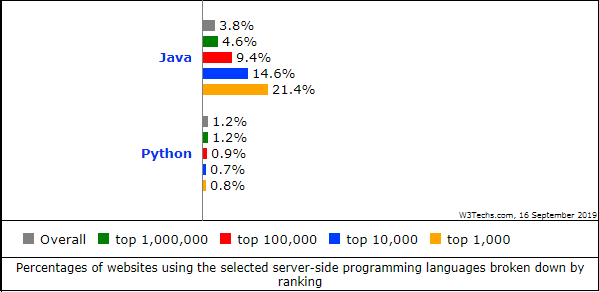
The choice between Java and Python depends on your specific requirements and project goals. If you need a highly performant language for building large-scale applications with strict security requirements, Java may be the better option. On the other hand, if you prioritize readability, ease of use, and rapid development cycles, Python could be the right choice.

In conclusion, both Java and Python have their strengths and are valuable tools in a developer’s toolkit. Whether you choose Java or Python ultimately depends on the nature of your project and your personal preferences as a developer.


Top 5 Tips for Mastering Java and Python Programming

  1. Practice regularly to improve your skills in Java and Python.
  2. Utilize online resources such as tutorials, forums, and documentation for learning Java and Python.
  3. Join coding communities or clubs to collaborate with others and learn from their experiences in Java and Python.
  4. Break down complex problems into smaller tasks when working on projects in Java and Python.
  5. Stay updated with the latest features and updates in both Java and Python programming languages.

Practice regularly to improve your skills in Java and Python.

To enhance your proficiency in Java and Python, it is crucial to engage in consistent practice. Regular practice not only helps reinforce your understanding of the languages but also allows you to explore new concepts and refine your coding skills. By dedicating time each day to coding exercises, projects, or challenges in Java and Python, you can steadily improve your programming abilities and stay updated with the latest developments in both languages. Remember, practice makes progress, so make it a habit to code regularly to sharpen your skills in Java and Python.

Utilize online resources such as tutorials, forums, and documentation for learning Java and Python.

To enhance your proficiency in Java and Python, make the most of online resources like tutorials, forums, and documentation. These valuable tools provide a wealth of knowledge and support to help you grasp the intricacies of both programming languages. By actively engaging with these resources, you can deepen your understanding, troubleshoot challenges effectively, and stay updated on the latest developments in Java and Python programming.

Join coding communities or clubs to collaborate with others and learn from their experiences in Java and Python.

Joining coding communities or clubs is a valuable tip for aspiring programmers looking to enhance their skills in Java and Python. By collaborating with like-minded individuals, you can gain insights and learn from the experiences of others. These communities provide a platform for sharing knowledge, discussing best practices, and working on projects together, ultimately helping you grow as a developer in both Java and Python.

Break down complex problems into smaller tasks when working on projects in Java and Python.

When working on projects in Java and Python, it is essential to break down complex problems into smaller tasks. By dividing the problem into manageable components, developers can tackle each task more effectively and efficiently. This approach not only helps in maintaining clarity and focus but also makes it easier to debug and test the code. Breaking down complex problems into smaller tasks enables developers to approach the project systematically, leading to better organization and ultimately a more successful outcome.

Stay updated with the latest features and updates in both Java and Python programming languages.

It is essential to stay updated with the latest features and updates in both Java and Python programming languages. By keeping abreast of new developments, enhancements, and best practices in these languages, developers can leverage the full potential of Java and Python to create efficient, secure, and innovative solutions. Continuous learning and adaptation to the evolving landscape of programming languages ensure that developers remain competitive and equipped to tackle modern challenges in software development.

Revolutionizing Industries: The Impact of Artificial Intelligence in Business

Artificial Intelligence in Business: Transforming the Future

Artificial Intelligence (AI) is no longer a futuristic concept; it is a present-day reality that is reshaping the business landscape. From enhancing customer experiences to optimizing operations, AI is becoming an integral part of modern business strategies. This article delves into how AI is transforming businesses across various sectors.

The Role of AI in Business

AI technologies, such as machine learning, natural language processing, and robotics, are enabling businesses to automate processes, analyze data more efficiently, and make informed decisions. Here are some key areas where AI is making a significant impact:

Customer Service and Support

AI-powered chatbots and virtual assistants are revolutionizing customer service by providing instant responses and personalized interactions. These tools can handle routine inquiries, freeing up human agents to focus on more complex issues.

Data Analysis and Insights

Businesses generate vast amounts of data daily. AI algorithms can process this data at high speed to uncover patterns and insights that would be impossible for humans to identify manually. This capability allows companies to make data-driven decisions that enhance performance and competitiveness.

Marketing and Sales

AI helps businesses personalize marketing campaigns by analyzing consumer behavior and preferences. Predictive analytics can forecast trends, allowing companies to tailor their strategies accordingly. Additionally, AI tools optimize pricing strategies by assessing market conditions in real-time.

Supply Chain Management

AI improves supply chain efficiency by predicting demand fluctuations, optimizing inventory levels, and identifying potential disruptions before they occur. This leads to cost reductions and improved customer satisfaction through timely deliveries.

The Benefits of Implementing AI in Business

  • Increased Efficiency: Automation of repetitive tasks reduces human error and increases productivity.
  • Cost Savings: By optimizing processes and reducing waste, businesses can achieve significant cost savings.
  • Enhanced Decision-Making: Real-time data analysis provides actionable insights that inform strategic decisions.
  • Improved Customer Experience: Personalized services create better customer satisfaction and loyalty.

The Challenges of AI Adoption

Despite its benefits, implementing AI comes with challenges such as:

  • Lack of Expertise: There is a shortage of skilled professionals who can develop and manage AI systems effectively.
  • Cultural Resistance: Employees may resist changes brought about by automation due to fear of job displacement.
  • Data Privacy Concerns: Handling sensitive data requires robust security measures to prevent breaches.

The Future of AI in Business

The future looks promising as advancements in technology continue to expand the capabilities of AI. Businesses that embrace these changes will likely gain a competitive edge in their industries. As AI becomes more accessible, even small businesses will be able to leverage its power for growth and innovation.

The integration of artificial intelligence into business practices marks the dawn of a new era where efficiency meets creativity, paving the way for unprecedented opportunities across all sectors.


Unlocking Business Success: 8 Key Advantages of AI Integration

  1. Increased efficiency through automation of repetitive tasks.
  2. Cost savings by optimizing processes and reducing waste.
  3. Enhanced decision-making with real-time data analysis.
  4. Improved customer experience through personalized services.
  5. Predictive analytics for forecasting trends and planning strategies.
  6. Optimized marketing campaigns based on consumer behavior analysis.
  7. Efficient supply chain management with demand prediction and inventory optimization.
  8. Competitive edge in the market by leveraging AI for innovation and growth.


5 Challenges of Integrating Artificial Intelligence in Business: From Job Displacement to Technological Dependence

  1. 1. Job Displacement
  2. 2. Data Privacy Concerns
  3. 3. Cost of Implementation
  4. 4. Lack of Human Touch
  5. 5. Dependence on Technology

Increased efficiency through automation of repetitive tasks.

Artificial intelligence significantly boosts efficiency in business by automating repetitive tasks, allowing employees to focus on more strategic and creative endeavors. By taking over routine activities such as data entry, scheduling, and basic customer inquiries, AI reduces the likelihood of human error and speeds up processes that would otherwise consume valuable time. This not only enhances productivity but also leads to cost savings and improved accuracy. As a result, businesses can allocate resources more effectively, prioritize innovation, and ultimately achieve better outcomes in a competitive marketplace.

Cost savings by optimizing processes and reducing waste.

Artificial intelligence significantly contributes to cost savings in business by optimizing processes and reducing waste. By automating routine tasks and streamlining operations, AI minimizes the need for manual intervention, which can lead to human error and inefficiency. This automation not only speeds up processes but also ensures consistent quality, reducing the likelihood of costly mistakes. Additionally, AI systems can analyze data to identify areas of waste within a company’s operations, such as excess inventory or inefficient energy use. By addressing these issues proactively, businesses can cut unnecessary expenses and allocate resources more effectively, ultimately boosting their bottom line while maintaining high operational standards.

Enhanced decision-making with real-time data analysis.

Artificial intelligence significantly enhances decision-making in business by enabling real-time data analysis. Through AI-powered analytics, businesses can process vast amounts of data quickly and accurately, allowing leaders to gain valuable insights into market trends, customer behaviors, and operational efficiencies. This immediate access to actionable information empowers companies to make informed decisions swiftly, adapt strategies on the fly, and anticipate future challenges with greater confidence. By leveraging AI’s ability to analyze data in real time, businesses can optimize performance, reduce risks, and maintain a competitive edge in an ever-evolving marketplace.

Improved customer experience through personalized services.

Artificial intelligence significantly enhances customer experience by enabling businesses to offer personalized services tailored to individual preferences and behaviors. Through advanced data analytics and machine learning algorithms, AI can analyze vast amounts of customer data to identify patterns and predict future needs. This allows companies to deliver targeted recommendations, personalized marketing messages, and customized solutions that resonate with each customer. By anticipating customer desires and providing relevant interactions, businesses can foster stronger relationships, increase customer satisfaction, and build loyalty. Ultimately, AI-driven personalization transforms the way companies engage with their clients, creating a more meaningful and efficient customer journey.

Predictive analytics, powered by artificial intelligence, is revolutionizing how businesses forecast trends and plan strategies. By analyzing vast amounts of historical and real-time data, AI algorithms can identify patterns and predict future outcomes with remarkable accuracy. This capability enables businesses to anticipate market shifts, consumer behavior changes, and potential disruptions, allowing them to proactively adjust their strategies. As a result, companies can optimize resource allocation, improve decision-making processes, and maintain a competitive edge in their respective industries. By leveraging predictive analytics, businesses are better equipped to navigate uncertainties and capitalize on emerging opportunities.

Optimized marketing campaigns based on consumer behavior analysis.

Artificial intelligence is revolutionizing marketing by enabling businesses to optimize their campaigns through detailed consumer behavior analysis. By leveraging AI algorithms, companies can sift through vast amounts of data to identify patterns and preferences among their target audience. This allows for the creation of highly personalized marketing strategies that resonate with consumers on an individual level. As a result, businesses can deliver more relevant content and offers, enhancing customer engagement and increasing conversion rates. The ability to predict consumer trends and tailor campaigns accordingly not only maximizes the return on investment but also strengthens brand loyalty by meeting customer needs more effectively.

Efficient supply chain management with demand prediction and inventory optimization.

Artificial intelligence significantly enhances supply chain management by enabling accurate demand prediction and inventory optimization. By analyzing historical data and current market trends, AI algorithms can forecast demand fluctuations with remarkable precision. This predictive capability allows businesses to adjust their inventory levels proactively, ensuring that they have the right amount of stock at the right time. Consequently, companies can minimize overstocking or stockouts, reducing storage costs and improving cash flow. Additionally, AI-driven insights help identify potential supply chain disruptions early on, allowing businesses to implement contingency plans swiftly. Overall, AI’s role in supply chain management leads to increased efficiency, cost savings, and improved customer satisfaction through timely product availability.

Competitive edge in the market by leveraging AI for innovation and growth.

Leveraging artificial intelligence provides businesses with a significant competitive edge in the market by driving innovation and fostering growth. AI enables companies to streamline operations, enhance product offerings, and deliver personalized customer experiences, all of which contribute to a stronger market position. By utilizing AI-driven insights and predictive analytics, businesses can anticipate market trends and consumer needs more accurately, allowing them to adapt quickly and strategically. This agility not only helps in capturing new opportunities but also in mitigating potential risks. As a result, companies that effectively integrate AI into their strategies are better positioned to outpace competitors and achieve sustainable growth.

1. Job Displacement

One significant concern regarding the integration of artificial intelligence in business is job displacement. As AI technologies advance, many routine and manual tasks are becoming automated, leading to a reduction in the demand for human labor in certain roles. This shift can result in job losses as positions that were once essential become obsolete. Industries such as manufacturing, customer service, and data entry are particularly vulnerable to this trend, as AI-driven systems can perform these tasks more efficiently and cost-effectively. While AI creates opportunities for new types of jobs, there is a growing need for reskilling and upskilling the workforce to adapt to the changing employment landscape. The challenge lies in managing this transition effectively to minimize the negative impact on workers and ensure that they are equipped with the skills required for emerging roles in an AI-driven economy.

2. Data Privacy Concerns

The integration of artificial intelligence in business operations brings with it significant data privacy concerns, particularly when handling sensitive information. AI systems often require large datasets to function effectively, which may include personal or confidential data. This reliance on extensive data collection and processing raises the risk of unauthorized access or breaches, potentially exposing sensitive information. Businesses must navigate complex regulatory landscapes, such as GDPR and CCPA, to ensure compliance while protecting customer privacy. Moreover, the sophisticated nature of AI algorithms can make it challenging to fully understand how data is being used or shared, further complicating efforts to maintain transparency and security. As a result, companies must invest in robust cybersecurity measures and transparent data management practices to mitigate these risks and build trust with their customers.

3. Cost of Implementation

Integrating AI technologies into a business can be a costly endeavor, particularly for smaller companies with limited budgets. The expenses associated with AI implementation include not only the initial investment in software and hardware but also the ongoing costs of maintenance, updates, and training staff to effectively use these new systems. Additionally, small businesses may need to hire specialized personnel or consultants to manage and oversee AI projects, further increasing the financial burden. This substantial investment can be daunting for small businesses that are already operating on tight margins, potentially hindering their ability to adopt AI solutions and compete with larger enterprises that have more resources at their disposal.

4. Lack of Human Touch

One significant drawback of using artificial intelligence in business is the lack of human touch in customer interactions. While AI-powered chatbots and virtual assistants can efficiently handle routine inquiries and provide instant responses, they often fall short in delivering the empathy and understanding that human customer service representatives offer. This absence of a personal connection can lead to customer frustration, especially in situations that require emotional intelligence or nuanced problem-solving. As a result, businesses may struggle to build strong relationships with their customers, potentially impacting customer satisfaction and loyalty. Balancing AI efficiency with human empathy remains a challenge for companies aiming to provide exceptional customer experiences.

5. Dependence on Technology

Dependence on technology is a significant concern when it comes to integrating artificial intelligence into business operations. As companies increasingly rely on AI systems for critical tasks, they may become vulnerable to disruptions if these systems malfunction or are compromised. A technical glitch or cyberattack could lead to significant operational setbacks, financial losses, and damage to a company’s reputation. This overreliance can also diminish human oversight and problem-solving skills, making businesses less adaptable in the face of unexpected challenges. Therefore, while AI offers numerous advantages, it is crucial for businesses to maintain a balanced approach that includes contingency plans and robust cybersecurity measures to mitigate these risks.

AI in Business: Revolutionizing Modern Enterprises

AI in Business: Transforming the Future

AI in Business: Transforming the Future

The integration of Artificial Intelligence (AI) into business operations is revolutionizing industries across the globe. From automating routine tasks to providing deep insights through data analysis, AI is reshaping how businesses operate and compete.

The Role of AI in Modern Business

AI technologies, such as machine learning, natural language processing, and computer vision, are enabling businesses to enhance efficiency and improve decision-making. By leveraging AI, companies can:

  • Automate Repetitive Tasks: AI-powered automation tools can handle mundane tasks like data entry and customer service inquiries, freeing up human resources for more strategic activities.
  • Enhance Customer Experiences: Chatbots and virtual assistants provide 24/7 customer support, offering personalized interactions that improve customer satisfaction.
  • Gain Insights from Data: Advanced analytics powered by AI help businesses analyze large volumes of data to uncover patterns and trends that inform strategic decisions.

Benefits of AI Adoption in Business

The adoption of AI brings numerous benefits to businesses willing to embrace it:

  • Increased Efficiency: Automation reduces the time and effort required for manual processes, leading to faster turnaround times and increased productivity.
  • Cost Savings: By automating tasks and optimizing operations, businesses can significantly reduce operational costs.
  • Improved Accuracy: AI systems minimize human errors by consistently performing tasks with high precision.

Challenges in Implementing AI

Despite its advantages, integrating AI into business processes comes with challenges. Companies must address issues such as:

  • Lack of Expertise: Implementing AI requires skilled professionals who understand both technology and business needs.
  • Data Privacy Concerns: Businesses must ensure that their use of AI complies with data protection regulations to safeguard customer information.
  • Cultural Resistance: Employees may resist changes brought by automation due to fear of job displacement or unfamiliarity with new technologies.

The Future of AI in Business

The future looks promising for businesses that embrace AI. As technology continues to evolve, we can expect even more sophisticated applications that will further transform industries. Companies that invest in developing their AI capabilities today are likely to gain a competitive edge tomorrow.

The key is not just adopting AI but integrating it strategically into business models. By doing so, organizations can harness its full potential to drive innovation and growth while navigating the challenges effectively.

The journey towards an AI-driven business landscape is underway—and it promises a future where technology empowers companies like never before.


Unlocking Business Potential: 8 Ways AI Revolutionizes Operations and Growth

  1. Increased efficiency through automation of routine tasks
  2. Enhanced customer experiences with personalized interactions
  3. Improved decision-making with data-driven insights from AI analytics
  4. Cost savings by reducing operational expenses through automation
  5. Minimized human errors with consistent and precise AI performance
  6. Faster turnaround times for processes due to AI optimization
  7. Scalability in operations as AI systems can handle increasing workloads efficiently
  8. Innovative solutions and products developed faster with AI technology


Challenges of AI in Business: Job Displacement, Privacy Risks, and High Initial Costs

  1. Potential job displacement
  2. Data privacy concerns
  3. Initial high implementation costs

Increased efficiency through automation of routine tasks

AI in business significantly boosts efficiency by automating routine tasks, allowing employees to focus on more strategic and creative activities. By utilizing AI-powered tools, companies can streamline operations such as data entry, scheduling, and customer service inquiries. This automation not only reduces the time and effort required for these repetitive tasks but also minimizes human error, ensuring consistent and accurate results. As a result, businesses experience increased productivity and can allocate resources more effectively, ultimately leading to improved performance and competitiveness in the market.

Enhanced customer experiences with personalized interactions

AI in business significantly enhances customer experiences by providing personalized interactions that cater to individual preferences and needs. Through the use of machine learning algorithms and data analytics, businesses can analyze customer behavior and tailor their offerings accordingly. This personalization extends to various touchpoints, such as recommending products based on past purchases or customizing marketing messages to resonate with specific audiences. Additionally, AI-powered chatbots and virtual assistants offer instant, round-the-clock support, addressing customer inquiries with precision and efficiency. By delivering these tailored experiences, businesses not only improve customer satisfaction but also foster loyalty and long-term relationships.

Improved decision-making with data-driven insights from AI analytics

AI in business significantly enhances decision-making by providing data-driven insights through advanced analytics. By processing vast amounts of data quickly and accurately, AI systems can identify patterns, trends, and correlations that might be overlooked by human analysts. This capability allows businesses to make informed decisions based on real-time information, leading to more strategic planning and better outcomes. Whether predicting market trends, optimizing supply chains, or personalizing customer experiences, AI-driven insights empower companies to act with confidence and precision, ultimately driving growth and competitive advantage.

Cost savings by reducing operational expenses through automation

AI in business significantly contributes to cost savings by reducing operational expenses through automation. By automating repetitive and time-consuming tasks, companies can streamline their processes, minimizing the need for extensive manual labor. This not only speeds up operations but also reduces the likelihood of human errors, which can be costly to rectify. Automation allows businesses to reallocate resources more efficiently, focusing human talent on strategic initiatives rather than routine activities. As a result, companies can lower labor costs and improve overall productivity, leading to substantial financial savings and a stronger bottom line.

Minimized human errors with consistent and precise AI performance

AI in business significantly reduces human errors by offering consistent and precise performance. Unlike humans, AI systems are not prone to fatigue or distraction, which often lead to mistakes. By automating tasks that require accuracy and attention to detail, AI ensures that processes are carried out with a high level of precision every time. This reliability is particularly valuable in areas such as data analysis, financial transactions, and quality control, where even minor errors can have substantial consequences. As a result, businesses can maintain higher standards of quality and efficiency, ultimately leading to improved outcomes and customer satisfaction.

Faster turnaround times for processes due to AI optimization

AI optimization significantly enhances business operations by streamlining processes and reducing the time required to complete tasks. Through intelligent automation and advanced algorithms, AI can analyze data, identify inefficiencies, and implement solutions more quickly than traditional methods. This leads to faster turnaround times for various processes, such as order processing, customer service responses, and supply chain management. By minimizing delays and accelerating workflows, businesses can improve productivity, meet customer demands more effectively, and gain a competitive advantage in their respective markets. As a result, AI-driven optimization not only boosts operational efficiency but also contributes to overall business growth.

Scalability in operations as AI systems can handle increasing workloads efficiently

AI in business significantly enhances scalability in operations by efficiently managing increasing workloads. As businesses grow, the demand on their systems and processes intensifies. AI systems are designed to adapt to these changes seamlessly, processing vast amounts of data and executing tasks at a speed and accuracy beyond human capability. This ability to scale effortlessly means businesses can expand their operations without a proportional increase in resources or costs. By automating routine processes and optimizing workflow, AI allows companies to maintain high performance levels even as they scale up, ensuring consistent service quality and operational efficiency.

Innovative solutions and products developed faster with AI technology

AI technology accelerates the development of innovative solutions and products by streamlining research and development processes. With AI’s ability to rapidly analyze vast amounts of data, businesses can identify market trends and consumer preferences more efficiently, allowing them to tailor their offerings to meet emerging demands. Additionally, AI-driven simulations and modeling enable companies to test and refine product designs quickly, reducing the time from concept to market. This agility not only fosters creativity but also ensures that businesses remain competitive by continuously introducing cutting-edge products that resonate with customers’ evolving needs.

Potential job displacement

The rise of AI automation in business presents a significant concern regarding potential job displacement. As companies increasingly adopt AI technologies to streamline operations and improve efficiency, certain job roles traditionally performed by humans may become obsolete. This shift can lead to workforce reductions, particularly in sectors where routine and repetitive tasks are prevalent. While AI can enhance productivity and reduce costs, it also poses challenges for employees whose skills may no longer be in demand. This transition necessitates a focus on reskilling and upskilling the workforce to prepare for new opportunities created by technological advancements, ensuring that the benefits of AI are shared broadly across society.

Data privacy concerns

The integration of AI systems in business operations often involves processing vast amounts of sensitive data, which raises significant privacy and security concerns. As AI algorithms analyze customer information, financial records, and proprietary business data, the risk of data breaches and unauthorized access increases. Companies must navigate complex regulatory environments to ensure compliance with data protection laws, such as GDPR or CCPA. Additionally, the potential for misuse of personal data by AI systems can lead to ethical dilemmas and damage to consumer trust. To mitigate these risks, businesses need to implement robust security measures and maintain transparency about how they collect, store, and use data.

Initial high implementation costs

Implementing AI technologies in business operations often involves substantial initial costs, which can be a significant barrier for many companies. This includes expenses related to purchasing advanced software and hardware, hiring skilled professionals to manage and maintain the systems, and training existing staff to work alongside new technologies. Additionally, businesses may need to invest in upgrading their IT infrastructure to support AI applications effectively. These upfront investments can be daunting, particularly for small and medium-sized enterprises with limited budgets. However, while the initial financial outlay is considerable, many organizations view it as a long-term investment that has the potential to yield significant returns through increased efficiency and competitiveness.